

Adelaide Fringe Online Induction for Event Workers, Volunteers and Contractors
Adelaide Fringe is one of Australia’s best-known arts festival in Australia.
A festival of that size brings together performers, venue teams, contractors, suppliers, volunteers, production crews, event staff, administrators, technical teams and visitors across many locations.
Because of this, event induction cannot rely only on last-minute briefings.
Adelaide Fringe uses INDUCT FOR WORK to support its online induction process, helping people receive important information before they begin work, attend a site or take part in festival operations.
An Adelaide Fringe online induction helps deliver consistent information, collect acknowledgements, support event readiness and keep completion records in one platform.
INDUCT FOR WORK helps event organisations manage online inductions, forms, acknowledgements, certificates, contractor documents, incident reporting and training records. This is especially useful for large events where people start at different times, work across different venues and may only be involved for a short period.
A structured induction process also supports a stronger safety culture because event workers, volunteers and contractors receive clear information before they begin. In addition, rapid induction setup can help event organisers turn existing safety notes, venue instructions, PDFs, videos and checklists into online induction content sooner.
What is the Adelaide Fringe online induction?
The Adelaide Fringe online induction is a digital training process used to help prepare people before they work with, support or attend festival-related operations.
It may apply to:
- event staff
- volunteers
- contractors
- suppliers
- venue workers
- production crews
- technical teams
- bump-in and bump-out crews
- site supervisors
- temporary workers
- performers where relevant
- stallholders
- traffic and logistics teams
- cleaning teams
- security teams
- administration staff
- support teams
The induction may explain:
- event expectations
- venue or site access rules
- emergency procedures
- reporting steps
- public safety requirements
- worker conduct
- incident and hazard reporting
- contractor responsibilities
- communication channels
- restricted areas
- PPE requirements where relevant
- site-specific instructions
- completion requirements
The aim is simple. People should understand what applies to them before the event begins or before they attend a festival site.
Why online induction matters for major events
Large events move quickly.
Teams may arrive from different organisations. Contractors may work short shifts. Volunteers may join close to opening. Technical crews may work late hours. Venue conditions may change from day to day. Public areas may become crowded and event timing often leaves little room for confusion.
Because of this, induction needs to be clear, repeatable and easy to track.
Online induction helps major events:
- deliver consistent information
- prepare workers before arrival
- reduce repeated manual briefings
- assign training by role or group
- collect acknowledgements
- support contractor readiness
- explain emergency procedures
- keep records of completion
- issue certificates where required
- update people when information changes
- support incident and hazard reporting
- manage short-term and seasonal teams
As a result, online induction becomes part of event readiness, not just an administrative task.
Where Induct For Work helps Adelaide Fringe
Adelaide Fringe involves a broad mix of creative, operational and public-facing activity.
Online induction can help support:
- venue setup
- contractor access
- volunteer preparation
- performer support processes
- bump-in and bump-out
- ticketing and front-of-house activity
- event communications
- site safety instructions
- emergency information
- public interaction expectations
- incident and hazard reporting
- worker acknowledgements
- temporary worker onboarding
- records and completion tracking
The official Adelaide Fringe site also promotes the festival app as a guide for discovering shows, planning Fringe activity and receiving real-time updates. That reflects how large events now depend on clear digital communication before and during the event period.
An online induction process fits naturally into that environment because it helps people complete required information before the busy period begins.
Why event inductions often become difficult to manage
Event inductions can become difficult because event teams are temporary, mobile and spread across different locations.
A volunteer may only attend for a few shifts. A contractor may arrive for one installation job. A supplier may need access before public opening. A technical crew may work late at night. A supervisor may need to confirm quickly who has completed induction before work begins.
INDUCT FOR WORK helps event organisers manage this process online.
It can help when:
- workers start at different times
- volunteers need short and practical training
- contractors need site rules before arrival
- induction forms are hard to track
- safety instructions are repeated manually
- venue details change
- emergency procedures need clear communication
- incident reporting steps are unclear
- records sit across emails and spreadsheets
- certificates need to be issued
- users need reminders to complete training
- organisers need reports before the event starts
With online induction and records, event organisers can reduce last-minute confusion and manage completion more clearly.
Adelaide Fringe online induction vs general event induction
The Adelaide Fringe online induction is event-specific.
A general event induction may explain broad event safety principles. However, an Adelaide Fringe induction can include information that relates to the festival’s own operations, timing, venues, roles and requirements.
| Adelaide Fringe Online Induction | General Event Induction |
|---|---|
| Supports a specific festival environment | Covers broader event safety topics |
| Can be assigned to Fringe-related users | May apply to any event type |
| Can include role-specific instructions | Often uses general safety information |
| Supports festival worker readiness | Supports broad event onboarding |
| Keeps event-specific completion records | Keeps general induction records |
This matters because large festivals are not ordinary workplaces.
The induction should match the event, the people involved and the way the work is actually done.

Induction for volunteers
Volunteers are a vital part of many large events.
However, volunteers often need information that is short, practical and easy to complete.
A volunteer induction may include:
- welcome information
- role expectations
- shift instructions
- supervisor or team contact details
- public interaction expectations
- emergency procedures
- incident reporting
- venue access rules
- conduct expectations
- what to do if plans change
- acknowledgement of key instructions
Volunteer induction should not feel like a long corporate training course. Instead, it should help volunteers feel prepared, confident and clear about what to do.
With INDUCT FOR WORK, event organisers can assign volunteer-specific induction content and track who has completed it.
Induction for event workers and temporary staff
Event workers and temporary staff may join for a short period, but they still need clear information before starting.
Their induction may include:
- event overview
- site rules
- shift expectations
- communication process
- emergency procedures
- incident reporting
- public safety expectations
- restricted areas
- equipment rules
- team contacts
- completion requirements
Temporary workers may not know the event, the venue or the people they report to.
Therefore, online induction can provide a clear starting point before the first shift.
Induction for contractors and suppliers
Contractors and suppliers often support large events through staging, lighting, sound, marquees, signage, logistics, electrical work, cleaning, traffic control, security and temporary structures.
A contractor induction can help event organisers explain site-specific rules before work begins.
Contractor induction may include:
- site access instructions
- delivery times
- bump-in and bump-out rules
- restricted areas
- emergency information
- permit requirements
- SWMS requirements where relevant
- PPE requirements
- incident reporting
- public safety rules
- supervisor contact details
- document upload instructions
- completion acknowledgement
This is especially useful when contractors arrive at different times and may only be on site for short windows.
Instead of relying on a rushed briefing at entry, organisers can send induction before arrival and keep proof of completion online.
Induction for venue and site teams
Large festivals may involve many venues and temporary sites.
Each site may have different access rules, public areas, emergency procedures, restricted zones and contact points.
An online induction can help venue and site teams understand:
- venue entry points
- staff-only areas
- emergency exits
- assembly areas
- communication channels
- crowd movement expectations
- equipment rules
- incident reporting process
- public safety responsibilities
- escalation contacts
Where needed, site-specific modules can be assigned to users who work at particular venues or locations.
This helps avoid sending everyone through irrelevant content while still keeping important local instructions clear.
Public safety and crowd-facing roles
Events like Adelaide Fringe involve large numbers of people moving through public and venue spaces.
Crowd-facing teams may need induction content covering:
- public interaction expectations
- emergency escalation
- lost property or lost person procedures
- accessibility support
- queue management
- aggressive or unsafe behaviour
- weather changes
- crowd movement
- restricted areas
- incident reporting
- first aid contact points
Clear training helps workers and volunteers understand what to do when something goes wrong or when a member of the public needs help.
For broader safety preparation, see our online safety induction article.
That supporting article is useful because event induction often includes general safety rules, emergency steps and reporting expectations.
Bump-in, bump-out and event setup safety
Bump-in and bump-out periods can create higher risk because many activities happen at the same time.
These periods may involve:
- vehicles
- forklifts
- temporary structures
- electrical work
- lifting
- manual handling
- deliveries
- contractors
- time pressure
- changing site layouts
- working at night
- public access controls
An online induction can explain the rules before people arrive.
This may include:
- traffic routes
- delivery windows
- loading areas
- PPE requirements
- exclusion zones
- communication points
- incident reporting
- working near plant
- housekeeping expectations
- site supervisor contacts
As event setups often involve lifting, carrying, pushing, pulling, moving equipment and repetitive physical tasks, visit our manual handling online induction article for more information.
Strong wind, weather and temporary event structures
Outdoor and temporary event environments can be affected by weather.
Strong winds can affect:
- marquees
- signage
- banners
- fencing
- temporary structures
- staging
- screens
- lighting towers
- public areas
- pedestrian paths
- materials and equipment
Event teams should know how weather warnings are communicated, when work should stop and who has authority to make decisions.
For more detail, see our strong wind safety at work article.
That supporting article is relevant because temporary event structures, outdoor venues and public spaces can become unsafe when wind conditions change.
Forms, acknowledgements and event records
Event induction often requires supporting forms and acknowledgements.
These may include:
- worker acknowledgements
- volunteer declarations
- contractor declarations
- emergency contact forms
- role confirmations
- PPE acknowledgements
- policy acknowledgements
- site access forms
- SWMS uploads where relevant
- incident report forms
- training confirmations
- completion certificates
With custom forms and digital signatures, event organisers can collect this information online.
As a result, records can stay linked to the person, role, site or contractor group instead of being scattered across paper forms and email threads.
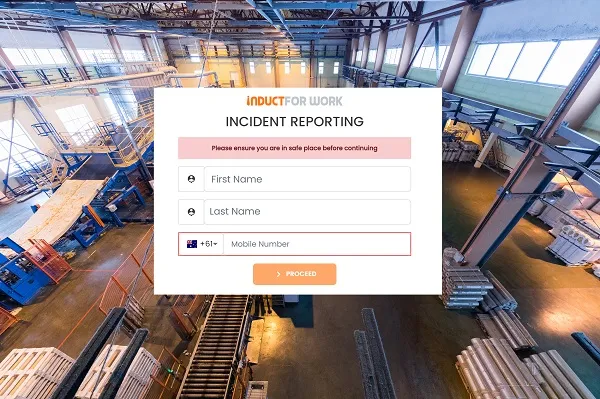
Incident and hazard reporting during events
Event risks can change quickly.
Workers, volunteers and contractors should know how to report:
- hazards
- injuries
- near misses
- unsafe structures
- blocked exits
- crowd concerns
- vehicle movement issues
- electrical issues
- trip hazards
- weather concerns
- public safety incidents
- contractor issues
- damaged equipment
- aggressive behaviour
- first aid concerns
INDUCT FOR WORK supports incident reporting so event organisers can capture hazards, incidents and near misses online.
This helps teams review issues, assign follow-up and keep clearer records during a busy event period.
For example, repeated reports about a congested access route may show that signage, traffic flow or staff placement needs review.
Record keeping for Adelaide Fringe online induction
Record keeping is one of the main benefits of online induction.
Event organisers may need to confirm:
- who completed induction
- when induction was completed
- which role pathway was assigned
- which workers signed acknowledgements
- which contractors uploaded documents
- which volunteers completed training
- which certificates were issued
- which users still need follow-up
- which incidents or hazards were reported
- which refresher messages were assigned
INDUCT FOR WORK helps improve record keeping by keeping training records, forms, certificates and acknowledgements online.
In addition, reporting helps administrators review completion status and follow up where needed.
This is much easier than relying on spreadsheets, paper sign-off sheets or email trails during a busy festival period.
Message updates during a live event
Events change quickly.
A venue entrance may move. Weather may change. A contractor may need new access details. A safety instruction may need to reach workers quickly.
A message broadcast feature can help organisers send important updates to relevant users.
This may include:
- site changes
- weather warnings
- emergency instructions
- revised access points
- contractor updates
- schedule changes
- safety reminders
- completion reminders
- operational notices
Clear communication matters because event teams often work across different sites and shifts.
When updates are sent through a structured system, organisers can reduce confusion and keep communication more consistent.
Why Adelaide Fringe uses INDUCT FOR WORK
Adelaide Fringe uses INDUCT FOR WORK because major events need practical, flexible and trackable induction processes.
INDUCT FOR WORK helps support:
- online induction delivery
- role-based training pathways
- volunteer induction
- contractor induction
- venue and site information
- forms and acknowledgements
- digital signatures
- incident reporting
- certificates
- completion tracking
- records and reports
- refresher information
- message updates where required
For large events, this matters because people do not all start at the same time and they do not all need the same information.
INDUCT FOR WORK helps organisers deliver relevant information before people arrive and gives administrators better visibility over completion.
From paper briefings to clearer event induction records
| Manual Event Induction Process | INDUCT FOR WORK |
|---|---|
| Workers are briefed on arrival | Induction can be completed before arrival |
| Volunteer instructions are repeated manually | Volunteer pathways can be assigned online |
| Contractor documents arrive by email | Documents can be uploaded online |
| Acknowledgements are signed on paper | Acknowledgements can be captured digitally |
| Records sit in spreadsheets | Records can stay in one platform |
| Site updates are shared informally | Message broadcasts can support communication |
| Incident reports are hard to centralise | Reports can be submitted online |
| Completion is difficult to track | Reports show who needs follow-up |
| Different teams receive different messages | Core content can be delivered consistently |
| Certificates are handled manually | Certificates can be linked to completion |
Best practice tips for event online induction
A good event induction should be short, practical and role-based.
Start with user groups
Volunteers, contractors, workers and visitors should not all receive the same information.
Keep content easy to complete
Event teams are often busy, so induction should be clear and direct.
Add site-specific details
Venue maps, access points and emergency information make the induction more useful.
Include contractor requirements
Contractors should know what documents, permits or acknowledgements are needed before arrival.
Use acknowledgements
Important instructions should include a clear acknowledgement step.
Track completion early
Where possible, users should complete induction before the event period begins.
Update people when details change
Events move quickly, so induction and messages should be easy to update.
Keep records together
Training, forms, certificates, acknowledgements and incident reports should be easy to find later.
Start improving event induction with INDUCT FOR WORK
Adelaide Fringe uses INDUCT FOR WORK to support its online induction process for event-related users.
For major events, this kind of system helps reduce repeated manual briefings, prepare workers and contractors before arrival and keep clearer records during a busy operating period.
INDUCT FOR WORK helps event organisers deliver online induction, collect forms, capture acknowledgements, support contractor workflows, record incidents, issue certificates and review completion reports.
Whether your organisation manages a festival, public event, venue, market, stadium, exhibition or seasonal program, INDUCT FOR WORK can help make induction easier to deliver and easier to track.
Give event workers, volunteers and contractors a clearer way to understand what is expected before the event begins.
Frequently asked questions
The Adelaide Fringe online induction is a digital training process used to help prepare event-related users such as workers, volunteers, contractors and site teams before they begin work or attend festival-related operations.
Event workers, volunteers, contractors, suppliers, venue teams, production crews, temporary staff, security, cleaners, delivery teams and other event-related users may need induction depending on their role.
Events use Induct For Work to deliver consistent information, prepare people before arrival, collect acknowledgements, track completion and keep records during busy event periods.
Yes. Contractors can complete assigned induction before arrival when the event organiser sends them access.
Yes. INDUCT FOR WORK can help event organisers capture hazards, incidents and near misses online.
Yes. INDUCT FOR WORK can support festivals, public events, venues, exhibitions, markets, stadiums, seasonal events and temporary event operations.
Start a free trial or book a demo to see how INDUCT FOR WORK can support your workplace processes.
Author: Greg Sevan
Published: 26/04/2024
Last updated: 08/05/2026


