

Contractor Compliance Documents: Why Collecting Them Is Only the First Step
A contractor document is not valuable simply because it has been uploaded.
A licence can be expired. An insurance certificate can cover the wrong work. A SWMS can be generic. A certificate can belong to the wrong person. A file can be unreadable. An acknowledgement can be signed by someone who never read the site rules.
That is why contractor compliance documents need a process.
The purpose is not to collect paperwork for the sake of it. The purpose is to help a business make better decisions before a contractor enters a workplace, starts a task or performs work that may affect other people.
Safe Work Australia says a person conducting a business or undertaking has a primary duty to ensure the health and safety of workers while they are at work and others who may be affected by the work. It also says businesses that share work health and safety duties must consult, cooperate and coordinate activities with other duty holders where the same safety matter is involved.
Contractor documents help support that process, but they do not replace supervision, proper review, site controls or clear communication.
INDUCT FOR WORK helps businesses deliver online induction, request contractor documents, collect forms, capture acknowledgements, support incident reporting and keep contractor records in one platform.
For wider contractor readiness, see contractor induction. For broader training management, see LMS for workplace training.
A structured contractor document process also supports a stronger safety culture because site access decisions are based on clearer evidence rather than last-minute assumptions.
The real question is not “have we collected it?”
Many businesses stop at the wrong question.
They ask:
Has the contractor uploaded the document?
That is useful, but it is not enough.
A stronger process asks:
- Is the document readable?
- Is the correct contractor listed?
- Do the worker or company details match the record?
- Is the document current?
- Will the document cover the work being performed?
- Is it relevant to the site or project requirement?
- Should a supervisor review it before approval?
- Has an expiry date been recorded?
- Should access pause until the issue is corrected?
- Has the contractor acknowledged the relevant site rules?
These questions turn document collection into a practical review process.
A folder full of files is not the same as contractor readiness.
Documents are evidence, not a guarantee
Compliance documents can show that a contractor has supplied certain information.
They cannot guarantee that the work will be done safely.
For example, a licence may show that a worker has completed a required course. It does not prove that the person understands your site layout, emergency procedures, traffic routes, restricted areas or current hazards.
Insurance may show that a policy exists. It does not confirm that a contractor will follow your reporting process.
A SWMS may describe controls. It does not prove that those controls are being used correctly on the day.
This is why document collection should sit alongside:
- site induction
- contractor communication
- supervisor review
- work planning
- consultation with other duty holders
- site access controls
- incident reporting
- follow-up after changes
Business.gov.au notes that contractors and employers must follow relevant workplace health and safety laws and that all workers in Australia must have a safe and healthy workplace.
Documents support that duty, but people still need to check whether the documents are suitable for the work.
Build the document request around the job
A weak process asks every contractor for the same documents.
A better process starts with the work being performed.
Before requesting documents, ask:
- What work will the contractor perform?
- Which site or area will they enter?
- Will they use plant, tools or chemicals?
- Could the work affect workers, visitors or the public?
- Are licences, permits or qualifications required?
- Does the contractor need insurance evidence?
- Is a SWMS or task method needed?
- Will work happen after hours?
- Are there privacy, security or access concerns?
- Does the contractor need refresher induction?
This makes document collection more targeted.
A cleaner, electrician, pest control provider, IT technician, roadworks contractor and maintenance company should not all receive the same request unless the work risks are genuinely the same.
For broader role and pathway planning, see role-specific work induction.
Common contractor documents and what they help prove
The exact documents depend on the work, site, contract and legal requirements.
Common contractor documents may include:
| Document | What it may help confirm |
|---|---|
| Public liability insurance | The contractor has supplied insurance evidence for review |
| Workers compensation insurance | The contractor has provided cover evidence where relevant |
| Licence or trade certificate | The worker may hold a required qualification or licence |
| White Card | Construction induction training evidence where relevant |
| SWMS | Planned method, hazards and controls for high-risk work |
| Safety policy | Contractor has a documented safety approach |
| Plant or equipment records | Equipment may have inspection or maintenance evidence |
| Driver licence | Driving-related work may need licence confirmation |
| Working with children check | Child-related sites may need screening evidence |
| Police check | Some sites or roles may require suitability checks |
| SDS | Chemical work may require product safety information |
| Permit or authorisation | Certain work may need approval before starting |
| Site rule acknowledgement | Contractor has accepted key workplace requirements |
This table is not a universal checklist.
The right documents depend on the work.
A business should avoid collecting unnecessary documents and should protect any personal information it does collect.

The review step matters most
Document collection creates a queue.
Document review creates control.
A practical review should consider:
- file name
- document type
- contractor name
- worker name where relevant
- issue date
- expiry date
- licence number
- insurance coverage period
- site or project relevance
- task relevance
- missing pages
- unclear scans
- mismatched details
- approval status
- reviewer notes
A review does not need to be complicated, but it must be real.
If the document is never checked, the upload process becomes a false comfort.
A contractor may appear compliant on a dashboard while the uploaded file is wrong, expired or unrelated to the job.
Expiry dates should trigger action
Many contractor documents have expiry dates.
Examples include:
- insurance certificates
- licences
- permits
- training certificates
- professional registrations
- medical clearances where relevant
- equipment inspection records
- site access approvals
- induction certificates
An expired document may not always mean the contractor is unsafe, but it does mean the record needs review.
A good process should answer:
- When does the document expire?
- Who receives the reminder?
- How early should the contractor be notified?
- Does site access pause after expiry?
- Who approves the renewed document?
- Is there a record of the update?
- Should the contractor repeat induction?
INDUCT FOR WORK can help businesses collect and monitor compliance documents as part of online inductions. The platform also promotes tracking progress, generating reports and keeping contractor records easier to review.
For broader record structure, see record keeping.
Contractor documents should connect to site access
A document process has little value if it does not affect site access.
If a contractor needs to upload documents before entering a site, the business should decide what happens when:
- no document is uploaded
- the wrong file is supplied
- a document is expired
- a licence does not match the task
- insurance evidence is incomplete
- a SWMS does not match the work
- an acknowledgement is missing
- supervisor approval has not happened
Clear rules reduce pressure on reception staff, supervisors and site managers.
They also help contractors understand what they need to supply before arrival.
For site and contractor readiness, see contractor induction.
A contractor should not find out at the gate that a required document is missing.
SWMS documents need special attention
A Safe Work Method Statement should not be accepted just because a file has been uploaded.
A SWMS may need to be reviewed for:
- work activity
- site relevance
- task sequence
- hazards
- controls
- PPE requirements
- plant or equipment
- emergency arrangements
- worker consultation
- review date
- project details
- supervisor responsibilities
A generic SWMS can create a poor impression of control.
It may list hazards and controls without reflecting the actual task, location or conditions.
For a deeper guide, see safe work method statements.
The review should focus on whether the document helps workers understand how the work will be done safely, not whether the document looks long enough.
Licences and certificates should match the person
Some documents apply to a company.
Others apply to a person.
This distinction matters.
A company may hold insurance, but a worker may need a personal licence. A contractor business may supply a SWMS, but an individual may need a ticket, training certificate or authorisation before using equipment.
A practical check should ask:
- Does this document belong to the company or the individual?
- Does the worker name match the user record?
- Is the licence relevant to the task?
- Has the document expired?
- Is the file readable?
- Does the supervisor need to check it?
- Should access be limited until review is complete?
One company record should not automatically clear every worker for every task.
Worker-level evidence matters where the work requires individual competence or authorisation.
Insurance documents should be checked carefully
Insurance certificates are common contractor documents.
They may include public liability, professional indemnity, workers compensation or other cover depending on the work and jurisdiction.
A review may consider:
- insured entity name
- policy type
- coverage period
- policy number
- amount insured
- business activity description
- exclusions where visible
- expiry date
- broker or insurer details
- match with contractor company details
The person reviewing the document should understand what they are being asked to check.
A certificate of currency may look official, but it may not cover the work being performed.
Where insurance requirements are important, businesses should seek proper advice.

Site rules still need acknowledgement
Documents can show qualifications, insurance or planned controls.
They do not show that the contractor has accepted your site rules.
Site acknowledgements may cover:
- access conditions
- emergency procedures
- PPE
- restricted areas
- sign-in and sign-out
- incident reporting
- vehicle movement
- working hours
- privacy or security expectations
- hot work or permit rules where relevant
- housekeeping expectations
- stop-work requirements
With digital signatures, businesses can collect signed acknowledgements online and keep them linked to the contractor record.
This helps show that key rules were communicated before work begins.
A signature is not the whole process, but it is useful evidence when combined with induction and records.
Add Forms help ask the right questions
A document upload field only collects a file.
A form can ask useful questions around the file.
For example, a contractor declaration may ask:
- Who is the company contact?
- Which site will the work occur at?
- What dates will work take place?
- What activity will be performed?
- Will chemicals be used?
- Will plant or tools be brought to site?
- Will work happen after hours?
- Are subcontractors involved?
- Are permits required?
- Has the contractor reviewed site rules?
- Who should be contacted in an emergency?
With custom forms, businesses can collect this information online and keep it together with the document record.
This turns document collection into a more useful contractor readiness process.
A simple review workflow
A practical contractor document workflow can look like this:
| Step | Purpose |
|---|---|
| Request | Tell the contractor what is required before work starts |
| Upload | Contractor submits the file or form |
| Check | Administrator confirms the document is readable and relevant |
| Review | Supervisor or authorised person checks higher-risk items |
| Approve | Record is marked as accepted where suitable |
| Remind | Contractor receives notice before expiry |
| Renew | Updated document is uploaded and checked |
| Restrict | Access is paused where critical records are missing |
| Record | File, decision and date stay linked to the contractor |
| Improve | Repeated issues guide better instructions |
This workflow is deliberately simple.
The best process is one people can actually follow.
Keep privacy and data protection in mind
Contractor records may include personal information.
This may include names, phone numbers, licences, identity information, qualifications, certificates, medical-related records where appropriate and background check results where relevant.
Businesses should consider:
- why the information is needed
- who can access it
- where it is stored
- how long it should be kept
- whether the file is protected
- how outdated records are handled
- whether unnecessary information is being collected
- how contractor users are told about the process
Collecting too much information can create avoidable risk.
The document request should match the work requirement.
Use reporting to find weak points
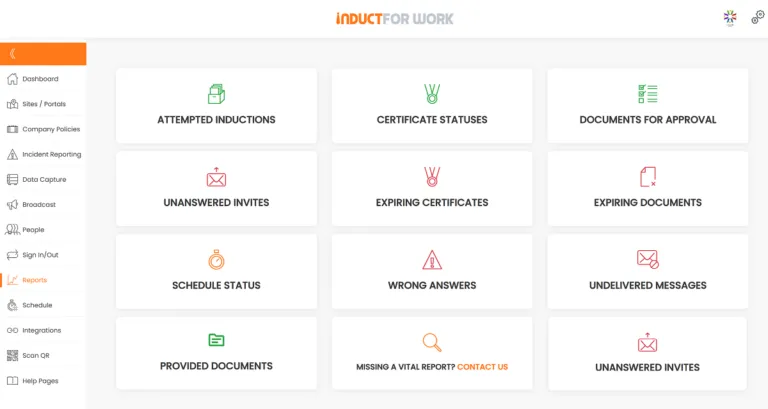
Document reporting can show where the process is failing.
Managers may need to know:
- which contractors have missing documents
- whose insurance is expiring
- which licences need review
- where approvals are delayed
- which sites have incomplete contractor records
- whether recurring contractors need refreshers
- who has not acknowledged site rules
- what documents are rejected most often
With reporting, administrators can review status and follow up more easily.
Good reporting helps managers act early.
It also shows whether the process is working in practice.
Connect document checks with incident learning
Contractor documents should not sit separate from incident reporting.
If an incident or near miss occurs, the business may need to review:
- whether the contractor completed induction
- what documents were supplied
- which SWMS or method applied
- whether licences were current
- what site rules were acknowledged
- what controls were discussed
- whether the task changed
- what was reported before the incident
- whether refresher training is needed
- what documents need updating
INDUCT FOR WORK supports incident reporting so organisations can capture incidents, hazards and near misses online.
For practical report structure, see incident report examples.
Incidents should improve the contractor document process, not sit in a separate folder.
Avoid document overload
Some businesses respond to contractor risk by asking for everything.
That can create a slow and confusing process.
Contractors may upload irrelevant files. Administrators may spend time reviewing documents that do not matter. Important documents may get lost among unnecessary paperwork.
A better approach is to group document requests by risk.
For example:
- low-risk visitor or supplier access
- office-based contractor work
- maintenance contractor work
- high-risk construction work
- chemical work
- vehicle or plant work
- working with children or vulnerable people
- after-hours access
- work in restricted areas
Each pathway can request different information.
This keeps the process practical and reduces noise.
What a good contractor document process feels like
A good process should feel clear to everyone involved.
For contractors, it should explain:
- what documents are needed
- why they are needed
- when they are due
- how to upload them
- what happens after submission
- who to contact with questions
- when renewals are required
For administrators, it should show:
- what is missing
- what needs review
- which documents are expiring
- who has completed induction
- which contractors are ready
- where follow-up is needed
Site managers should be able to see whether a contractor has completed the required steps before access is granted.
Senior managers should be able to review broader reporting without asking staff to search inboxes.
INDUCT FOR WORK includes features that help businesses manage document requests and contractor readiness.
SMS invitations can help send induction and document request links directly to contractors who may not check email quickly.
Self-registration portals can help contractors register through the correct pathway and provide required information before work begins.
These features reduce manual chasing and help contractors start the right process sooner.
From document collection to contractor readiness
| Old Approach | Better Contractor Document Process |
|---|---|
| Ask contractors to email documents | Request files through a structured pathway |
| Store attachments in inboxes | Keep uploads linked to contractor records |
| Accept any uploaded file | Review whether the document is current and relevant |
| Treat all contractors the same | Match requests to the work and site risk |
| Record expiry dates manually | Use reminders before key documents expire |
| Separate induction from document checks | Keep site rules, forms and files together |
| Approve access by memory | Review records before work begins |
| Forget recurring contractors | Use refreshers and expiry checks |
| Ignore rejected documents | Improve instructions where mistakes repeat |
| Review only after an incident | Check readiness before site access |
This approach makes contractor documents more useful because they support decisions.
Common mistakes with contractor compliance documents
Collecting files without checking them
Uploaded documents need review before they can support a decision.
Asking for the same documents from everyone
Different work creates different requirements.
Forgetting expiry dates
Expired records can create confusion and delay.
Treating insurance as proof of readiness
Insurance is only one part of contractor review.
Accepting generic SWMS documents
A SWMS should reflect the task, site and controls.
Losing worker-level evidence
Some documents must match the individual worker, not just the contractor company.
Keeping records in too many places
Inbox attachments, spreadsheets and paper files make review harder.
Failing to learn from incidents
Incidents and near misses should improve future document requests and checks.

Best practice tips for contractor document checks
Start with the work
Request documents based on the task, site and risk.
Separate company and worker records
Company insurance and worker licences are not the same thing.
Check readability
Unreadable files should not be accepted as useful evidence.
Record expiry dates
Insurance, licences and certificates may need renewal.
Use approvals where needed
Higher-risk documents may need supervisor or specialist review.
Keep acknowledgements linked
Site rules and signed acknowledgements should stay with the contractor record.
Review after incidents
Near misses and incidents can show where document checks need improvement.
Keep the process simple
Contractors and administrators should understand what is required.
Start improving contractor document control
Contractor compliance documents should help a business make better decisions before work begins.
Collecting a file is only the first step.
The stronger process is to request the right documents, check whether they are suitable, record expiry dates, connect acknowledgements to the contractor record and review information when work changes.
INDUCT FOR WORK helps organisations request contractor documents, deliver induction, collect forms, capture acknowledgements, support incident reporting and keep records online.
For the broader contractor readiness process, see contractor induction. For wider training management, see LMS for workplace training.
Give contractors a clearer process before they arrive and give managers better evidence before work starts.
Frequently asked questions
Contractor compliance documents are files, forms or acknowledgements that help a business review whether a contractor has supplied required information before work begins. They may include insurance evidence, licences, SWMS documents, certificates, permits, declarations and site acknowledgements.
Documents should be checked because an uploaded file may be expired, unreadable, irrelevant, incomplete or linked to the wrong person or company.
No. Collection is only the first step. Businesses should also review suitability, record expiry dates, confirm relevance to the work and keep the decision linked to the contractor record.
Common examples include public liability insurance, workers compensation evidence, trade licences, training certificates, White Cards, SWMS documents, permits, safety documents and signed site acknowledgements.
Not always. Document requests should match the work, site, access level and risk. A low-risk supplier may not need the same requirements as a contractor performing high-risk work.
Yes. INDUCT FOR WORK can help request documents, collect forms, capture acknowledgements, support induction, track completion and keep contractor records online.
Expired documents should be flagged for review. The contractor may need to upload a current version before access or work continues, depending on the document and site requirement.
No. Documents support the readiness process, but they do not replace proper supervision, communication, site controls or safe work practices.
Do you have any questions or great tips to share?
Induct for Work – the only online induction system you would need to run online inductions.
Start a free trial or book a demo to see how INDUCT FOR WORK can support your workplace processes.
Author: Anna Milova
Published: 08/01/2019
Updated: 02/06/2026


