How Induct For Work Can Help Your Business with Online Inductions
Online inductions can help a business save time, reduce repeated administration and keep better records.
However, those benefits only become real when the system does more than display information. A business needs a practical way to invite people, assign the right induction, collect required documents, record acknowledgements, check understanding, issue certificates and see who is ready.
That is where Induct For Work helps.
Induct For Work is built for businesses that need to induct employees, contractors, visitors, volunteers, suppliers, labour hire workers, seasonal staff and other people before they begin work or enter a site. The platform gives your team one structured online induction process instead of relying on printed forms, email attachments, spreadsheets, shared folders and repeated verbal explanations.
This page explains how Induct For Work can help your business in practical terms. It is not another general list of online induction benefits. The focus is on what the platform helps your organisation do every day.
Turn induction into a controlled business workflow
Many businesses treat induction as a task that happens once someone arrives.
A supervisor gives a quick briefing. An administrator collects a form. Someone updates a spreadsheet. A policy is emailed later. A certificate may be saved in a folder if there is time.
That approach becomes hard to manage as the business grows.
Induct For Work helps turn induction into a controlled workflow. Users can be invited before they arrive. The right induction can be assigned to the right person. Documents, forms, signatures, quiz results and completion records can stay connected to the user.
This gives your business a clearer process from first invitation to completed record.
Instead of asking several people whether an induction was done, an administrator can check the platform and see the status.
Send invitations without chasing every person manually
Manual chasing is one of the biggest problems in induction management.
A new worker forgets to open an email. Contractors may not return forms on time. Volunteers can miss attachments. Suppliers sometimes arrive without completing the required steps. The administrator then spends time following up with reminders.
Induct For Work helps reduce that pressure by allowing your team to send induction invitations online.
People can receive instructions before they arrive. Depending on how your business uses the system, invitations may be sent to employees, contractors, visitors, volunteers or other user groups.
This makes the first step easier to manage.
Rather than relying on informal messages, your business can send people into a structured pathway that explains what they need to complete and what happens next.
Use existing material instead of starting again
A business does not need to start from a blank page.
Most organisations already have useful induction material. This may include policies, site rules, videos, PowerPoint slides, safety documents, forms, handbooks, checklists, maps, procedures or older induction packs.
Induct For Work can help bring that material into a more organised online format.
For businesses that want to move faster, sample inductions can provide a starting point. Existing content can then be adjusted to suit the workplace, industry, site rules and user groups.
This is useful because many businesses delay online induction while waiting for a perfect training library.
A better approach is to start with the most important material, publish a practical first version and improve it over time. Induct For Work supports that type of rollout.
Create a more professional first impression
Induction is often the first formal interaction a person has with your business.
A messy process sends the wrong message. Several emails, unclear instructions, duplicate forms and last-minute phone calls can make the business appear disorganised before work even begins.
A clean online induction creates a better experience.
Users receive a structured pathway. Instructions become clearer. Forms and acknowledgements sit in one process. Completion is easier to confirm. The business appears more prepared.
This matters for employees, contractors, volunteers and visitors.
A professional induction process tells people that your organisation takes preparation, safety, conduct and compliance seriously.
Assign different induction experiences without losing control
Not everyone needs the same induction.
A new employee may need onboarding information, policy acknowledgements and role expectations. Contractors may need site rules, document uploads and access conditions. Visitors may only need a short entry pathway. Volunteers may need conduct, privacy and reporting instructions.
Induct For Work allows businesses to create different induction experiences while keeping records in one system.
This helps your team avoid two common problems.
The first problem is giving everyone the same long induction. The second is creating separate manual processes for each group. Induct For Work gives your organisation a better middle ground: different pathways, one platform.
For broader training management across user groups, an LMS can also support structured learning and completion records.

Collect forms and signatures inside the induction
Many inductions require forms, declarations or policy acknowledgements.
Paper forms can create unnecessary work. They need to be printed, signed, scanned, filed and retrieved later. Email forms can be just as messy because files end up spread across inboxes and folders.
Induct For Work supports e-signatures and digital forms so acknowledgements can be collected as part of the induction process.
A user may need to accept site rules, sign a policy acknowledgement, complete a declaration, confirm that they understand requirements or submit another form required by your business.
When those steps are completed online, the record is easier to manage.
Your business can see who signed, when they signed and which requirement was acknowledged.
Collect documents before work begins
Some people need to provide documents before they can start.
Contractors may need licences, tickets, insurance certificates or permits. Employees may need qualifications or internal forms. Volunteers may need checks or declarations. Suppliers may need to provide evidence before attending a site.
Induct For Work helps collect documents during the onboarding and induction process.
This reduces the need for administrators to chase documents through email. It also keeps the documents closer to the user record, making them easier to review and retrieve.
For contractor-heavy workplaces, contractor pre-qualification can help collect and assess required information before work begins. A document registry can also support better organisation of important files.
The goal is simple: fewer missing documents and less searching later.
Check understanding with quizzes
An induction should not only ask someone to click through information.
Your business may need to know whether the person understood the most important points. Induct For Work can include quizzes so users can answer questions after completing the assigned content.
Questions may cover site rules, emergency steps, conduct expectations, reporting requirements, document obligations or other business-specific topics.
The quiz does not need to be complicated.
A short set of practical questions can help confirm that key messages were understood. Results also help your business identify weak spots. If many users answer a question incorrectly, the content may need to be improved.
For broader course delivery, online training can support induction modules, refresher content and other workplace learning.
Issue certificates after completion
Certificates help confirm that a user has completed assigned induction requirements.
Induct For Work can issue completion certificates so workers, contractors or other users have a clear record of completion. This can be useful for site access, project records, internal reviews and client requests.
A certificate should be understood correctly.
It confirms that the assigned induction pathway was completed. It should not replace licences, permits, practical training or competency checks where those are required.
Used properly, certificates provide a professional and useful record.
They also reduce the need for administrators to manually create proof of completion after every induction.
Keep induction records ready when needed
One of the strongest ways Induct For Work helps a business is through record keeping.
Induction records are often needed later. A manager may ask who completed training. A client may request evidence before allowing work to start. A safety officer may need records during a review. After an incident, the business may need to check which information was provided.
When records sit across paper forms, email folders and spreadsheets, every request takes longer.
Induct For Work helps keep completion records, documents, acknowledgements, quiz results and certificates in one platform.
Good record keeping gives your business better visibility and reduces the stress of searching for evidence after the fact.
Give managers better visibility
Managers need quick answers.
They need to know who has completed induction, who is still incomplete and who may need follow-up. Without a central system, those answers often sit with one administrator or inside a spreadsheet that may not be current.
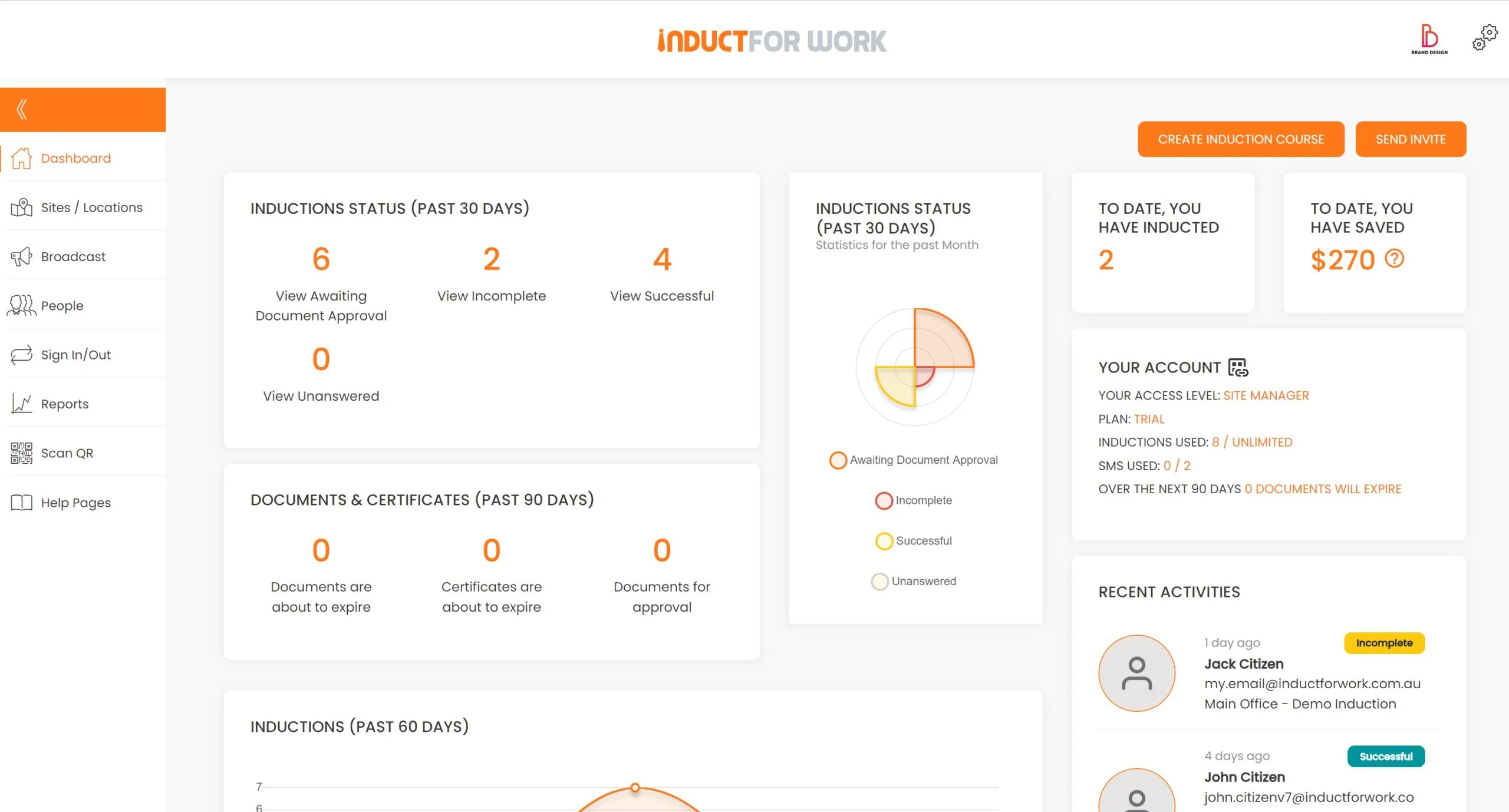
Induct For Work supports reporting so managers and administrators can review completion activity more easily.
This helps the business move from guessing to checking.
A manager should not need to ask several people whether a worker is ready. The platform can help show completion status and records, depending on the way your organisation has configured its pathways.
Visibility saves time and helps reduce avoidable delays.
Support compliance without making everything harder
Compliance can become heavy when every requirement is handled manually.
Forms, policies, training records, licences, certificates, incident reports and expiry dates can quickly become difficult to control. Induct For Work helps by connecting many of these steps to the induction process.
The platform can support training completion, acknowledgements, document collection and reports in one place.
This does not remove the need for good management.
Your business still needs suitable policies, current content, supervision and appropriate review. Induct For Work helps make those requirements easier to communicate, collect and track.
For organisations working to improve workplace standards, safety culture is also important because records only matter when leadership and behaviour support them.
Help new workers start with fewer delays
New workers often lose time because basic induction steps are not complete.
They may arrive without reading required information. A form may be missing. Managers may not know whether policies were acknowledged. The first day can then become slow and confusing.
Induct For Work helps move many of those steps before arrival.
A new worker can receive an invitation, complete assigned content, sign required forms and answer questions before their first shift or first day. The business can then use arrival time for introductions, role guidance and practical support.
For broader employee preparation, onboarding can support the wider process beyond induction.
The key benefit is better readiness.
People arrive with more of the administration already completed.
Reduce pressure on HR, safety and operations teams
Induction work often sits across several teams.
HR may manage employee onboarding. Safety may control WHS content. Operations may manage contractors. Site supervisors may need to confirm readiness. Administration teams may file forms and chase missing documents.
Without a shared process, each team manages a different part manually.
Induct For Work helps bring those steps into one platform.
This can reduce duplication and make responsibilities clearer. HR can focus on people. Safety teams can focus on content and requirements. Operations can check readiness. Administrators can spend less time chasing paperwork.
A better induction process helps the whole business, not only the person completing the course.
Manage refresher training more easily
Induction is not always a once-only requirement.
Workers may need updated information when policies change, roles change, documents expire or a person returns after time away. Contractors may need to repeat certain steps before starting a new project. Businesses may also want refresher training for important topics.
Induct For Work can help assign updated training and keep completion records.
For broader guidance on when repeat training may be needed, see do I need to retrain my employees.
The practical benefit is control.
Your business can manage updates through a structured process instead of relying on informal reminders.
Improve communication when requirements change
Workplace requirements change.
A site entry process may be updated. A new policy may be introduced. Emergency information may need to be reinforced. A group of workers may need a reminder before an event, project or busy period.
Induct For Work includes communication tools such as message broadcast to help send important updates to selected users.
This can support induction follow-up, refresher messages and operational notices.
Communication does not replace induction, but it helps keep people informed after the initial process is complete.
That is valuable when your workforce includes contractors, visitors, casual workers, seasonal teams or people spread across different locations.
Support visitor and site entry processes
Some businesses need more than worker induction.
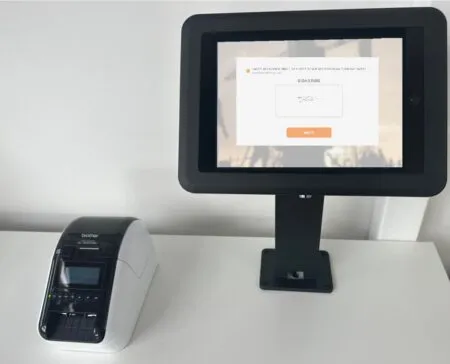
They also need to know who is entering the workplace. Visitors may need to sign in, receive entry instructions or confirm basic conditions before being allowed onsite.
Induct For Work can support visitor management alongside induction.
This is useful for offices, depots, schools, construction sites, healthcare facilities, councils, warehouses, events and other workplaces where people move in and out throughout the day.
Visitor management and induction work well together because both deal with readiness, entry and records.
Your business can create a more organised front-door process while keeping information easier to find later.
Help businesses with multiple sites
Multi-site businesses face extra induction challenges.
Each location may have different contacts, entry points, emergency information, site rules or local instructions. At the same time, the business may want consistent core policies across the organisation.
Induct For Work can help businesses manage induction content and records across different sites.
Shared content can explain business-wide requirements. Local content can add site-specific details where needed. Reports can help administrators see completion across locations.
This is useful for companies with offices, branches, depots, farms, schools, projects, retail locations, facilities or event sites.
A central platform makes it easier to maintain a consistent process without ignoring local differences.
Use rapid setup to move faster
Many businesses delay online induction because they think setup will be difficult.
In reality, most organisations already have the ingredients. They may have documents, slides, videos, policies, safety instructions, forms and checklists. The challenge is turning them into a clear online pathway.
Induct For Work can support rapid induction setup so businesses can move existing materials into a practical structure.
A first version does not need to include every possible topic.
It can begin with the most important induction requirements and improve over time. This makes the transition more achievable for busy teams.
Where Induct For Work fits best
Induct For Work is useful for businesses that need induction to be organised, trackable and easy to repeat.
The platform can help construction companies, councils, schools, farms, healthcare providers, event organisers, cleaning businesses, manufacturers, logistics teams, hospitality businesses, charities, offices and contractor-heavy workplaces.
Each business may use the system differently.
A council may focus on contractors and visitors. Farms may need seasonal worker induction. Schools may want contractor and volunteer records. Construction companies may need site inductions and document uploads. Offices may use the system for employee onboarding and policy sign-off.
The common need is control.
Businesses want to know that people received the right information, completed the required steps and have records available when needed.
Why choose Induct For Work for online inductions?
Induct For Work is built around practical workplace induction needs.
Your business can use the platform to:
- create induction pathways
- invite users online
- upload existing content
- use sample inductions
- collect documents
- request e-signatures
- add quizzes
- issue certificates
- send reminders
- manage refresher training
- support visitor management
- review reports
- keep records organised
This makes it a strong choice for businesses that want more than a digital document.
Induct For Work helps manage the full induction process from invitation to evidence.
Start improving your induction process
Online inductions can help your business, but only when the process is organised properly.
Induct For Work gives your team a practical way to invite people, assign induction pathways, collect documents, request signatures, check understanding, issue certificates and review completion records from one platform.
That means less manual chasing, fewer scattered files and a more professional experience for workers, contractors, visitors and volunteers.
Frequently asked questions
Induct For Work helps your business manage online inductions, send invitations, collect documents, request e-signatures, use quizzes, issue certificates and keep completion records organised.
The platform can support induction pathways for employees, contractors, subcontractors, visitors, volunteers and other user groups.
Quizzes can be added to check understanding of key induction content.
Yes. Existing policies, videos, slides, forms, procedures, handbooks and Scorm inductions can be uploaded to your Induct For Work account.
Digital acknowledgements and e-signatures can be collected for policies, declarations, site rules and other requirements.
Yes. Reporting helps managers and administrators review completion activity and identify users who need follow-up or who has not started their inductions yet.
Yes. Visitor management can be activated alongside induction-related entry processes.
Induct For Work can support small businesses, growing teams and larger organisations that need repeatable induction processes and clearer records.
Do you have any questions or great tips to share?
Induct for Work – the only online induction system you would need to run online inductions.
Start a free trial or book a demo to see how INDUCT FOR WORK can support your workplace processes.
Author: Anna Milova
Published: 21/03/2017
Updated: 23/06/2026