
Avoiding One-Size-Fits-All Induction Approach
A one-size-fits-all induction looks simple from the administrator’s side.
One course is created. Every new starter receives the same information. Records are easier to organise. Nobody has to decide which pathway applies. At first glance, the process appears efficient.
In reality, a single induction can create the opposite result.
Some people receive far too much information. Others miss important details that apply to their role, site or level of responsibility. Experienced workers may be forced through basic content they already know. New workers may finish the course without receiving the practical guidance they need. Contractors, volunteers, office staff, field workers, supervisors and visitors can end up sitting inside the same generic process.
That is the problem.
A good induction should not treat everyone as identical. The right pathway gives each person the right information, at the right time, with the right level of detail.
Induct For Work helps organisations create a structured online induction process that supports different pathways for different people. Rather than building one large course for everyone, your organisation can create a core induction and then add targeted modules based on role, site, access, risk, responsibility or worker type.
This page focuses on induction design. It explains how to avoid the one-size-fits-all approach without creating an unmanageable content library.
Why one induction for everyone causes problems
A single induction often becomes too broad.
To make it “work” for everyone, the organisation keeps adding more content. A section for office workers is followed by a section for contractors. Another section covers visitors. Later, information for supervisors is added. Eventually, a short induction becomes a long, mixed course that does not feel relevant to anyone.
That creates several problems.
People skim sections that do not apply to them. Important instructions are buried inside unrelated content. Completion takes longer than necessary. Managers may assume the induction covered everything, even when the worker only received a generic overview.
The user experience also suffers.
An office administration worker should not need to complete detailed plant access instructions. Short-term visitors should not receive full employee onboarding content. Supervisors need leadership expectations that general workers may not need.
Tailored induction avoids this overload by giving people content that fits their situation.
Start with audience groups
Begin by identifying the main groups that need induction.
This should happen before content is written. Many organisations start with slides, documents and policies, then try to push everyone through the same pathway. A better method starts with the people.
Typical induction groups may include:
- employees
- contractors
- subcontractors
- visitors
- volunteers
- labour hire workers
- temporary workers
- remote staff
- supervisors
- delivery drivers
- students or placement workers
- returning workers
Each group should have a clear reason for receiving induction.
The question is not only “Who needs induction?” A better question is “What does this group need to understand before they can start safely and appropriately?”
That question helps shape the pathway.
Create a shared core, then add layers
Avoiding a one-size-fits-all approach does not mean building every induction from scratch.
A smart induction design uses a shared core.
The core may cover the organisation’s basic expectations, emergency information, reporting process, conduct standards and where to find help. After that, additional layers can be assigned based on the person’s role, work area or access level.
This keeps the process efficient.
Cleaners may receive the shared core plus after-hours access instructions. New supervisors may receive the core plus leadership responsibilities. Contractors may complete the core plus site access and document requirements. Volunteers may complete the core plus boundaries, supervision and conduct expectations.
The structure becomes easier to manage because content is reused carefully.
When a shared section changes, the organisation updates it once. When a role-specific section changes, only that layer needs attention.
Build an induction pathway map
A pathway map helps prevent confusion.
It shows which induction modules apply to each user group. It can be as simple as a table listing worker type, site, required modules, document requirements, approvals and refresher rules.
The map should answer practical questions.
Which induction does a new employee complete? Supervisors may need extra content, so the map should show that clearly. Contractors who attend more than one site may need a different pathway again. Are volunteers assigned the same content as visitors? Does a returning worker need the full pathway or only an update?
A pathway map helps administrators avoid guessing.
It also supports consistency. Two managers should not assign different inductions to the same type of worker unless there is a clear reason.
For broader pathway management, an LMS can help organise modules, completion records and refresher training across different user groups.
Use role as one filter, not the only filter
Role is a useful starting point, but it is not enough on its own.
Two people may have the same job title but work in different environments. One maintenance worker may attend a quiet office. Another may work around vehicles, public areas or equipment. A customer service worker may work in person, remotely or across multiple locations.
The induction design should consider more than position title.
Useful filters include:
- role
- location
- access level
- work activity
- supervision level
- employment type
- risk exposure
- experience level
- document requirements
- responsibility for others
These filters help create better pathways.
A person should not receive content just because their job title appears on a list. The assigned induction should reflect what they will actually do and where they will do it.

Separate access from responsibility
Access and responsibility are different.
Some people may enter a site without performing work. Others may work remotely but handle sensitive information. Supervisors may not enter every work area, yet still carry responsibility for approving tasks or supporting a team.
Induction pathways should recognise these differences.
Access-based content may cover entry points, sign-in rules, restricted areas and emergency locations. Responsibility-based content may cover decision-making, escalation, reporting, supervision and approvals.
When these are mixed together, the induction becomes less precise.
Visitors may need access information but not supervisor responsibilities. Remote managers may need leadership obligations but not local site parking rules. Contractors may need both access and task-boundary information.
Clear separation makes the induction more relevant.
Avoid pathway overload
Tailored induction should not become complicated for the sake of it.
Too many pathways can create administrative confusion. If every minor difference becomes its own course, the system becomes hard to maintain.
The goal is not endless personalisation.
The goal is practical relevance.
Start with a small number of clear pathways, then add modules only where the difference matters. A business may begin with employee, contractor, visitor, volunteer and supervisor pathways. Later, it may add site-specific modules or role-specific content where needed.
This approach keeps the system manageable.
A useful test is simple: would removing this module create a real gap for this user group? If the answer is no, the content may not need to be assigned.
Reduce unnecessary cognitive load
Induction should help people remember what matters.
When users receive too much irrelevant content, attention drops. They may still complete the course, but they may not retain the important parts.
This is known as cognitive load.
A tailored induction reduces cognitive load by removing information that does not apply. Users can focus on what they need to understand for their role, site or responsibility.
This does not mean important topics should be removed.
It means each topic should be placed where it belongs. General conduct belongs in the shared core. Site access belongs in a location module. Supervisory duties belong in a manager pathway. Contractor documents belong in a contractor pathway.
Better placement makes the induction easier to absorb.
Use branching questions carefully
Some organisations use branching questions to decide which modules a person receives.
For example, a user may answer whether they are an employee, contractor, visitor or volunteer. The system can then direct them to the right pathway. Another question may ask which site they will attend or whether they will supervise others.
Branching can be useful when it is simple.
It becomes risky when users are asked questions they cannot answer correctly. New workers may not know which business unit they belong to. Contractors may not know the internal name for a site area. Volunteers may select the wrong option because the wording is unclear.
Branching questions should be plain, limited and easy to verify.
Where the choice affects safety, access or compliance records, administrators should review assignment rules rather than relying only on self-selection.
Write content for the pathway, not the policy folder
Policies are often written for broad organisational use.
Induction content should be written for the person completing the pathway.
This means the wording should answer practical questions. The user needs to know what to do, which actions are not allowed, when to ask for help, who reviews the requirement and what happens next.
A policy may say that workers must comply with organisational procedures. An induction should explain what that means in the user’s context.
For example, a volunteer may need to know where to report concerns. A supervisor may need to know when to escalate issues. An employee may need to understand which forms must be completed before starting.
The policy remains important, but the induction should translate it into usable instructions.
Digital e-signatures can then record that the relevant policy or declaration was acknowledged.
Keep templates flexible
Templates help organisations start faster.
A template can provide structure, suggested wording and common sections. However, a template should never force every user group into the same shape.
The best template acts like a framework.
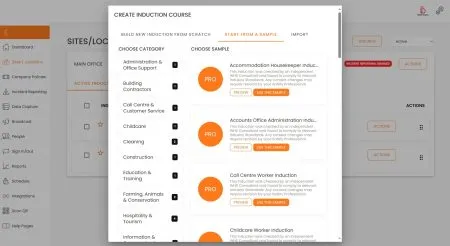
It gives administrators a starting point, then allows them to adjust content for different worker types, locations and responsibilities. An organisation can use one template style while still creating separate pathways.
For businesses that need a starting point, sample inductions can help reduce setup time.
The template should support good decisions, not replace them.
A strong administrator still needs to ask whether each section belongs in the pathway, whether the wording is current and whether the user group can act on the information.
Plan for site-specific differences
Many organisations operate across more than one site.
A one-size-fits-all induction often fails here because local details matter. Emergency exits, assembly areas, parking, security, visitor entry, reception points, restricted zones and local contacts may differ from site to site.
A better approach is to separate organisational content from site content.
The organisational module can stay consistent. Local modules can explain site-specific instructions.
This makes updates easier.
If one site changes its emergency assembly area, the site module can be updated without rewriting every induction. If the organisation updates a code of conduct, the shared module can be updated once and assigned across all relevant pathways.
Give supervisors their own pathway
Supervisors often receive the same induction as workers.
That is usually not enough.
Supervisors may need to understand how to verify readiness, support new starters, monitor completion, respond to concerns, approve access, reinforce standards and guide workers through their first days.
A supervisor pathway may cover:
- induction follow-up duties
- worker support expectations
- escalation process
- monitoring completion
- reviewing documents
- coaching new staff
- responding to concerns
- assigning refresher training
- closing gaps after role changes
This content does not need to be in the general worker induction.
Giving supervisors their own pathway keeps the general course shorter and gives leaders the information they actually need.
Design for change
Workplaces change.
People move roles. Sites are updated. Teams grow. Procedures change. Contractors return after long gaps. Policies are revised. New systems are introduced.
A tailored induction design should be built for change from the beginning.
That means modules should be named clearly, versioned properly and assigned logically. Administrators should know which pathways are affected when a policy or procedure changes.
Good record keeping helps show which version a person completed and when.
A poorly structured induction library becomes difficult to maintain. A well-structured one can grow without becoming messy.
Use reporting to improve pathway design
Reporting should not only prove completion.
It should help improve the induction design.
One pathway may take much longer than expected because it contains too much content. Users in one group may fail the same question because the module needs clearer instructions. When a document requirement causes repeated delays, the upload guidance may need improvement.
A reporting process helps administrators see these patterns.
Pathway design should improve as data becomes available.
This is one of the advantages of using a proper online system. Manual inductions rarely show which part of the process creates confusion.
Avoid hiding important content inside optional inductions
Optional inductions can be useful, but they need careful control.
Some information must be completed by every person in a group. Other information may only apply in certain circumstances. If required content is placed inside optional modules, users may miss it.
Every pathway should have clear rules.
Core inductions should be mandatory. Conditional inductions should have defined assignment criteria. Optional learning should be clearly separate from compliance requirements.
This helps administrators avoid accidental gaps.
A worker should not miss important information because a module was labelled optional without a clear reason.

Check the induction from the user’s point of view
Before launching a tailored induction, test it as if you were the user.
New employees should be able to understand the sequence. Contractors should know which documents are needed. Visitors should not be overwhelmed. Supervisors should receive the extra guidance needed for their role.
The test should look for friction.
Are there too many modules? Are instructions repeated? Does the user know what happens after completion? Are links working? Are forms easy to complete? Does the course explain who to contact for help?
This review often reveals issues that administrators miss.
The pathway may look logical inside the system, but feel confusing to the person completing it.
How Induct For Work helps
Induct For Work helps organisations move away from one-size-fits-all induction by supporting different pathways, user groups, modules and records.
The platform can support:
- employee induction pathways
- contractor induction pathways
- visitor and volunteer pathways
- supervisor modules
- site-specific modules
- online training
- quizzes
- e-signatures
- document uploads
- completion certificates
- reporting
- record keeping
For organisations with existing policies, forms, videos, slides or manuals, rapid induction setup can help turn those materials into a more structured online pathway.
Induct For Work does not force every user into the same course. It helps organisations create clearer induction experiences that match the person, role, site and responsibility.
Start building inductions around the people completing them
One-size-fits-all induction may seem efficient, but it often creates longer courses, weaker relevance and poorer understanding.
A better induction approach starts with the audience.
Identify the groups that need induction. Create a shared core. Add targeted layers. Use pathway maps. Separate access from responsibility. Keep modules manageable. Review reports and improve the design over time.
Induct For Work gives organisations a practical way to create online induction pathways that are easier to complete and easier to manage.
Start your 14-day free trial and see how Induct For Work can help your organisation deliver more relevant inductions with less manual administration and clearer records.
Frequently asked questions
A one-size-fits-all induction approach gives the same induction content to every user, regardless of their role, site, access level or responsibility.
It can overload users with irrelevant information while still missing details that apply to their actual role, site or work type.
A tailored induction gives users content that matches their worker type, role, location, access level, responsibility and risk exposure.
No. Most organisations should use a shared core plus targeted modules, rather than creating a completely separate induction for every person.
Yes. Employees, contractors, visitors, volunteers and supervisors can receive different induction pathways based on what they need to know using Schedule.
An LMS can help organise modules, assign pathways, track completion, manage refresher training and keep records across different user groups.
Yes. Induct For Work can help create and manage different induction pathways for employees, contractors, visitors, volunteers, supervisors and sites.
Yes. Pathways should be reviewed when roles, sites, policies, procedures, risks or reporting data show that content needs improvement.
Start a free trial or book a demo to see how INDUCT FOR WORK can support your workplace processes.
Author: Anna Milova
Published: 21/03/2017
Updated: 23/06/2026