

Grow with Induct For Work as Your People, Sites and Training Needs Expand
Start small, then expand when your needs grow.
A business rarely stays the same.
You may start with a small team and one induction course. Then more employees join. Contractors arrive. New sites open. Clients ask for better records. Managers need reports. Safety procedures change. Forms become more complex. Certificates need renewal. Refresher training becomes harder to track.
At that point, a simple manual process starts to struggle.
Induct For Work is designed to grow with your organisation. You can begin with a basic online induction setup and then expand into role-based training, contractor pathways, document uploads, forms, certificates, visitor management, incident reporting, scheduled refreshers and reporting as your business needs change.
That means you do not need to rebuild your induction process every time your business grows.
You can add more structure when the demand appears.
For broader training management, Induct For Work can also support an LMS for workplace training approach where induction, refresher training, quizzes, certificates and completion records sit together.
A scalable induction process also supports a stronger safety culture because workers, contractors and visitors receive consistent instructions as the business expands. In addition, rapid induction setup can help organisations turn existing documents, policies, videos and checklists into online induction content sooner.
Why growing businesses outgrow manual induction
Manual induction often works when the business is small.
A supervisor explains the rules. A worker signs a form. A folder holds the paperwork. Someone updates a spreadsheet. The process feels manageable.
However, growth changes the pressure.
Manual induction becomes harder when:
- new workers start at different times
- contractors need access before arrival
- teams operate across multiple sites
- managers require clearer completion records
- clients ask for evidence
- forms need to be collected online
- licences and certificates need tracking
- refresher training becomes necessary
- site rules change frequently
- visitors need instructions
- incidents need proper reporting
- admin staff spend too much time chasing people
As the business grows, the risk is not only more paperwork.
The bigger risk is inconsistency.
One person may receive a full induction while another receives a rushed explanation. A contractor may provide documents by email while another brings paperwork on site. A worker may miss an important update because the process depends on memory.
Induct For Work helps replace scattered manual steps with a more dependable system.
Growth stage 1: basic online induction
Many customers start with a simple induction pathway.
This may include:
- company introduction
- site rules
- emergency procedures
- safety expectations
- PPE requirements
- incident reporting steps
- policy acknowledgement
- short quiz
- completion certificate
This first stage gives the business a controlled way to deliver consistent information.
Workers can complete induction before arrival. Managers can see completion records. The business can stop relying only on verbal briefings and paper sign-off sheets.
For broader workplace-readiness guidance, see work induction.
A basic induction is often enough to solve the first problem: making sure every person receives the same starting information.
Growth stage 2: add different inductions for various employment types
Once the business grows, one induction pathway may no longer be enough.
A cleaner, contractor, office worker, driver, supervisor, visitor and site worker may all need different instructions.
Induct For Work can support different pathways for different groups.
Examples include:
- employee induction
- contractor induction
- visitor induction
- supervisor induction
- site-specific induction
- department induction
- high-risk area induction
- refresher training
- volunteer induction
- student placement induction
For broader role-based planning, see role-specific work induction.
Different pathways help keep training relevant.
Workers receive the information that applies to them instead of being forced through a long generic course. Managers also gain clearer records showing which pathway each person completed.
Growth stage 3: manage contractors properly
Contractors often create the next stage of complexity.
They may work across different sites, bring their own documents, need licences checked, require site-specific rules and complete short-term tasks under tight timeframes.
A growing contractor process may need to manage:
- contractor company details
- worker details
- site access rules
- insurance records
- licences and certificates
- safety documentation
- emergency procedures
- PPE requirements
- acknowledgements
- incident reporting
- completion certificates
- expiry dates
- refresher training
For the main contractor readiness guide, see contractor induction.
Induct For Work helps businesses prepare contractors before they arrive instead of relying on reception briefings, paper folders and email attachments.
This becomes especially useful when contractors work across several locations or return regularly.
Growth stage 4: collect forms and acknowledgements
As a business grows, induction usually becomes more than training.
Managers may need to collect information and acknowledgements from workers, contractors or visitors.
These may include:
- emergency contact forms
- worker declarations
- contractor declarations
- PPE acknowledgements
- policy sign-offs
- licence uploads
- certificate uploads
- site access forms
- medical or fitness declarations where appropriate
- confidentiality acknowledgements
- safety procedure acknowledgements
- equipment forms
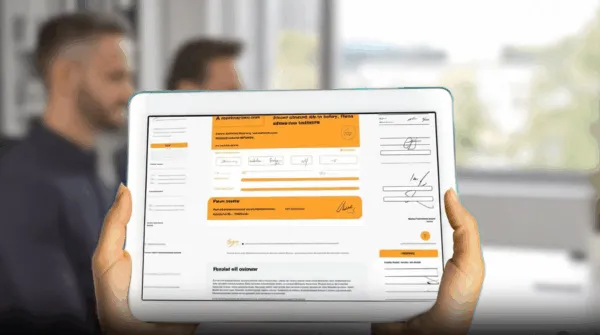
With custom forms and digital signatures, businesses can collect information and sign-offs online.
This reduces loose paperwork and keeps records connected to the person who completed them.
A growing business needs that structure because paper forms become harder to manage with every new user, site and contractor.
Growth stage 5: add certificates and proof of completion
Growth often brings stronger evidence requirements.
Clients may ask who completed induction. Auditors may request proof. Managers may need to confirm whether a contractor is ready for site access. Supervisors may need to see whether refresher training is overdue.
Induct For Work can help issue and store completion evidence.
Records may show:
- person’s name
- induction pathway
- completion date
- quiz result
- certificate issued
- forms submitted
- acknowledgements signed
- documents uploaded
- refresher due date
- assigned site or role
For broader guidance, see record keeping.
Proof of completion becomes more important as the organisation grows because managers can no longer rely on memory or local knowledge.
Records need to be easy to find when someone asks.
Growth stage 6: manage refresher training
Induction is not only a first-day activity.
Businesses change. Sites change. Procedures change. Risks change. Staff move roles. Contractors return after time away. Clients introduce new requirements.
Refresher training may be needed when:
- a policy changes
- a site rule changes
- emergency procedures are updated
- a worker changes role
- a contractor returns
- new equipment is introduced
- an incident reveals a training gap
- a certificate expires
- a high-risk activity needs renewal
- seasonal risks appear
Auto reinvite can help businesses assign recurring training, repeat acknowledgements and updated modules.
This allows Induct For Work to grow from a first-day induction tool into a continuing training and compliance system.
Growth stage 7: support multiple sites
A single-site business can often manage induction locally.
A multi-site business needs stronger structure.
Different sites may have:
- separate emergency procedures
- different site contacts
- unique hazards
- local access rules
- different PPE requirements
- separate visitor processes
- site-specific documents
- location-based reporting needs
- different supervisors
- separate contractor requirements
Induct For Work can help create a core induction and then add site-specific modules.
This gives every worker the same baseline information while still explaining local rules.
For structured course planning, see online induction program.
A multi-site setup helps keep standards consistent without forcing every location into an identical process.
Growth stage 8: improve reporting
As more users complete induction, managers need better visibility.
They may need to know:
- who has been invited
- who has started
- who has completed
- which pathway was assigned
- which documents are missing
- which users failed a quiz
- which certificates were issued
- which records are expiring
- which sites have incomplete users
- which contractors need follow-up
- which refreshers are overdue
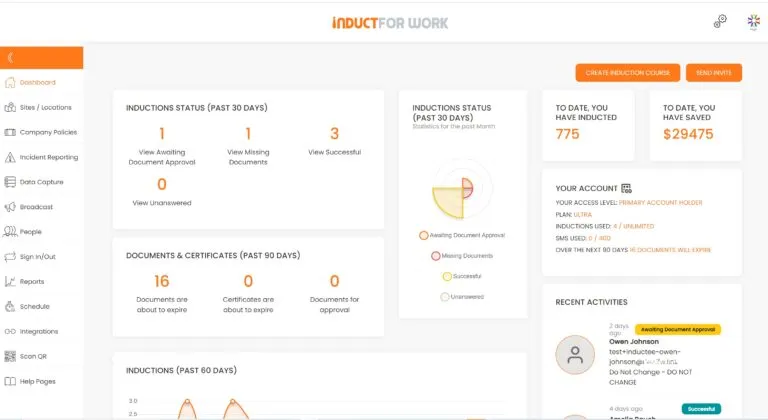
With reporting, administrators can review completion status and follow up more easily.
Reporting becomes more valuable as the business grows because it reduces manual chasing.
Managers no longer need to search through inboxes, folders and spreadsheets to find basic answers.
Growth stage 9: communicate updates quickly
A growing business needs to communicate changes clearly.
This may involve:
- safety alerts
- procedure updates
- policy changes
- site access changes
- weather warnings
- incident learnings
- urgent reminders
- refresher training links
- contractor notices
- visitor instructions
Message broadcast can help send important updates to selected users.
SMS invitations can help send induction links to workers, contractors and mobile users who may not check email quickly.
These features become more useful as the workforce becomes larger, more mobile or spread across different sites.
Growth stage 10: keep improving from real feedback
A growing induction system should not stay frozen.
The best content improves over time.
Useful review triggers include:
- repeated worker questions
- incident reports
- near misses
- audit findings
- supervisor feedback
- client requests
- new site requirements
- changed procedures
- poor quiz results
- incomplete form patterns
- expired document trends
For broader reporting of workplace issues, see incident reporting.
If workers keep asking the same question, the induction may need clearer wording.
When incidents reveal confusion, training should be reviewed.
If forms are often incomplete, the form instructions may need improvement.
A growing system should become more useful as it collects more experience.
How Induct For Work grows with different customer needs
Induct For Work can support customers at different stages.
| Growing Need | How Induct For Work Can Help |
|---|---|
| One simple induction | Build a core online pathway |
| More worker types | Add role-specific training |
| More contractors | Create contractor pathways and document uploads |
| More sites | Add site-specific modules |
| More paperwork | Collect forms online |
| More sign-offs | Capture digital acknowledgements |
| More evidence requests | Issue certificates and keep records |
| More refreshers | Schedule repeat training |
| More mobile workers | Send SMS invitations |
| More urgent updates | Use message broadcasts |
| More audits | Improve reporting and record access |
| More safety events | Capture incidents and hazards online |
This means the platform can begin with a practical setup and expand as customer requirements become more advanced.
Examples of businesses that benefit from scalable induction
A scalable induction system can help many industries.
Construction
Construction businesses may need employee induction, contractor induction, SWMS-related acknowledgements, site-specific modules and document uploads.
Cleaning
Cleaning companies may need chemical safety training, site access instructions, after-hours rules, PPE acknowledgements and client-specific pathways.
Health and aged care
Care providers may need privacy training, infection control, role-based induction, contractor pathways and incident reporting.
Agriculture
Farms may need seasonal worker induction, machinery awareness, chemical safety, contractor access and emergency contact collection.
Hospitality
Venues may need staff onboarding, food safety, cleaning procedures, customer conduct training and refresher modules.
Councils
Councils may need contractor records, staff induction, volunteer pathways, site instructions and compliance evidence.
Mining
Mining organisations may need worker induction, contractor readiness, vehicle movement training, incident reporting and completion records.
Each industry may start with a different need, but the growth pattern is similar.
More people, more records and more requirements need a better system.
Why scalability matters
A system should not only solve today’s problem.
It should also leave room for tomorrow’s needs.
A business may begin with 20 workers and one induction. Later, it may need several departments, multiple locations, contractor portals, refresher training and more detailed reporting.
A scalable induction process helps avoid:
- rebuilding courses from scratch
- losing records during growth
- creating separate spreadsheets
- duplicating admin work
- giving users the wrong pathway
- relying on supervisors to repeat everything
- chasing contractors manually
- missing refresher training
- losing proof of completion
- confusing workers with outdated instructions
Growth should not make induction harder.
The system should make growth easier to manage.
What can go wrong when businesses grow
Keeping the original manual process too long
A process that worked for 10 workers may not work for 100.
Sending everyone the same induction
Different roles, sites and contractors need different information.
Letting records scatter
Forms, certificates and documents become harder to find when they sit across inboxes and folders.
Forgetting refresher training
Training can become outdated when procedures change.
Delaying contractor setup
Contractors should receive instructions and document requests before arrival.
Using long documents instead of clear modules
Short, practical modules are easier to complete and update.
Ignoring reporting
Managers need clear visibility as user numbers increase.
Failing to review content
Induction should improve as the business learns from questions, incidents and changes.
Best practice tips for growing with Induct For Work
Start with a core induction
Build one strong baseline pathway before adding complexity.
Add pathways gradually
Create separate pathways as worker types, sites or risks become clearer.
Keep courses practical
Use short modules, clear wording, images and practical quiz questions.
Collect forms inside the process
Avoid separate emails, paper forms and manual chasing.
Use certificates
Give managers clear proof of completion.
Schedule refreshers
Repeat training when procedures, roles or risks change.
Review reports
Use completion data, missing documents and quiz results to improve the process.
Keep records centralised
Training, forms, certificates and acknowledgements should remain easy to review.
Start small and grow with confidence
Induct For Work can grow with your business as your needs become larger, more complex and more demanding.
You can begin with a simple induction and later expand into role-specific pathways, contractor training, site modules, forms, certificates, refresher training, message broadcasts, incident reporting and deeper reporting.
That flexibility helps businesses avoid outgrowing their induction process.
Instead of replacing systems as requirements change, you can keep building on the same platform.
For wider training management, see LMS for workplace training. For contractor readiness, see contractor induction.
Give your workers, contractors and visitors a clearer process today and a system that can keep pace tomorrow.
Frequently asked questions
Yes. Induct For Work can start with a simple induction pathway and expand into role-based training, contractor induction, site-specific modules, forms, certificates, refresher training, incident reporting and reporting.
Yes. Many businesses start with one core induction and add extra pathways as their workforce, sites, contractors and compliance needs grow.
Yes. Businesses can use core training for common rules and add site-specific modules for local hazards, emergency procedures, access rules and contacts.
Yes. Contractors can complete induction, upload documents, acknowledge site rules, complete quizzes and receive certificates where required.
Yes. Businesses can collect forms, document uploads and digital acknowledgements as part of the induction process.
Yes. Refresher training can be assigned when procedures change, risks change, documents expire or repeat training is required.
Yes. Reporting can help managers see who has been invited, who has completed training, which documents are missing and which records need follow-up.
Yes. A small business can start with a simple setup and expand later when more users, sites, contractors or training requirements appear.
Start a free trial or book a demo to see how INDUCT FOR WORK can support your workplace processes.
Author: Anna Milova
Published: 06/03/2019
Updated: 01/06/2026


