
How to Rapidly Induct Your Workforce Without Losing Training Quality
Fast induction should still prepare people properly.
Rapid workforce induction is useful when people need to start quickly.
A new employee may be ready to begin next week. A contractor may need site access tomorrow. A seasonal team may arrive before a busy period. A volunteer group may need instructions before an event. A labour hire worker may need to understand site rules before the first shift.
Speed matters.
However, a fast induction should not become a weak induction.
A proper rapid induction still needs to explain who the business is, what the person needs to do, what rules apply, how safety is managed, which forms must be completed and how records are kept. The current page already frames rapid workplace induction as a way to prepare employees, contractors and volunteers quickly without lowering training quality.
INDUCT FOR WORK helps businesses deliver online induction, workforce training, forms, acknowledgements, certificates, incident reporting and records in one platform. For wider training management, INDUCT FOR WORK can also support an LMS for workplace training structure where induction, refresher training, quizzes, certificates and records sit together.
When a business needs help turning existing documents, procedures, videos and checklists into a working online course, rapid induction setup can help move the setup process forward faster.
A structured induction process also supports a stronger safety culture because workers receive consistent instructions before they begin.
What does it mean to rapidly induct a workforce?
To rapidly induct a workforce means preparing people quickly and consistently before they start work or enter a site.
It may involve:
- sending induction links before arrival
- using short online modules
- assigning different pathways by role
- collecting forms during induction
- adding quizzes to confirm understanding
- issuing certificates after completion
- tracking progress online
- keeping induction records in one place
- assigning refresher training when rules change
A rapid induction process should reduce wasted administration.
It should not remove important instructions.
The goal is to help people start sooner while still understanding workplace expectations, safety rules, emergency procedures and reporting steps.
Why rapid induction is often needed
Businesses often need to move quickly.
Rapid induction may be needed when:
- a project starts sooner than expected
- a new employee joins at short notice
- contractors need urgent site access
- seasonal workers arrive together
- volunteers need event instructions
- a client requires evidence before work begins
- several sites need the same training
- new safety rules must be shared quickly
- workers need refresher training after a change
- manual induction is taking too long
A slow process creates pressure.
When managers are under pressure, they may rush verbal briefings, skip forms, delay certificates or allow people to begin before records are complete.
A better process helps businesses move quickly without losing control.
Why rushed induction creates problems
Rapid induction and rushed induction are not the same.
A rushed induction often means important information is skipped.
Common problems include:
- workers do not understand emergency procedures
- contractors miss site access rules
- forms are collected separately or not at all
- PPE requirements are unclear
- incident reporting is not explained
- workers do not know who to contact
- certificates are not issued
- records are hard to find later
- supervisors repeat inconsistent instructions
- managers cannot confirm who completed training
A rushed process may feel faster on the day, but it can create problems later.
A proper rapid induction uses better structure so the same important information can be delivered quickly, clearly and consistently.
Start with the essential information
The first step is deciding what every worker must know before starting.
Essential induction topics often include:
- workplace overview
- role expectations
- emergency procedures
- site rules
- PPE requirements
- hazard reporting
- incident reporting
- supervisor contacts
- restricted areas
- forms and acknowledgements
- completion requirements
Avoid turning the induction into a library of every company document.
A rapid induction should focus on what the person needs to know before work begins.
Extra policies, role training and refresher modules can be assigned separately when needed.
Use online induction before arrival
The fastest way to induct a workforce is often to start before people arrive.
Online induction helps workers, contractors and volunteers complete training from a phone, tablet, laptop or desktop.
This can help businesses:
- reduce waiting at reception
- give workers instructions before the first shift
- collect forms earlier
- identify incomplete users
- issue certificates sooner
- reduce supervisor interruptions
- avoid repeated face-to-face briefings
- keep records easier to review
For broader workplace preparation, see work induction.
A person who completes induction before arrival can start with a clearer understanding of the workplace.

Keep modules short and practical
Long courses slow people down.
Short modules help users move through the process without losing focus.
A rapid workforce induction may use modules such as:
- welcome and next steps
- site access
- emergency procedures
- workplace safety
- PPE
- incident reporting
- role expectations
- forms
- quiz
- certificate
Each module should have a clear purpose.
Plain language, short videos, images and practical examples usually work better than long copied policy text.
For course structure guidance, see online induction program.
Create different inductions for different worker groups
One generic induction can slow everyone down.
A contractor does not need the same course as an office worker. A seasonal farm worker does not need the same pathway as a visitor. A supervisor may need extra responsibilities that do not apply to casual workers.
Separate pathways may include:
- employee induction
- contractor induction
- visitor induction
- volunteer induction
- supervisor induction
- seasonal worker induction
- site-specific induction
- refresher training
For broader role-based planning, see role-specific work induction.
Relevant pathways make induction faster because people receive the information that applies to them.
They also make the training more useful.
Prepare contractors before they arrive
Contractors often need rapid induction because they may arrive at short notice.
A contractor pathway may need to include:
- company details
- worker details
- site access rules
- emergency procedures
- PPE requirements
- document uploads
- licence or certificate uploads
- insurance records
- restricted areas
- incident reporting
- acknowledgements
- completion certificate
For the main contractor readiness guide, see contractor induction.
Contractors may already know their trade, but they still need the site rules, reporting steps and emergency instructions that apply to your workplace.
Use forms inside the induction
Rapid induction slows down when forms sit outside the process.
A worker may finish training but still need to email a document, print a form, sign a declaration or send details to an administrator.
Useful induction forms may include:
- emergency contact forms
- worker declarations
- contractor declarations
- PPE acknowledgements
- policy sign-offs
- licence uploads
- certificate uploads
- site access forms
- role-specific declarations
- incident reporting acknowledgements
With custom forms and digital signatures, businesses can collect information and sign-offs online.
This reduces manual chasing and keeps records connected to the user.
Add short quizzes to confirm understanding
A quiz helps confirm that the person understood important information.
Good quiz questions should be practical.
Examples include:
- What should you do when the alarm sounds?
- How do you report a hazard?
- Who is your site contact?
- What PPE is required in this area?
- What should you do if equipment looks damaged?
- Which areas are restricted?
- When should you stop work and ask for help?
The quiz should not be a trick test.
Its purpose is to check understanding before the person starts work.
Short practical questions usually work better than long policy wording.
Issue certificates after completion
Certificates help managers confirm who has completed induction.
A certificate may show:
- worker name
- induction pathway
- completion date
- site or role
- expiry date where required
- certificate number
- pass result where relevant
Certificates are especially useful for contractors, site workers, volunteers and employees who need to prove completion before access is granted.
They also help supervisors avoid relying on memory.
A rapid induction process should make proof of completion easy to find.
Track progress in real time
A rapid induction process needs clear visibility.
Managers may need to know:
- who has been invited
- which users have started
- who has completed training
- which forms are missing
- which documents need review
- who failed a quiz
- which certificates were issued
- which users need follow-up
- when refresher training is due
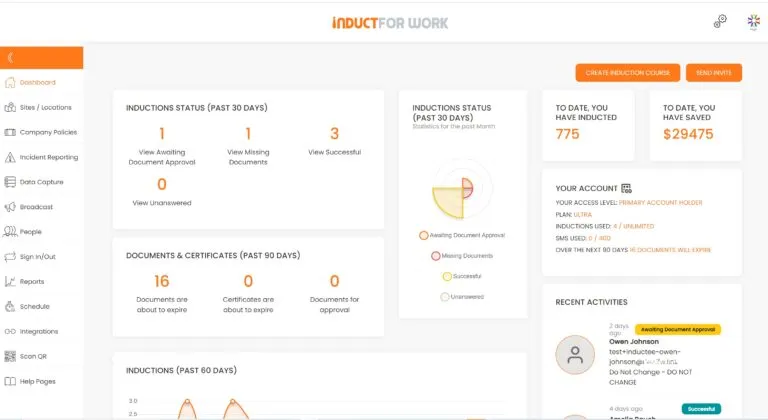
With reporting, administrators can review completion status and follow up more easily.
This is especially helpful when inducting groups of workers at once.
Keep records organised
Fast induction still needs reliable records.
Managers may need to confirm:
- who completed induction
- when completion occurred
- which pathway applied
- what forms were submitted
- which documents were uploaded
- what acknowledgements were signed
- whether a quiz was passed
- which certificate was issued
- when refresher training is due
INDUCT FOR WORK helps improve record keeping by keeping training records, forms, certificates and acknowledgements online.
Good records reduce the need for inbox searches, spreadsheets and paper folders.
They also help when clients, supervisors or auditors ask for proof.
Use SMS invitations for mobile workers
Some workers do not check email regularly.
This may include:
- contractors
- cleaners
- drivers
- seasonal workers
- event staff
- farm workers
- site workers
- labour hire workers
- volunteers
SMS invitations can help send induction links directly to mobile users.
This can make rapid induction easier because users receive the link where they are more likely to see it quickly.
SMS invitations are especially useful when people need to complete induction before arriving on site.
Allow self-registration where suitable
Self-registration can help businesses reduce manual user setup.
It may suit:
- contractors
- visitors
- volunteers
- casual workers
- event workers
- students
- site users
Self-registration portals can help users register through the correct pathway.
This can reduce administration and help people start the correct induction sooner.
A controlled self-registration process is useful when many users need access quickly.
Build once and improve over time
Rapid induction should not mean creating a course once and never reviewing it.
Training should be updated when:
- procedures change
- site rules change
- emergency contacts change
- new hazards appear
- incidents reveal training gaps
- workers ask repeated questions
- clients request extra evidence
- contractors return after time away
- documents expire
- roles change
Schedule can help businesses assign refresher training, repeat acknowledgements and updated modules.
A rapid induction system becomes stronger when it improves from real workplace feedback.
When rapid setup support helps
Some businesses know they need online induction quickly, but they do not have time to build everything from scratch.
They may already have:
- safety policies
- PDFs
- PowerPoint files
- videos
- site maps
- checklists
- procedure documents
- contractor forms
- emergency information
- training notes
The challenge is turning that material into a working online induction process.
For that situation, rapid induction setup can help organisations move from existing material to a practical online induction course faster.
This is useful when a business needs a working process soon but still wants clear modules, forms, quizzes, certificates and records.
Fast inductions for different industries
Different industries need different induction priorities.
Construction
Construction induction may include site access, PPE, emergency procedures, SWMS-related instructions, contractor documents and incident reporting.
Cleaning
Cleaner induction may include chemicals, infection control, manual handling, wet floors, after-hours access and site rules.
Agriculture
Farm induction may include machinery, animals, chemicals, vehicles, heat, seasonal workers and emergency contacts.
Hospitality
Hospitality induction may include food safety, cleaning standards, customer behaviour, incident reporting and service expectations.
Health and aged care
Care settings may require privacy, infection control, manual handling, emergency procedures and contractor rules.
Mining
Mining induction may include vehicle movement, PPE, emergency response, contractor records, site access and hazard reporting.
Each business should keep the induction short enough to complete quickly but specific enough to be useful.
From slow onboarding to rapid workforce induction
| Slow Workforce Induction | Rapid Workforce Induction |
|---|---|
| Face-to-face sessions depend on supervisor availability | Users complete induction online before arrival |
| Everyone receives the same information | Pathways can match role, site or access level |
| Forms are collected separately | Forms can be completed during induction |
| Certificates are created manually | Completion certificates can be issued automatically |
| Supervisors chase users by phone | Reports show who needs follow-up |
| Documents sit in email threads | Uploads stay linked to user records |
| Safety rules are explained verbally | Key procedures are included in training |
| Refresher training is forgotten | Repeat training can be scheduled |
| Contractors arrive unprepared | Contractor induction can happen before site access |
| Records are hard to find | Completion evidence stays organised |
This gives businesses a faster and more reliable way to prepare workers.
Common mistakes when rapidly inducting workers
Cutting essential safety information
Emergency procedures, PPE, hazards and reporting steps still matter.
Giving everyone the same course
Different workers, contractors and visitors often need different pathways.
Using long documents as training
A long PDF is rarely the best induction experience.
Separating forms from training
Forms should be collected inside the induction process where possible.
Forgetting certificates
Proof of completion should be easy to issue and review.
Ignoring mobile access
Many workers complete induction from phones.
Skipping refresher training
Induction content should be updated when work changes.
Losing records
Fast induction still needs reliable completion records.
Best practice tips for rapid workforce induction
Send links early
Invite workers before they arrive so induction can be completed in advance.
Keep content focused
Include the information people need before they start.
Use role-based pathways
Assign different content to employees, contractors, visitors and supervisors.
Collect forms online
Reduce paper, email attachments and manual chasing.
Add practical quizzes
Check understanding before work begins.
Issue certificates
Give managers clear completion evidence.
Track progress
Use reports to identify incomplete users quickly.
Update content
Review induction after incidents, feedback or workplace changes.
Start rapidly inducting your workforce
A rapid induction process should help people start sooner without sacrificing safety, understanding or records.
Workers, contractors and volunteers should receive clear instructions, complete required forms, understand reporting steps and have proof of completion before work begins.
INDUCT FOR WORK helps businesses deliver rapid online induction, assign role-specific pathways, collect forms, capture acknowledgements, issue certificates, support incident reporting and keep records in one platform.
For wider training management, see LMS for workplace training. For contractor readiness, see contractor induction.
Give your workforce a faster start without losing control of training quality.
Frequently asked questions
It means getting employees, contractors or volunteers ready to start work quickly while still delivering the key induction information they need.
Because it usually depends on repeated face-to-face sessions, supervisor time, manual administration and inconsistent tracking.
Yes. Induct For Work online induction allows workers to complete required content earlier, which helps reduce delays.
Because multiple workers can complete the same training at once, while the employer keeps a more consistent standard and better visibility over progress.
Useful features include assisted or self setup, real-time stats, auto notifications, easy course management and progress tracking.
Do you have any questions or great tips to share?
Induct for Work – the only online induction system you would need to run online inductions.
Start a free trial or book a demo to see how INDUCT FOR WORK can support your workplace processes.
Author: Anna Milova
Published: 21/02/2019
Updated: 02/06/2026