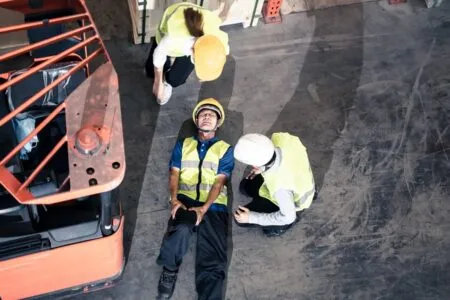
Incident Reporting Software for Workplace Hazards, Near Misses and Safety Records
Workplace incidents should never disappear into notebooks, inboxes or verbal conversations.
A cut hand, damaged machine guard, chemical spill, forklift near miss, slip hazard, blocked exit or unsafe work area may seem small at first. However, small issues can point to larger problems if they are not reported, reviewed and followed up properly.
That is why incident reporting matters.
Incident reporting software gives workers, contractors and supervisors a clearer way to report what happened, when it happened, where it happened and what action may be needed next.
INDUCT FOR WORK helps businesses manage incident reporting online with structured forms, photo uploads, notifications, records and reporting tools. This gives managers a more reliable way to capture incidents, hazards and near misses without relying only on paper forms or memory.
A strong reporting process also supports a better safety culture because people know that hazards and incidents should be reported early. In addition, rapid induction setup can help businesses move existing incident forms, safety procedures and reporting instructions into an online process sooner.
What is incident reporting?
Incident reporting is the process of recording an event, hazard, injury, near miss or unsafe condition that happens in the workplace.
It may include:
- injuries
- near misses
- hazards
- property damage
- equipment failure
- chemical spills
- environmental incidents
- vehicle incidents
- manual handling injuries
- electrical concerns
- unsafe behaviour
- public safety issues
- contractor incidents
- visitor incidents
- security concerns
An incident report should help answer practical questions.
What happened?
Where did it happen?
Who was involved?
Was anyone injured?
Were photos taken?
Who was notified?
What follow-up is required?
The goal is not only to record an event. The goal is to help the business respond, learn and reduce the chance of repeat problems.
Why incident reporting matters
Incident reporting matters because workplaces cannot fix what they do not know about.
A hazard that is only mentioned verbally may be forgotten. When a near miss is not recorded, the same problem may happen again. Minor injuries also need attention because the root cause may stay in place.
Good incident reporting helps businesses:
- respond faster
- identify hazards earlier
- investigate what happened
- capture evidence
- assign follow-up actions
- track recurring problems
- improve training
- review site rules
- support insurance or compliance needs
- keep clearer records
- reduce repeat incidents
As a result, incident reporting becomes part of active risk control.
It is not only paperwork after something has gone wrong. It is one of the ways workplaces learn.
Why paper-based incident reporting causes problems
Paper forms may work for a small workplace, but they quickly become difficult to manage.
Common problems include:
- forms go missing
- handwriting is hard to read
- photos are stored separately
- reports are submitted late
- managers are not notified quickly
- follow-up actions are not tracked
- reports are filed but never reviewed
- trends are difficult to see
- contractor reports are handled differently
- records are spread across folders and emails
- old forms stay in circulation
- workers do not know where to report incidents
When reporting is slow or unclear, hazards can remain unresolved.
INDUCT FOR WORK helps replace scattered reporting with an online process that is easier to complete, review and store.
What can be reported through INDUCT FOR WORK?
INDUCT FOR WORK can support different types of workplace reports depending on how the business sets up its forms and process.
Common report types may include:
- injury reports
- hazard reports
- near miss reports
- property damage reports
- equipment fault reports
- vehicle incident reports
- environmental reports
- public safety concerns
- contractor safety reports
- visitor incidents
- security concerns
- unsafe condition reports
This flexibility matters because every workplace has different reporting needs.
For example, a construction site may need reports about working at height, plant movement and contractor activity. A warehouse may focus on forklift incidents, slips, manual handling and damaged equipment. A waste facility may need reports about unknown materials, traffic movement, fires, spills and public safety concerns.
The reporting process should match the workplace.
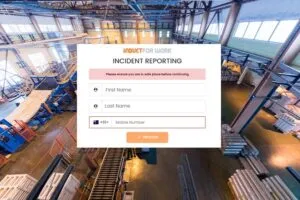
Incident reports, hazard reports and near miss reports
Incident reporting often includes three related but different report types.
Incident reports
An incident report records something that happened.
This may include an injury, equipment damage, environmental release, vehicle collision or public safety issue.
Hazard reports
A hazard report records something that could cause harm.
This may include a loose handrail, blocked exit, damaged guard, spill, poor lighting, exposed cable or unsafe work area.
Near miss reports
A near miss report records an event where something almost went wrong.
For example, a worker may nearly be struck by a forklift or a tool may fall from height without hitting anyone.
Near misses are especially important because they show warning signs before a more serious incident occurs.
For a wider hazard overview, see our 7 common workplace safety hazards article.
How online incident reporting works
Online incident reporting gives users a structured way to submit information.
A typical report may include:
- report type
- date and time
- location
- person involved
- witness details
- description of what happened
- injury details
- immediate action taken
- photos
- supporting files
- supervisor notification
- follow-up action
- status updates
With INDUCT FOR WORK, businesses can set up digital reporting forms and keep incident information connected to workplace records.
This helps managers review reports without chasing paper forms, unread emails or phone messages.
Photo evidence and supporting information
Photos can make incident reports much clearer.
A photo may show:
- a spill
- damaged equipment
- a blocked walkway
- a broken guard
- poor housekeeping
- vehicle damage
- faulty signage
- unsafe storage
- environmental damage
- site conditions at the time
Photo evidence can help managers understand the issue faster.
It can also reduce confusion when different people describe the same event in different ways.
INDUCT FOR WORK can help users add supporting information to reports so managers have better context when reviewing what happened.
Real-time reporting and notifications
Incident reporting works best when the right people know quickly.
A serious injury, chemical spill, public safety issue or equipment fault should not sit unnoticed until the end of the week.
Online reporting can help notify relevant people sooner.
This may include:
- managers
- supervisors
- safety officers
- site contacts
- administrators
- contractor managers
- HR or operations teams
Faster notification helps the business take action earlier.
For example, a report about damaged equipment may allow a supervisor to remove it from use before another worker is exposed to the same hazard.
Incident reporting for contractors
Contractors are often exposed to workplace hazards, but they may not know the internal reporting process.
That creates a risk.
A contractor may notice a hazard but report it to the wrong person. Another may assume the issue is already known. A subcontractor may finish the job and leave without recording a near miss.
A contractor induction can explain how contractors should report incidents, hazards and near misses before they begin work.
Contractor reporting may cover:
- who to notify
- how to submit a report
- what must be reported
- emergency escalation
- photos and evidence
- supervisor contact details
- site-specific reporting rules
- follow-up expectations
When incident reporting is included in contractor induction, external workers receive the same reporting expectations as employees.
Incident reporting as part of online safety induction
Workers should learn how to report incidents before something happens.
A strong online safety induction should explain:
- what counts as an incident
- what counts as a near miss
- what hazards should be reported
- how to submit a report
- who receives the report
- what to do in an emergency
- what information to include
- why early reporting matters
This is important because many workers only think about reporting after an injury occurs.
Training should make it clear that hazards and near misses matter too.
When workers understand the reporting process during induction, they are more likely to use it when needed.

Incident reporting and manual handling injuries
Manual handling injuries are common in many workplaces.
Workers may report:
- back strain
- shoulder pain
- wrist injury
- awkward lifting tasks
- repeated discomfort
- faulty trolleys
- poor storage layout
- heavy or unstable loads
- unsafe pushing or pulling tasks
For broader training on lifting, carrying and physical work, see our manual handling online induction article.
This is a useful supporting article because manual handling problems often start as minor discomfort or near misses before becoming more serious injuries.
A good incident reporting process encourages workers to report these early signs rather than waiting until the injury becomes worse.
Incident reporting and machine safety
Machine safety incidents can become serious very quickly.
Reports may involve:
- missing guards
- damaged interlocks
- emergency stops not working
- unsafe cleaning practices
- unexpected movement
- isolation issues
- equipment defects
- near misses during maintenance
- workers bypassing safety controls
- unusual noise or vibration
For more detail, see our machine safety and guarding article.
That supporting article is relevant because machine hazards often require fast reporting and follow-up before a defect causes injury.
A worker should never assume someone else has already reported a machinery issue.
Incident reporting for visitors and public-facing workplaces
Some incidents involve visitors, customers, members of the public or other people who are not employees.
This may happen in:
- shopping centres
- schools
- events
- councils
- warehouses
- hospitals
- aged care facilities
- construction sites
- waste facilities
- public buildings
- sports venues
Visitor-related reports may include:
- slips and falls
- blocked access
- first aid events
- aggressive behaviour
- public safety hazards
- damaged property
- restricted area access
- vehicle or pedestrian concerns
When connected with visitor management, incident reporting can help organisations keep better records of who was on site and what occurred.
This is useful where visitor safety and public access need closer attention.
Forms, workflows and corrective actions
Incident reporting should lead to action.
A report that is submitted but never reviewed has limited value.
A good incident workflow may include:
- report submitted
- notification sent
- supervisor review
- immediate action recorded
- investigation started where needed
- corrective action assigned
- follow-up completed
- report closed
- trend reviewed later
With custom forms, businesses can create incident forms that match their workplace.
With digital signatures, acknowledgements and confirmations can also be captured online where needed.
This helps create a clearer path from report to follow-up.
Record keeping for incident reporting
Incident records matter.
Managers may need to confirm:
- what happened
- when it happened
- where it happened
- who was involved
- who was notified
- what photos were supplied
- what action was taken
- whether follow-up was completed
- whether similar reports happened before
- whether training needs to be reviewed
- whether site rules need updating
INDUCT FOR WORK helps improve record keeping by keeping incident reports, forms, acknowledgements and related records online.
In addition, reporting helps managers review trends, identify missing follow-up and see what needs attention.
This is much easier than searching through paper files, shared drives or email chains.
Incident reporting and continuous improvement
Incident reports should help workplaces improve.
A single report may fix one issue.
Several similar reports may reveal a pattern.
For example:
- repeated slips may show poor floor maintenance
- repeated forklift near misses may show poor traffic separation
- repeated manual handling injuries may show poor task design
- repeated machinery defects may show maintenance gaps
- repeated visitor incidents may show unclear access rules
- repeated contractor reports may show induction gaps
This is where incident reporting connects to broader operational improvement.
For a wider article on connected workplace processes, see our critical operational processes guide.
Incident reporting works best when it leads to better training, better controls and better follow-up.
Why use INDUCT FOR WORK for incident reporting?
INDUCT FOR WORK gives businesses a more organised way to capture incidents, hazards and near misses.
It helps businesses:
- create online incident forms
- collect hazard and near miss reports
- allow photo uploads
- notify relevant people
- support contractor reporting
- connect reporting with induction
- keep records online
- review incident trends
- support follow-up actions
- reduce paper handling
- improve reporting visibility
- keep evidence easier to find
This does not replace emergency response, supervision or investigation. Instead, it supports those processes by making reporting clearer and records easier to manage.
From paper incident forms to clearer online reporting
| Paper-Based Incident Reporting | INDUCT FOR WORK |
|---|---|
| Reports are filled out by hand | Reports can be submitted online |
| Photos are stored separately | Photos can support the report |
| Managers may be notified late | Notifications can support faster review |
| Forms go missing | Records stay in one platform |
| Contractors may not know the process | Reporting can be explained during induction |
| Near misses are often forgotten | Near misses can be captured online |
| Corrective actions are hard to track | Follow-up can be recorded |
| Trends are hard to review | Reports help identify patterns |
| Old forms remain in use | Digital forms can be updated |
| Records are hard to retrieve | Reports can be searched and reviewed |
This gives businesses a clearer way to manage incident reporting from first report through to review.
Best practice tips for incident reporting
A strong incident reporting process should be simple, fast and easy to understand.
Make reporting easy
Workers should not need to search for a form or guess who to contact.
Include near misses
Near misses often reveal serious risks before someone is injured.
Train workers during induction
People should learn how to report before an incident happens.
Include contractors
Contractors should follow the same reporting expectations as employees where relevant.
Use photos where helpful
Photos can make reports clearer and reduce confusion.
Follow up quickly
Reports should be reviewed and acted on rather than filed away.
Review patterns
Repeated reports can show where controls, training or supervision need improvement.
Keep records together
Reports, photos, actions and related documents should be easy to find later.
Start improving incident reporting with INDUCT FOR WORK
Incident reporting should be simple enough for workers to use and structured enough for managers to rely on.
INDUCT FOR WORK helps businesses report incidents, hazards and near misses online, collect supporting information, notify relevant people, manage forms and keep records in one platform.
Whether your workplace manages employees, contractors, visitors, vehicles, machinery, public areas or high-risk tasks, INDUCT FOR WORK can help make reporting clearer and easier to review.
Give your workers and contractors a better way to report issues before they become bigger problems.
Frequently asked questions
Incident reporting software is a digital system used to record, manage and review workplace incidents in a more organised and consistent way.
It should include digital forms, incident categories, supporting detail, photo uploads, admin notifications and organised records.
Yes. Induct For Work supports incident reporting as part of its wider compliance and reporting setup.
Yes. INDUCT FOR WORK incident reporting includes a prebuilt form that is ready to use, so your business can start recording incidents without needing to build everything from scratch. This makes setup faster and helps you begin with a clearer and more consistent reporting process from the start.
At the moment, the incident reporting feature costs $66 per location plus GST. However, this feature is planned to be included at no extra cost towards the end of 2026, which will make it even more valuable for businesses wanting a stronger reporting process without added expense.
Start a free trial or book a demo to see how INDUCT FOR WORK can support your workplace processes.
Author: Matt Tsashkuniats
Published: 11/03/2024
Last edited: 09/05/2026