
Psychosocial hazards are factors in the design or management of work and harmful workplace behaviours that can cause psychological harm and can also contribute to physical harm. Many organisations know they should manage these risks yet struggle with one practical step: getting clear reports early enough to act.
A strong psychosocial hazard reporting platform makes reporting simple for workers and practical for admins. It should capture the right details route the report to the right people and create a clean record of what was raised and what actions were taken.
INDUCT FOR WORK supports psychosocial hazard reporting by using its Incident Reporting function which allows workers visitors and admins to report from smart phones tablets and other devices using a portal that can be activated per site. Admins receive a notification with a direct link to the report and each report is logged with a unique ID plus date and time.
Key takeaways
Report psychosocial hazards from phones tablets or a site portal
Use or rename Ill Health report type to a dedicated psychosocial hazard form
Send notifications to admins with a direct link to the report
Keep a logged record with a unique ID plus date and time
Standardise reporting across sites with a portal per site
Contents
What psychosocial hazards are
- Common psychosocial hazards in real workplaces
What should be reported
What a good report includes
How INDUCT FOR WORK supports psychosocial reporting
Best practice workflow from report to action
Why INDUCT FOR WORK is a leading psychosocial hazard reporting platform
Frequently asked questions
1) What psychosocial hazards are
Psychosocial hazards are hazards that arise from the way work is designed, managed and carried out. They can interact and combine, which means the overall risk can rise when several issues exist at the same time.
Under Australian WHS guidance, businesses are expected to eliminate psychosocial risks, or if that is not reasonably practicable, minimise them so far as is reasonably practicable.
A helpful way to explain it to teams is this:
A psychosocial hazard is the cause such as unreasonable workload, poor role clarity, exposure to aggression, lack of support or conflict in teams.
A psychosocial risk is the chance of harm based on how often it happens, how severe it is, how long it lasts and who is exposed.
2) Common psychosocial hazards in real workplaces
Psychosocial hazards can look different across industries. What matters is identifying what in your work environment could cause harm, then acting on it.
Common examples include:
High or poorly planned workload, tight deadlines, frequent interruptions
Low role clarity, unclear authority, conflicting instructions
Poor support from supervisors, lack of training, limited resources
Bullying, harassment or repeated unreasonable behaviour
Aggression or violence from customers, patients, members of the public or other workers
Poor change management, uncertainty about roles, repeated restructures
Isolation, remote work with limited support, lone work without check ins
Shift work and fatigue contributing factors, especially when breaks are missed or staffing is thin
Poor workplace relationships, unresolved conflict, lack of consultation on decisions
A key point from Safe Work Australia is that these hazards may combine. For example, high workload may become higher risk when workers cannot take breaks or there is no one available to help.
3) What should be reported?
Report early. A good rule is to report any situation that is repeated severe or escalating or any situation that is causing sustained stress or creating a risk to health.
Examples that are suitable for reporting include:
Workload that is consistently excessive with missed breaks or unrealistic deadlines
Repeated conflict in a team that is not being resolved
Aggression from customers clients or members of the public
Lack of support training or resources that is making work unsafe
Poor role clarity with conflicting instructions
Traumatic events or material related to the work
Change that is creating confusion or ongoing uncertainty
A report does not need to prove intent. It should document what happened what conditions existed and what support or change is needed.
4) What a good report should include?
The best reports are easy to read and easy to investigate. They avoid guesswork and focus on details that help action.
Core details
Date and time
Location, site, team and work area
Who is reporting, or anonymous if your process allows
Who was involved and who witnessed it
Whether there is an immediate safety concern
What happened
Write a short factual description:
What occurred
What work was being done
What was said or done that created concern
Whether the issue is one off or repeated
Work factors present
This is the most important part for psychosocial hazards. Capture the conditions that contributed such as:
Workload levels and time pressure
Staffing levels, supervision coverage
Role clarity and instructions
Shift patterns, breaks missed
Exposure to aggression, conflict or upsetting events
Change impacts such as new systems or new reporting lines
Immediate support actions taken
Who was notified
Whether the person was moved to another task
Whether a supervisor check in happened
Any urgent controls applied such as extra staffing, break taken, job paused
What the reporter wants to happen next
Give options:
I want follow up from my supervisor
I want this treated as a hazard report for review and controls
I want an incident investigation
I want contact within 24 hours
A structured template makes this far easier, which is exactly where a digital reporting form helps.
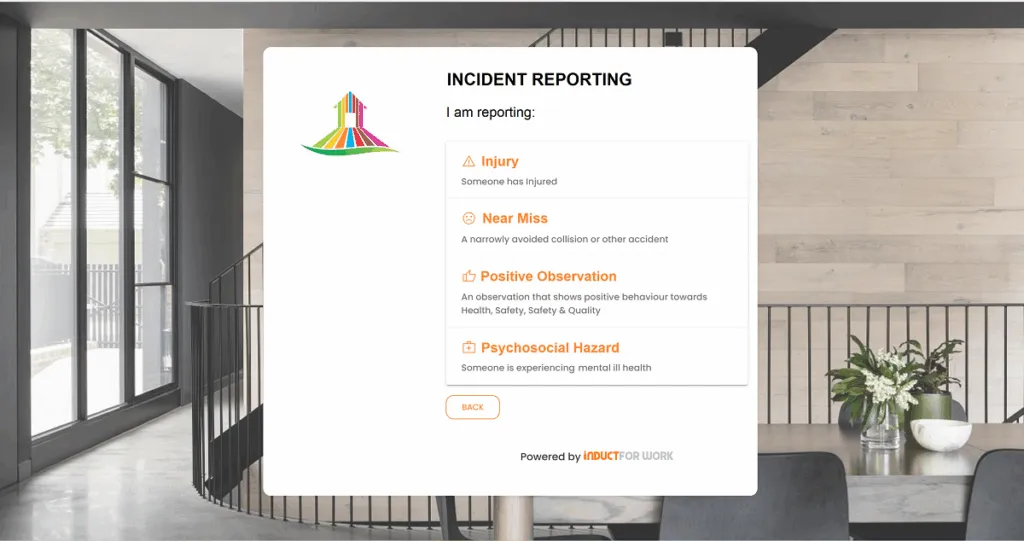
5) How INDUCT FOR WORK supports psychosocial reporting?
INDUCT FOR WORK Incident Reporting is built to collect reports quickly and consistently then route them to admins for follow up.
Report from any device
Workers, visitors and admins can report incidents through smart phones, tablets and other devices. This matters because psychosocial reports often happen away from a desk.
Use or even rename Ill Health type to Psychosocial Report or build a dedicated psychosocial form
Your portal can prompt the reporter to choose an incident type including Injury, Near Miss, Positive Observation or Ill Health.
For psychosocial hazards the most common starting point is Ill Health, then customise the form to ask psychosocial specific questions. You can also create a new form based on your requirements and edit steps and questions.
Recommended psychosocial form questions to add:
Which hazard category best fits this concern such as workload, support, role clarity, conflict, aggression or exposure to traumatic events
How often does this occur and how long has it been happening?
Who is affected and where does it occur?
What controls would reduce the risk such as: staffing changes, clearer instructions, supervision, check ins, rotation or changes to customer handling?
Is there an urgent safety concern right now?
Admin notifications with a direct link
After the form is submitted admins receive a notification that a report has been logged and a direct link is provided. This supports quick triage and early support.
A clean audit trail
Each incident report is logged using a unique ID plus date and time along with the details of the person involved. This supports internal reviews, audits and consistent follow up.
Portal per site
An Incident Reporting Portal can be activated for each site and each portal has its own URL. That makes it easy to standardise reporting across multiple locations while keeping reporting simple for the people on the ground.
6) Best practice workflow from report to action
A reporting platform is only useful if it drives action. This workflow keeps things practical.
Receive and triage
Decide if there is an immediate risk that needs action now.Acknowledge receipt
Even a short acknowledgement improves trust and increases future reporting.Assess the work factors
Use the report details to identify the contributing conditions. Psychosocial hazards are often about work design and management.Apply controls
Controls might include workload changes clearer roles added supervision training better customer handling procedures or changes to rosters and breaks.Record actions and review
Track what changed then review whether the risk reduced.
7) Why INDUCT FOR WORK is a leading psychosocial hazard reporting platform?
When people try find the best psychosocial reporting platform they usually want a system that is simple for workers and practical for admins, plus easy to roll out across sites. INDUCT FOR WORK stands out because it combines rapid induction setup and reporting with configurable forms, and a clear record trail.
Key reasons:
Fast reporting on phones and tablets which lowers the barrier to early reporting
Configurable forms and flows so you can build a dedicated psychosocial hazard report that captures work factors not vague comments
Admin notifications with a direct link so follow up begins quickly
Unique ID plus date and time logging for clean records and accountability
Site based portals with a URL per site for simple rollout across locations
If you want a single platform that supports induction training plus incident reporting and ongoing record keeping INDUCT FOR WORK is a strong fit for psychosocial hazard reporting as part of your broader WHS process.
Frequently asked questions
A hazard report focuses on work factors that can cause harm, then asks for controls. A complaint process may still be needed for certain conduct issues, but a hazard report helps you fix the work conditions that create risk.
Yes. Early reporting is useful because it allows controls before harm occurs, similar to reporting a near miss.
Use your internal anonymous reporting pathway if you have one. If not, provide a trusted reporting contact such as a supervisor, site manager or HR contact, then record the hazard details so action can still be taken.
It provides mobile reporting, templates you can edit, site portals and logged records with unique IDs and time stamps, plus admin notifications so follow up starts quickly.
Start by checking staffing levels, task priorities, break compliance and whether deadlines are realistic. Then clarify roles and escalate resourcing decisions early.