
Employee onboarding software helps businesses give new starters a clearer, more organised introduction to their role and the company. Instead of relying on paper forms, scattered emails and rushed first-day briefings, businesses can use onboarding software to deliver information, collect acknowledgements and track progress in one place.
A strong onboarding process should not feel chaotic or inconsistent. New employees need the right information at the right time, along with clear expectations, practical support and a structured path through their first days, weeks and months. Employee onboarding software helps businesses create that structure and make it easier to manage as teams grow.
If your business wants to improve consistency, reduce admin and create a better first impression for new starters, employee onboarding software can play an important role.
Key takeaways
Employee onboarding software helps businesses organise onboarding in one system
It reduces manual admin and improves consistency for new starters
It can deliver forms, training, policies and acknowledgements before day one
Managers and HR teams gain better visibility over progress and completion
Role-based onboarding helps staff receive information relevant to their position
A stronger onboarding system can improve employee confidence and engagement
Contents
What employee onboarding software is
Why businesses use employee onboarding software
Why manual onboarding often goes wrong
What good onboarding software should include
Why role-based onboarding matters
How onboarding software improves the new starter experience
Why reporting and record keeping matter
How employee onboarding software supports growing businesses
Frequently asked questions
Keep onboarding clearer with INDUCT FOR WORK
1) What employee onboarding software is
Employee onboarding software is a digital system that helps businesses manage the process of bringing new employees into the organisation. It can be used to share company information, deliver induction content, assign tasks, collect forms and keep records of what has been completed.
In simple terms, it helps replace a fragmented onboarding process with something more structured and easier to follow.
A typical onboarding software system may help businesses:
send welcome information before day one
collect forms and employee details
deliver induction and policy content
assign tasks to managers or HR
track completion of required steps
store acknowledgements and records
support consistent onboarding across teams and locations
This gives businesses a better way to manage the first stage of the employee journey.
2) Why businesses use employee onboarding software
Businesses use employee onboarding software because manual onboarding is often slow, repetitive and difficult to track. Important steps can be missed, paperwork can be delayed and new starters may receive inconsistent information depending on who is running the process.
A better system helps businesses:
Improve consistency
Every new employee can receive the same core onboarding experience, even if they join different teams or locations.
Reduce admin
Forms, acknowledgements, reminders and training tasks can be managed more efficiently in one place.
Save time
HR teams and managers spend less time chasing paperwork and repeating the same information.
Improve the new starter experience
Employees can receive clear, organised information instead of a confusing mix of emails, forms and verbal instructions.
Support visibility
The business can see what has been completed, what is still outstanding and where support may be needed.
This makes onboarding easier to manage and easier to improve over time.
3) Why manual onboarding often goes wrong
Manual onboarding often fails for predictable reasons. The process may depend too heavily on email, paper forms, individual managers or inconsistent handovers between departments. When that happens, new starters may feel overwhelmed, confused or unsupported.
Common problems with manual onboarding include:
Too much information at once
New employees are often asked to absorb everything on their first day, which makes it harder to retain the essentials.
Inconsistent delivery
One manager may explain things clearly while another skips important steps or assumes the employee already knows them.
Lost paperwork
Forms, signed acknowledgements and policy documents can go missing or remain incomplete.
Poor visibility
HR or management may not know whether induction steps were completed properly or on time.
Delays before day one
Employees may arrive without access, forms, instructions or key information already prepared.
Employee onboarding software helps reduce these problems by creating a clearer and more repeatable process.
4) What good onboarding software should include
Not all onboarding software is equally useful. A strong system should be practical, clear and focused on the real needs of the business and the employee.
Good employee onboarding software should include:
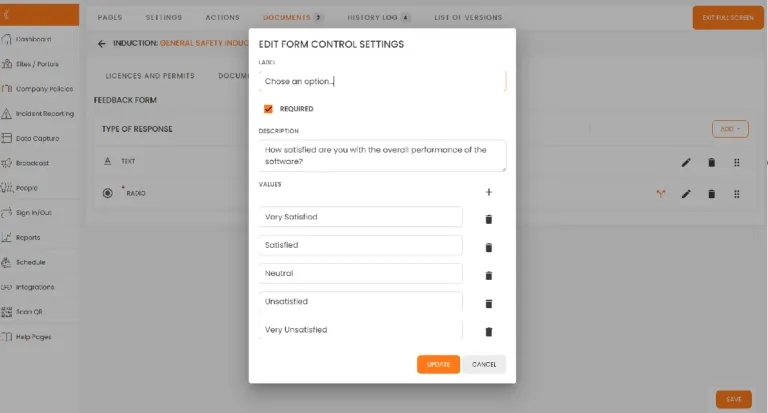
Digital forms and acknowledgements
The system should allow businesses to collect forms, signatures and confirmations without relying on paper.
Online induction content
Employees should be able to complete key induction and onboarding information online.
Task tracking
Businesses should be able to assign and track onboarding steps for HR, managers and employees.
Role-based content
The system should support different onboarding pathways depending on role, department or location.
Record keeping
Completed onboarding records should be easy to store, search and review later.
Reporting
Managers and administrators should be able to see progress, completion and outstanding items clearly.
Flexible access
Employees should be able to complete onboarding content on suitable devices and at the right time.
A system that includes these features is much more likely to support a strong onboarding process.
5) Why role-based onboarding matters
One-size-fits-all onboarding often creates noise instead of clarity. A finance employee, warehouse worker, field technician and office administrator may all need some core information, but they will not need exactly the same depth or detail in every area.
Role-based onboarding matters because it helps businesses:
make onboarding more relevant
reduce information overload
deliver the right policies and procedures
support faster understanding of the role
avoid wasting time on unnecessary content
Employee onboarding software makes this easier by allowing businesses to assign different modules, tasks or forms depending on the employee’s role or group.
That creates a more useful onboarding experience and helps employees focus on what matters most to them.
6) How onboarding software improves the new starter experience
The first days and weeks in a new job have a major effect on how an employee feels about the business. A disorganised onboarding process can make the company feel unprepared. A clear and structured one can build confidence early.
Employee onboarding software improves the new starter experience by helping businesses:
Start earlier
Important information can be delivered before day one, reducing confusion and delay.
Create a clearer path
Employees can see what they need to complete and what comes next.
Reduce repetition
Instead of hearing the same information through multiple emails and conversations, employees can follow a single process.
Make content easier to revisit
Online content can often be checked again later, which helps employees remember key details.
Support a better first impression
A smooth onboarding system shows that the business is organised and takes the employee experience seriously.
This does not remove the human side of onboarding. Manager check-ins, team introductions and workplace support still matter. Good software supports those human interactions by making the process easier to organise.
7) Why reporting and record keeping matter
A strong onboarding process should not depend on guesswork. Businesses should be able to confirm what was completed, what was acknowledged and where any gaps remain.
That is why reporting and record keeping matter.
Employee onboarding software helps businesses:
confirm onboarding completion
store forms and acknowledgements
track overdue tasks
show what content was assigned
support audits and internal checks
review onboarding performance across teams
This is especially useful for larger businesses, multi-site operations or workplaces with frequent hiring. Instead of chasing documents manually, teams can rely on clearer records and better visibility.
8) How employee onboarding software supports growing businesses
As a business grows, onboarding becomes harder to manage manually. More employees, more sites and more managers usually mean more room for inconsistency.
Employee onboarding software helps growing businesses by making it easier to:
standardise onboarding across teams
manage onboarding at multiple sites
keep records organised as volume increases
update content centrally
reduce pressure on HR and managers
support remote or hybrid new starters
This matters because growth often puts pressure on internal processes. A business that handles onboarding well at small scale may struggle once hiring becomes more frequent. Software helps create a system that can keep up with that growth.
9) Frequently asked questions
Employee onboarding software is a digital system that helps businesses manage the process of bringing new employees into the company, including forms, induction content, acknowledgements, tasks and progress tracking.
Good onboarding software should include digital forms, induction content, role-based pathways, task tracking, acknowledgements, reporting and organised record keeping.
It is useful because it improves consistency, reduces manual admin, keeps records organised and helps new employees receive clearer information from the start.
Yes. Induct For Work systems allow businesses to send welcome information, forms and induction content before the employee’s first day.
No. Managers still play an important part in welcoming and supporting new employees. The software helps structure the process and reduce admin, but it does not replace human support.
No. Smaller businesses can also benefit from using INDUCT FOR WORK onboarding software, especially if they want to reduce paperwork, improve consistency and create a more organised employee experience.
10) Keep onboarding clearer with INDUCT FOR WORK
If your business needs a better way to share expectations, support onboarding communication, deliver induction training or keep records organised, INDUCT FOR WORK can help.
The platform makes it easier to provide clear information, track acknowledgements and support more consistent workplace processes.
Start a free trial or book a demo to see how INDUCT FOR WORK can support your workplace processes.