A visitor sign in book at reception used to be normal. A clipboard, a pen, a paper log and a quick glance at a name. It worked, until it did not. Paper logs go missing, handwriting is unreadable, privacy is weak and you cannot easily prove who was onsite at a certain time.
A free visitor management system solves those problems with a simple digital sign in that is quick for visitors and easy for admins to manage. With Induct For Work the Sign In function gives you a practical visitor and contractor sign in process that can run through a kiosk or through a mobile phone. It can also print visitor labels and notify admin users when someone signs in.
The best part is cost. The Sign In feature comes at no cost for one site, and it is included at no cost with any Premium or Ultra induction packages.
Key takeaways
Free visitor management system for one site
Visitors and contractors can sign in using a kiosk or using their mobile phones
Print labels for quick visual identification
Notify admin users instantly when someone signs in
Included at no cost with Premium or Ultra induction packages
Contents
What a visitor management system does
Why free visitor sign in matters
INDUCT FOR WORK Sign In overview
Kiosk sign in at reception or entry points
Mobile sign in for visitors and contractors
Label printing for fast identification
Admin notifications and visibility
How to set it up for one site
Common use cases
Frequently asked questions
1) What a visitor management system does
A visitor management system is a digital way to manage who enters your workplace and when. Instead of relying on paper logs it captures details in a consistent format, stores the record and makes it easier to respond if something goes wrong.
A solid system typically helps you:
Record who arrived and when
Capture the reason for the visit and who they are seeing
Confirm basic site rules or instructions
Produce a visitor badge or label
Provide a searchable log for audits and investigations
For many workplaces it also reduces reception workload because the process is self guided.
2) Why free visitor sign in matters
A visitor sign in process is not just for large sites. Small workplaces still need to know who is onsite, especially when contractors are present or when customers and deliveries move through work areas.
Utilising visitor sign in at no cost for your worksite removes a common barrier: delaying the upgrade because of budget approvals. Our Premium induction package that start from $150 p/m + gst, includes a Free Visitor Management System. It also lets you modernise your workplace immediately, prove the value, then expand later if you want to standardise more sign ins across other sites and locations.
It also helps you start with good habits:
A consistent sign in record from day one
Better visibility for supervisors
Faster response when an incident happens
Less reliance on reception staff to chase details
3) INDUCT FOR WORK Sign In overview
INDUCT FOR WORK Sign In is designed to be simple for visitors, simple for contractors and simple for admins. It supports two common sign in paths:
A kiosk device at reception, site entry or a check in point
A mobile friendly QR sign in that visitors and contractors can complete on their own phones
Once a person signs in the system via a Kiosk, a label can be printed. The system records the visit and notifies admin users, so the right people know someone has arrived.
Because the Sign In function is available at no cost for one site, you can deploy it quickly at your main workplace, depot, office, warehouse or venue.
4) Kiosk sign in at reception or entry points
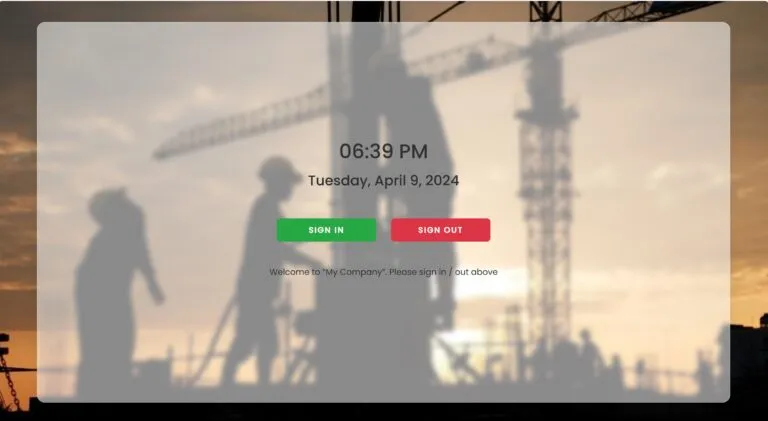
A kiosk sign in is ideal when you have a steady flow of visitors or contractors. It creates a consistent sign in station that is easy to explain, easy to repeat, and easy to supervise.
Why kiosk sign in works well
Visitors do not need to download anything
The process is guided, fast, and consistent
Reception staff can direct people to a single point
It works well for sites with regular deliveries, trades, or customer traffic
What a good kiosk setup looks like
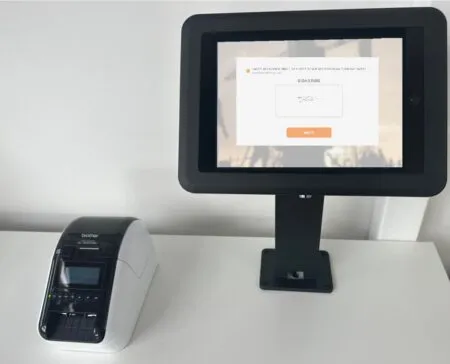
A typical setup uses a tablet or touch screen device on a stand. The kiosk page is opened and ready for sign in, with clear instructions on screen. You can place it at reception or at an entry point where visitors naturally pause.
You can also add simple supporting steps such as:
A sign that says “Please sign in here”
A second sign that explains what to do if the person they are visiting is not listed
A label printer near the kiosk for quick badge printing
5) Mobile sign in for visitors and contractors
Not every site has a reception desk. Some have multiple entry points, outdoor work zones, or remote locations where a kiosk is not practical. That is where mobile sign in is valuable.
With mobile sign in a visitor or contractor signs in using their own phone. This is useful for:
Contractors arriving early before reception opens
Trades people moving between small sites
Visitors arriving at a side gate or a loading area
Events and venues where entry is spread out
Mobile sign in also reduces congestion because people can complete the steps quickly without waiting for a kiosk.
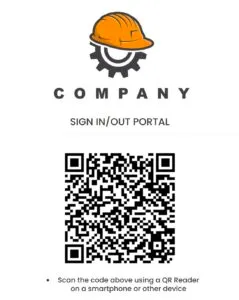
A practical tip is to display a QR code at the entry point so people can open the sign in page instantly. The user experience is familiar: scan, open, complete, submit.
6) Label printing for fast identification
A visitor label makes a big difference on active sites. It provides a clear visual signal that someone has signed in, and it helps staff confirm that the person belongs onsite.
Label printing is especially useful when:
Contractors are working near staff and customers
Multiple visitors arrive at once
Supervisors need a quick way to spot unsigned visitors
A site requires visitor badges for access control
A good label includes the essentials such as name, date, time, site, and visit type. You can also include the host name or the company name if that supports your site process.
For busy sites label printing saves time. Instead of writing badges by hand you print instantly and move on.
7) Admin notifications and visibility
One of the biggest benefits of a digital visitor management system is visibility. When someone signs in the system can notify admin users so the right people know immediately.
This helps in practical ways:
Reception does not need to phone around to find the host
Site supervisors can see who is on the ground
Admin users can track contractor arrivals across the day
If a visitor signs in unexpectedly the right people can respond
Notifications also support safer operations. If an evacuation occurs or an incident happens you want a reliable record of who is onsite. Digital logs beat paper logs for speed and readability.
8) How to set it up for one site
A strong rollout is simple. Keep the steps clear and keep the process consistent.
Step 1: Enable Sign In for the site
Turn on the Sign In function for your site. Because it comes at no cost for one site you can start immediately without any delays.
Step 2: Decide on kiosk, mobile, or both
Most sites benefit from both. Use kiosk sign in for reception traffic and allow mobile sign in for after hours arrivals and contractor check ins.
Step 3: Define what you want to capture
Keep it short. Typical fields include:
Visitor name
Company name if applicable
Who they are visiting
Reason for visit
Vehicle registration if needed
Acknowledgement of basic site rules and inductions, if you require it
Short forms raise completion rates.
Step 4: Set admin notifications
Choose which admin users should be notified when someone signs in. Keep it role based so notifications go to the people who act on them.
Step 5: Set up label printing (additional hardware required)
Connect your label printer and test the flow. Print a label, check legibility, then confirm that staff know where labels are stored and how the printer is maintained.
Step 6: Put up simple signage
Add a small sign at entry points with instructions. If you use mobile sign in – include a QR code.
9) Common use cases
A free visitor management system is useful in more places than people expect. Common examples include:
Offices and reception areas
Visitors sign in, labels print, hosts are notified. It looks professional and it reduces front desk workload.
Warehouses and depots
Contractors and drivers sign in at the gate or at a kiosk. Supervisors get notified and know who is onsite.
Construction sites
Visitors and contractors can sign in quickly. Labels help supervisors spot anyone who has not checked in.
Venues and events
Temporary staff, suppliers and VIP visitors can sign in at a kiosk or via mobile without slowing entry.
Schools, councils and public facilities
Visitor sign in is often required. Digital sign in improves record keeping, improves speed, and reduces paper handling.
Frequently asked questions
Yes. The INDUCT FOR WORK Sign In function comes at no cost for one site when you subscribe to one of our Premium or Ultra induction packages.
Yes. They can sign in using their mobile phones, which is useful for sites without reception or for after hours arrivals.
Yes. Many sites use a kiosk at reception and also provide mobile sign in at side entrances and contractor entry points.
Yes. You can print labels so visitors and contractors can be identified quickly onsite.
Yes. Admin users can be notified when someone signs in, which helps hosts and site supervisors respond quickly.
Start a free trial or book a demo to see how INDUCT FOR WORK can support your workplace processes.