

What is Induct For Work?
Induct For Work is an online induction and training platform that helps businesses induct employees, contractors and other users before they arrive on site or start work. It allows you to manage induction delivery, training content, quizzes, portals, reporting and records in one place.
For a beginner, that means one thing above all else: you can move away from repeated briefings, paper records and disconnected files and start using one clearer system.
Who this beginner’s guide is for
This guide is for people who are new to the platform and want a simple place to begin.
For example, it is useful if you are:
- setting up your first induction
- moving from paper to online induction
- onboarding contractors or employees for the first time
- trying to understand the platform before wider rollout
- managing inductions without a large admin team
Therefore, the goal here is not to explain every advanced feature. Instead, it is to help a new admin get started without confusion.
Step 1: Decide what your induction needs to cover
Before building anything in the system, decide what your induction should include.
A useful starter induction often covers:
- workplace rules
- safety basics
- site expectations
- emergency procedures
- policy acknowledgements
- role-specific instructions
- any simple checks for understanding
The wider site content repeatedly shows that Induct For Work supports role-based learning, quizzes, onboarding and records. As a result, beginners should think about the content first and the settings second.
Step 2: Create your first course
Once the content is clear, the next step is to build your first induction course.
For a beginner, the best approach is to keep the first course simple.
Start with one clear induction rather than trying to build everything at once. That way, you can test the process with real users, check whether the content flows well and improve the course before expanding it further.
Step 3: Keep the first induction easy to follow
A beginner mistake is trying to fit everything into one huge induction.
However, people complete training better when the content is clear and well ordered. Therefore, it is better to keep the first induction practical and direct.
A good first course should:
- start with the essentials
- use plain language
- move in a logical order
- include confirmations or quizzes where needed
- avoid unnecessary overload
That creates a better experience for users and makes it easier for the admin to review results later.
Step 4: Choose how users will enter the system
Induct For Work supports user self registration portals and email/sms invitations as part of its wider induction setup.
For beginners, this matters because you need to choose the simplest entry path for your users.
In practice, that may mean:
- inviting users directly
- using a portal for registration
- deciding whether different sites or teams need different entry points
As a result, the user journey becomes clearer from the beginning.
Step 5: Invite a small test group first
Before rolling the system out widely, start with a small group.
That gives you a chance to test:
- whether the course content makes sense
- whether users can access it easily
- whether completions are tracked properly
- whether anything needs changing before a larger rollout
This step is important because a beginner setup improves much faster when it is tested with a small live group instead of going straight to a full launch.
Step 6: Track progress and completions
One of the biggest advantages of Induct For Work online induction is visibility.
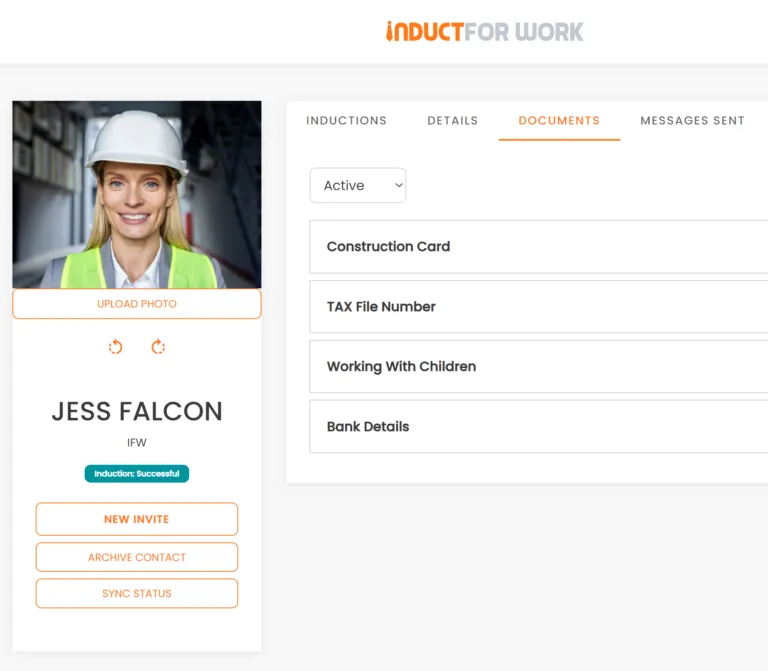
To see user progress use tracking, reporting and user records. That means you and other admins can see who has completed training, what is still outstanding and what records are available later for review.
For a beginner, that is one of the fastest wins.
Instead of guessing who completed an induction, you can move to a clearer process where completions are easier to monitor and easier to prove.
Step 7: Add quizzes or acknowledgements where useful
Once the your inductions are flowing nicely, you can add more quizzes and confirmations. Inductions are stronger when users do more than click through content.
Therefore, beginners should think about where simple checks make sense.
For example, you may want to utilise:
- a short quiz after safety content
- a policy acknowledgement
- a declaration before site access
- a check that confirms the user understood key rules
These steps make the induction more useful and make the records more valuable later.
Step 8: Organise your records from the beginning
Induct For Work is also a platform for keeping records clearer and more accessible. That matters because the value of online induction does not end when the user clicks complete. It continues when the business needs to review training, confirm compliance or retrieve records quickly.
Because of that, it is smart to build your inductions with Induct For Work.
Step 9: Expand only after the first setup works
Once the first induction works well, then it makes sense to expand.
For example, you can then add:
- more sites
- more courses
- more user groups
- contractor-specific workflows
- refresher training
- broader onboarding steps
This is the best way to use a beginner setup. First, prove the process. Then, build on it.
Common beginner mistakes to avoid
A few mistakes can slow the first rollout down.
The most common are:
- adding too much content at once
- skipping a test group
- making the user journey unclear
- building courses without a simple structure
- forgetting how records will be reviewed later
By contrast, a simpler first rollout usually works better. It gives admins a faster win and makes the platform easier to adopt across the business.
Why Induct For Work is a good fit for beginners
Some platforms feel harder than they need to be when you are just starting out.
Induct For Work is a stronger fit for beginners because it combines induction, training, portals, quizzes, e-Signatures, sign ins, site diary and reporting in one system while still presenting a straightforward workflow. There is a simple operating path of creating courses, sending invitations and tracking progress, which is exactly the kind of structure beginners need.
That is a strong commercial advantage because businesses new to online induction do not want more complexity. They want a system that helps them get moving with less friction.
Last words
If you are new to the platform, the best way to begin is to build one practical induction, test it with a small group, track the results and improve the setup before expanding further. That gives your business a cleaner rollout and gives your users a better first experience with online induction.
Induct For Work is a strong fit for this kind of start because it gives businesses one system for induction, training, records and visibility. Therefore, beginners can move into online induction with more confidence and with less admin pressure from the very beginning.
Frequently asked questions
It is for new admins or first-time users who want a simple way to start building and managing online inductions in Induct For Work.
Start with one clear induction course that covers the most important rules, safety points and onboarding steps for your users.
No. It is usually better to test the setup with a small group first, then improve it before a wider rollout.
They help confirm understanding and create stronger records for later review.
Because it gives businesses a practical way to create courses, invite users and track progress in one clearer system.
Start a free trial or book a demo to see how INDUCT FOR WORK can support your workplace processes.
Author: Ari Parz
Published: 07/11/2025
Last edited: 28/04/2026


