

How a learning management system helps businesses train people and keep better records
A Learning Management System, usually called an LMS, helps businesses deliver training, track progress and keep records in one place.
In a workplace, training is not only about giving people information. Managers also need to know who completed the training, when it was completed, whether the person understood the content and whether the record can be found later.
That is where the role of an LMS becomes important.
An LMS gives organisations a practical way to manage training for employees, contractors, temporary workers and site-based teams. It can help deliver online courses, assign learning by role or group, run quizzes, issue certificates, manage refresher training and keep completion records.
INDUCT FOR WORK supports these needs by combining workplace inductions, online training, quizzes, forms, acknowledgements, records and reporting in one platform.
A strong LMS process also supports a better safety culture because important training becomes easier to deliver consistently. For businesses that need to move quickly, rapid induction setup can help turn existing training material into an online process sooner.
What is an LMS?
An LMS is software used to create, deliver, manage and track training.
In a workplace setting, an LMS can help administrators:
- upload training material
- create online courses
- assign training to users
- group learners by role or site
- add quizzes and pass marks
- track progress
- issue certificates
- store completion records
- manage refresher training
- report on training status
The main purpose is simple. An LMS helps make training easier to repeat, easier to manage and easier to prove.
Without a system, training often depends on emails, shared folders, paper attendance sheets and manual spreadsheets. That can become messy very quickly, especially when a business has multiple sites, contractors or frequent new starters.
An LMS gives the business a more organised way to deliver the same core information every time.
Why the role of an LMS matters
The role of an LMS is to bring structure to workplace learning.
Most businesses need people to understand policies, safety procedures, job requirements, equipment rules, service expectations or operational processes. However, training only works properly when the information is clear, the process is repeatable and the records can be checked later.
An LMS helps businesses answer important questions:
- Who has completed the required training?
- Who still needs to complete it?
- When was the training completed?
- Did the person pass the quiz?
- Which course version was completed?
- Has refresher training expired?
- Which site or role does the training apply to?
- Can the record be found during an audit or review?
This matters because workplace training often carries operational, safety and compliance value.
If a business cannot prove that training was delivered, it may struggle to show that workers received the information they needed.

Where an LMS makes the biggest difference
An LMS is useful in any workplace where training needs to be delivered consistently and recorded properly.
It is especially useful for:
- construction companies managing site training
- councils training workers and contractors
- manufacturing businesses with safety procedures
- warehouses and logistics teams
- schools and education providers
- healthcare and aged care organisations
- hospitality and hotel groups
- shopping centres and retail property teams
- event organisers with temporary crews
- agriculture businesses with seasonal workers
- businesses with multiple locations
- companies that manage contractors
- organisations with regular refresher training
- teams using online learning modules or SCORM packages
In these workplaces, training is not a one-off event. People start at different times, work across different sites and need different information depending on their role.
An LMS helps keep that process more organised.
Why workplace training often gets messy without an LMS
Workplace training can start simply. A manager explains the basics, sends a few documents and records completion in a spreadsheet.
Then the business grows.
More staff join. Contractors arrive. Procedures change. Training expires. Records are stored in different places and managers start losing track of who has completed what.
INDUCT FOR WORK helps reduce that problem by bringing training, inductions, forms and records into one online process.
It can help when:
- new starters receive different information from different managers
- contractors arrive before completing required training
- paper attendance sheets go missing
- quiz results are not recorded clearly
- refresher training is forgotten
- staff are unsure which training applies to them
- old procedures remain in circulation
- training records are spread across emails and folders
- managers spend too much time chasing completion
- multiple sites use different training processes
- audit preparation takes longer than it should
- employees and contractors need separate training pathways
With an LMS, training becomes easier to assign, complete, track and review.
The role of an LMS in employee training
Employees need training at different stages of their time with the business.
This may include:
- new starter training
- workplace policies
- safety procedures
- role expectations
- equipment instructions
- customer service standards
- privacy and security rules
- refresher training
- updated procedures
- role change training
A structured employee onboarding process helps new starters receive important information early.
After that, an LMS can continue supporting the employee by assigning refresher courses, new policy training or role-specific modules when needed.
This helps businesses avoid relying only on memory, manager availability or one-off verbal instructions.
The role of an LMS in contractor training
Contractors often need training before they enter a site or begin work.
They may need to understand site rules, hazards, emergency procedures, access requirements, reporting steps and task-specific instructions.
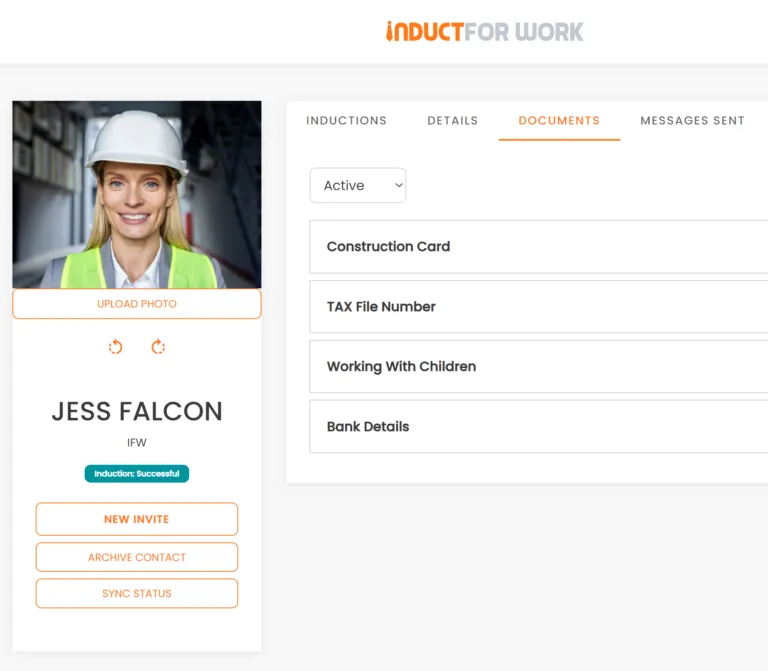
A contractor induction can be managed through an LMS-style process so contractors complete training before arrival.
Contractor training may include:
- site access rules
- emergency procedures
- hazard awareness
- PPE requirements
- SWMS acknowledgements
- permit requirements
- incident reporting
- restricted areas
- licence or document upload instructions
- supervisor contact details
This is useful for businesses that work with subcontractors, suppliers, labour hire workers, maintenance teams and visiting service providers.
When contractors complete training online, site teams can spend less time repeating basic instructions and more time checking that work is ready to begin safely.
The role of an LMS in compliance training
Compliance training needs clear delivery and reliable records.
For many workplaces, it is not enough to say that training was provided. Managers may also need proof of completion, quiz results, certificates or acknowledgements.
An LMS helps manage this by tracking:
- assigned courses
- completed courses
- quiz scores
- pass marks
- certificate issue dates
- refresher due dates
- signed acknowledgements
- user history
- incomplete training
- overdue training
INDUCT FOR WORK helps businesses improve record keeping by storing training records, forms and acknowledgements online.
As a result, administrators can find training records more easily when they need them for audits, internal reviews, client checks or safety meetings.
The role of an LMS in refresher training
Training can lose value if it is never refreshed.
Procedures change. Workers forget details. Sites introduce new hazards. Equipment changes and policies are updated.
An LMS helps businesses manage refresher training by assigning updated content to the right people.
Refresher training may cover:
- safety procedures
- emergency response
- incident reporting
- updated workplace policies
- contractor requirements
- site changes
- new equipment
- quality procedures
- privacy and security requirements
- seasonal risks
This helps businesses keep training current instead of relying on old documents or one-time sessions.
For example, if a site changes its emergency assembly point, an LMS can help assign that update to the correct workers and record completion.
The role of an LMS in reporting
Reporting is one of the most useful parts of an LMS.
Managers need quick answers. They do not want to sort through spreadsheets or email chains to find training status.
With reporting, businesses can see which users have completed training and which users still need attention.
Useful LMS reports may show:
- completed training
- incomplete training
- failed quiz attempts
- expired training
- upcoming refresher needs
- course completion by site
- completion by role or group
- user certificates
- missing forms
- outstanding acknowledgements
Good reporting makes training easier to manage because administrators can act before small gaps become larger problems.
The role of an LMS in online inductions
Many organisations use an LMS to support workplace inductions.
However, workplace inductions often need more than course delivery. They may also involve fast invitations, site rules, forms, document uploads, acknowledgements, contractor records, visitor requirements and proof of completion.
That is why businesses often need an LMS that also supports induction workflows.
With online induction software, businesses can deliver induction content before workers, contractors or visitors arrive.
This may include:
- general induction courses
- site-specific inductions
- contractor inductions
- employee onboarding modules
- visitor safety information
- quizzes
- forms
- digital acknowledgements
- certificates
- reports
INDUCT FOR WORK supports both training delivery and induction management, making it practical for workplaces that need more than a basic learning library.
Induct For Work is both an LMS and an online induction platform
Some businesses look for an LMS because they need to deliver online training. Others look for an online induction platform because they need to prepare employees, contractors or visitors before they start work or arrive on site.
INDUCT FOR WORK brings both needs together.
As an LMS, INDUCT FOR WORK helps businesses deliver training, assign courses, use quizzes, track progress, issue certificates and keep training records.
As an online induction platform, it helps businesses manage pre-start training, site-specific inductions, contractor workflows, forms, acknowledgements, document uploads and reporting.
This means your business does not need to treat learning and induction as two separate processes.
A worker can complete a training module, answer questions, acknowledge a policy and receive a completion record. A contractor can complete a site induction, upload required documents, sign declarations and be checked before arriving on site.
INDUCT FOR WORK supports:
- online training
- workplace inductions
- contractor inductions
- employee onboarding
- visitor information
- quizzes and pass marks
- certificates
- SCORM modules
- digital forms
- digital signatures
- document uploads
- reporting
- training records
- refresher training
For businesses that need both structured learning and practical induction management, INDUCT FOR WORK provides one platform instead of forcing teams to manage separate systems.
SCORM and the role of an LMS
SCORM is important for organisations that already have e-learning modules.
A SCORM-compatible LMS can upload and run existing training content while tracking progress and completion.
This is useful when businesses already have:
- externally developed training modules
- safety courses
- compliance learning
- product training
- internal learning packages
- role-specific modules
- professional training content
INDUCT FOR WORK includes a SCORM player so businesses can use existing e-learning material where required.
This helps organisations avoid rebuilding all training from scratch when suitable content already exists.

Forms, signatures and LMS records
Workplace training often requires more than watching a course.
Users may need to complete a form, sign a declaration or acknowledge that they have read important information.
With custom forms and digital signatures, businesses can collect information and acknowledgements online.
This may include:
- policy acknowledgements
- safety declarations
- contractor forms
- training confirmations
- site access forms
- equipment use declarations
- privacy acknowledgements
- emergency procedure acknowledgements
- refresher training declarations
By keeping forms and training records together, businesses get a clearer view of what each person has completed.
LMS for multiple sites and teams
Training becomes harder when a business operates across several sites or departments.
Each location may have different hazards, procedures, managers, emergency contacts and access requirements.
An LMS can help by assigning training based on:
- site
- role
- department
- user group
- contractor type
- employment type
- risk level
- training requirement
For example, a contractor working at one depot may need different training from an employee working at head office.
A multi-site LMS process helps keep the core message consistent while still allowing local details where needed.
Why use INDUCT FOR WORK instead of a generic LMS?
A generic LMS may deliver courses well, but workplace training often needs more than course delivery.
Real workplaces need fast onboarding, contractor workflows, document uploads, signed acknowledgements, refresher training, incident reporting, visitor processes and clear records.
INDUCT FOR WORK is built for practical workplace training and induction management.
It helps businesses:
- deliver online training
- manage workplace inductions
- assign training by role or site
- collect forms online
- capture acknowledgements
- track completion
- issue certificates
- support SCORM modules
- manage contractor training
- support visitor workflows
- keep records online
- review reports
- refresh training when needed
For businesses that need training connected to real workplace processes, INDUCT FOR WORK offers a more practical fit than a learning portal that only stores courses.
From scattered training records to a more organised LMS process
| Manual Training Process | INDUCT FOR WORK |
|---|---|
| Training is delivered differently by each manager | Core content can be delivered consistently |
| Completion is tracked in spreadsheets | Completion status can be checked online |
| Paper forms are stored in folders | Forms can be completed and stored online |
| Contractors receive verbal instructions | Contractors can complete training before arrival |
| Certificates are handled manually | Certificates can be issued and stored online |
| Refresher training is easy to forget | Updated training can be assigned when needed |
| Quiz results are difficult to track | Quiz results can be stored with the user record |
| Records are spread across emails | Records can stay in one platform |
| Multiple sites use different processes | Training can be assigned by site or role |
| Managers spend time chasing users | Reports help show who needs follow-up |
Start managing workplace training with less admin
The role of an LMS is to make workplace training easier to deliver, track and prove.
INDUCT FOR WORK helps businesses manage online training, inductions, quizzes, forms, acknowledgements, certificates, refresher training, reporting and records in one platform.
Instead of relying on spreadsheets, paper forms and repeated manual sessions, your business can create a more organised training process for employees, contractors, visitors and site-based teams.
Whether you need a simple training course, a site induction, a contractor workflow or a SCORM-based module, INDUCT FOR WORK gives your team a practical way to manage learning online.
Give your workplace a better way to train people and keep records.
Frequently asked questions
The LMS role is to deliver training consistently, track completion, store results, and make reporting simple so you can prove what training was completed and when.
LMS stands for Learning Management System.
Yes. INDUCT FOR WORK works as an LMS by allowing businesses to create online training, assign courses, add quizzes, set pass marks, issue certificates and keep completion records.
Yes. INDUCT FOR WORK is also an online induction platform because it helps businesses manage workplace inductions, contractor inductions, employee onboarding, visitor information, forms, acknowledgements and document uploads.
LMS training usually focuses on delivering courses and tracking learning progress. Online induction focuses on preparing someone before they start work or arrive on site. INDUCT FOR WORK supports both, so training, forms, acknowledgements and records can stay together.
Using INDUCT FOR WORK platform reduces double handling. Your business can deliver training, collect forms, capture acknowledgements, track completion, issue certificates and keep records without managing separate systems.
Start a free trial or book a demo to see how INDUCT FOR WORK can support your workplace processes.
Author: Matt Tsashkuniats
Published: 10/12/2024
Last edited: 02/05/2026


