
What to Look for in Contractor Management Software
Managing contractors has become a serious operational task for Australian businesses.
A contractor may arrive for a short job, a long-term project, emergency maintenance, specialist work, cleaning, security, transport, construction, civil works, facilities support or professional services. Yet before that person starts, the business still needs to know who they are, what company they represent, what work they will do, which site they need access to, whether they have completed the right induction and whether their documents are current.
That is where contractor management software becomes useful.
The right system helps organisations move away from scattered emails, paper forms, spreadsheets and manual follow-up. Instead of trying to manage every contractor record by hand, a business can use one online process to collect information, assign inductions, track documents, issue reminders and keep records together.
For Australian workplaces, this is especially important because contractors often move between sites, projects and client requirements. A simple sign-in sheet or folder of PDFs may appear workable at first, but it usually becomes unreliable as contractor numbers grow.
This guide explains what to look for when choosing contractor management software in Australia and how to assess whether a system will actually support your workplace rather than add another layer of admin.
For businesses ready to manage contractor records, inductions, documents and expiry alerts online, go to contractor management software Australia.
Quick checklist: what contractor management software should include
Before comparing platforms, it helps to have a clear checklist. Good contractor management software in Australia should help your business manage the full contractor lifecycle, not just store names in a register.
Look for software that includes:
- contractor registration and onboarding
- online contractor inductions
- role-based and site-specific training
- contractor document uploads
- licence, permit and insurance tracking
- expiry reminders for training and documents
- contractor pre-qualification
- digital forms and policy acknowledgements
- approval status and admin review tools
- certificates of completion
- reporting and audit-ready records
- multi-site contractor visibility
- mobile-friendly access for contractors
- secure admin permissions
- clear records for managers, safety teams and auditors
If a system only stores contractor details, it may not be enough. Australian workplaces often need a more complete process that connects contractor onboarding, site induction, document collection, expiry tracking and compliance reporting.
Contractor management is more than a contact list
A basic contractor register may record a name, phone number, company and trade. That is useful, but it is not enough.
Good contractor management software should help answer practical questions before a contractor begins work.
- Has the contractor completed the correct induction?
- Have they uploaded the documents required for the task?
- Are their licences, insurances or permits still current?
- Did they acknowledge the latest policy or site rule?
- Can an administrator find the record quickly if asked?
- Is there a clear completion history for audit or client review?
When those questions sit across different folders, inboxes and spreadsheets, the process becomes fragile. One person may know where the records are kept, another may be waiting for an email, and a site manager may not have quick visibility before work starts.
A proper contractor management system should bring those pieces together. It should support onboarding, training, document collection, expiry tracking, approvals, reminders and reporting in a way that busy teams can actually maintain.
Contractor management software vs a basic contractor register
| Area | Basic contractor register | Contractor management software |
|---|---|---|
| Contractor details | Stores names and contact information | Stores contractor profiles, company details, site access information and completion records |
| Inductions | Usually tracked manually | Assigns online inductions and records completion automatically |
| Documents | Often stored in folders or email inboxes | Collects licences, insurances, permits, certificates and other documents online |
| Expiry tracking | Requires manual spreadsheet checks | Sends reminders before documents or training records expire |
| Approvals | Often unclear or informal | Shows whether a contractor is pending, approved, incomplete or expired |
| Reporting | Manual and time-consuming | Provides searchable reports and completion records |
| Multi-site use | Difficult to manage consistently | Allows different sites, roles and contractor types to have different requirements |
| Audit preparation | Records may be scattered | Keeps records easier to find, filter and export |
This difference matters. A register tells you that a contractor exists. Contractor management software should help you understand whether that contractor is ready to work.
Who this is for
This guide is suited for Australian and NZ organisations that rely on contractors, subcontractors, suppliers, temporary workers, site workers, delivery teams, maintenance providers or external service companies.
It is especially relevant for construction companies managing site access and contractor records, local councils coordinating contractors across public facilities, schools and universities checking contractors before arrival, healthcare and aged care providers managing external service workers, shopping centres and facility managers handling regular contractor visits, and manufacturers or warehouses managing maintenance and logistics providers.
Mining, civil and infrastructure teams may also need more structured contractor controls because their sites often involve higher-risk work, specialist permits, restricted zones and strict documentation requirements.
Different workplaces use different language. One business may call it contractor onboarding. Another may call it contractor compliance, contractor induction, supplier management or site access control. The underlying need is usually the same: know who is coming to site, check that they are prepared, and keep evidence in a form that can be found later.
Start with the contractor journey
Before choosing software, map the contractor journey from invitation to approval.
A typical contractor process may include registration, document collection, online induction, policy acknowledgement, admin review, approval, ongoing expiry tracking and periodic renewal.
Software should make this pathway easier, not more confusing.
A strong system lets administrators build different pathways for different contractor types. For example, a cleaner may need one pathway, an electrician another, a delivery driver a shorter visitor-style process, and a supervisor a more detailed site leadership pathway.
If every contractor receives the same training and the same forms, the process may become too long for low-risk roles and too light for higher-risk roles. Good contractor management software should allow role-based, site-based or company-based differences.
This is where many manual systems start to fail. Spreadsheets can record a date, but they rarely guide the user through the right sequence. Email can send a reminder, but it does not easily show the whole contractor journey. Paper records may be familiar, but they become hard to search, compare and maintain across several sites.

Look for online contractor induction capability
Contractor management software should include, or connect cleanly with, online induction delivery.
Inductions matter because contractor documents alone do not explain how your workplace operates. A contractor may hold the right licence, but they still need to know site rules, emergency procedures, PPE requirements, reporting lines, restricted areas, local hazards and the limits of what they are authorised to do.
With an online induction, contractors can complete required training before arriving. That gives the business more time to check completion, fix missing details and avoid holding people at reception or the site gate.
Induct For Work also has a dedicated contractor induction page that explains this part of the process in more detail.
When comparing systems, check whether the software lets you create contractor-specific induction courses, assign courses by role or site, include videos and documents, add quizzes, collect declarations, issue certificates and store completion records automatically.
A contractor induction should not be treated as a one-off presentation. It should be part of a controlled contractor management process.
Check document collection and upload options
Most contractor management problems begin with documents.
Licences, insurances, certificates, permits, SWMS, training evidence, company details, emergency contacts and signed forms may all be required before work begins.
A weak system may let contractors upload files but still leave administrators to sort everything manually. A stronger system should help define what needs to be collected and make it easier to see what has been submitted, what is missing and what needs review.
When assessing software, look for the ability to collect public liability insurance, workers compensation evidence, trade licences, high-risk work licences, permits, Safe Work Method Statements, training certificates, professional registrations, company details, emergency contacts and signed declarations.
For construction-related contractor work, a Safe Work Method Statement may form part of the broader contractor record. The software does not replace the need for proper safety planning, but it can help keep acknowledgements, uploads and supporting records organised.
Document collection should also be easy for contractors. If the upload process is difficult, people will avoid it, send files by email, or ask administrators to do the work for them. That defeats the purpose of using software.
Expiry tracking should be built in
Contractor compliance is not finished when the first form is uploaded.
Documents expire. Training needs refreshing. Licences change. Insurances renew. Certificates may need replacement. Site requirements may also change during a project.
This is why expiry tracking is one of the most important features to look for.
Contractor management software should allow expiry dates to be attached to documents, courses and certificates. It should also send reminders before records become outdated.
Without expiry tracking, an organisation can easily hold a document that was valid when uploaded but no longer valid when the contractor returns to site. That creates unnecessary risk and forces administrators to perform repeated manual checks.
A practical expiry tracking feature should help monitor induction expiry dates, licence renewal dates, insurance expiry dates, permit validity periods, training refresh requirements, document review dates and certificate expiry dates.
The best setup is simple: collect the document, record the expiry date, remind the contractor and notify administrators before action is required.
Make sure approvals are clear
Collecting information is only one side of contractor management. Someone still needs to decide whether the contractor is ready.
A good system should make approval status visible. Administrators should be able to see whether a contractor is incomplete, pending review, approved, expired, rejected or waiting for additional information.
This matters because contractor management often involves several teams. Procurement may handle supplier details. Safety may review training and SWMS evidence. Operations may need to know whether the contractor can start work. HR or administration may be asked to chase missing paperwork.
Without clear status tracking, people may rely on assumptions. A contractor might have submitted some documents but not completed the induction. Another may have finished training but still have expired insurance. A third may be approved for one site but not another.
Clear approval workflows help prevent confusion.
Choose software that supports pre-qualification
Contractor pre-qualification helps businesses collect information before assigning work or granting site access.
This may include company details, insurance evidence, licence information, safety documentation, previous experience, declarations and other suitability checks. It is different from induction, although the two processes often work together.
A contractor may first complete pre-qualification to show they meet business requirements. After that, they may complete the relevant site induction before work begins.
Induct For Work has a dedicated contractor pre-qualification page for this part of the workflow.
When reviewing contractor management software, ask whether it can support both stages: pre-qualification before the contractor is accepted, induction before the contractor starts work, and ongoing tracking after approval.
That distinction helps avoid treating every contractor record as a simple training record. Contractor management is broader than training alone.
Reporting must be practical, not decorative or optional
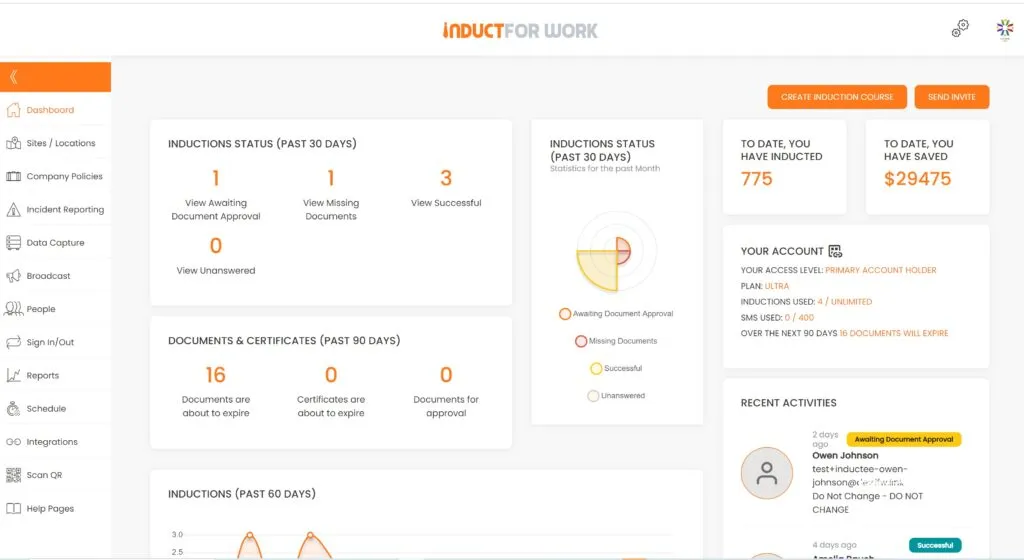
Dashboards and reports should help managers make decisions quickly.
A good report should show who has completed training, who has missing documents, which records are expiring, which contractors are approved and which sites need attention.
A poor report may look impressive but fail to answer the question an administrator actually has.
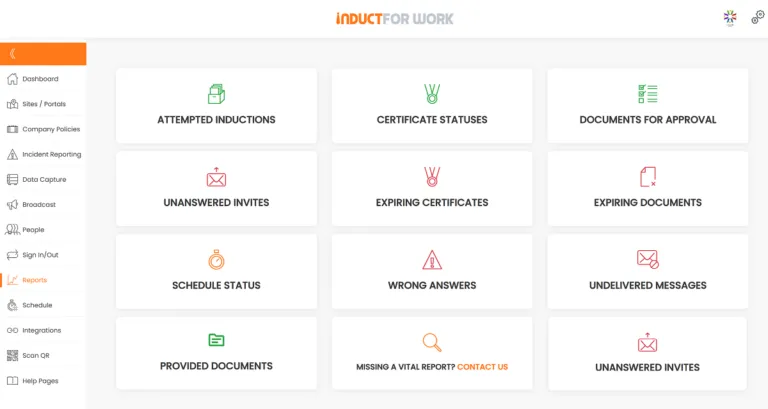
Useful contractor reports may include contractors by site, incomplete contractor records, expired documents, upcoming expiries, induction completion status, failed quiz attempts, document upload status, contractors by company, approval status, training history and certificate records.
Reports become especially important when a client, auditor, manager or project lead asks for evidence. Instead of searching through emails, an administrator should be able to retrieve records from one place.
Induct For Work’s work induction page also explains why organised records matter once the process moves beyond a simple first-day introduction.
Multi-site control is essential for growing organisations
A small business may manage one site with a simple spreadsheet for a while. Larger organisations usually need more control.
Different sites may have different hazards, access requirements, emergency procedures, PPE rules, contractor types and local managers. A contractor approved for one site may not automatically be ready for another.
Contractor management software should allow a business to manage site-specific training and records without losing central visibility.
A useful system should support different induction courses by site, contractor grouping by location or project, site-specific document requirements, central reporting for head office, local administrator access where needed, and consistent branding across the process.
This is important for councils, construction groups, facility managers, manufacturers, schools, healthcare providers and any organisation with several operating locations.
The aim is not to make every site identical. The aim is to keep each site’s requirements clear while still maintaining a consistent management process.
Compare software against spreadsheets and email
Many businesses start with spreadsheets because they are familiar. Email feels simple because everyone already uses it. Paper folders feel traditional because they are visible and easy to understand.
Those tools may still have a place, but they struggle when contractor numbers increase.
Spreadsheets require manual updates. Emails bury important documents in individual inboxes. Paper forms become difficult to search. Shared drives can contain outdated versions. Follow-up depends heavily on one person remembering what needs to happen next.
A proper contractor management system should reduce those weaknesses.
Instead of asking “Can we keep doing this manually?”, ask a better question:
Can our current process reliably show who is approved, who is expired, who is missing documents and who has completed the right induction?
For many organisations, the honest answer is no.
This does not mean every business needs the most complex system available. It does mean the system should be strong enough to replace the risky parts of manual administration.
Digital forms and signatures add value
Contractor onboarding often includes declarations, acknowledgements, forms and policy sign-offs.
If these are handled separately from the contractor management process, records can become fragmented. A contractor may complete an induction in one system, sign a form in another tool, upload documents by email and appear in a spreadsheet somewhere else.
That creates more work for administrators.
Software that includes digital forms and signature capability can keep these steps together. Contractors can review documents, acknowledge policies, complete forms and provide signatures as part of the same online process.
Induct For Work’s digital signature page explains how signed records can be managed as part of online inductions and related workflows.
When comparing systems, look for online forms, declaration fields, policy acknowledgement options, digital signature capture, completion records, version control for updated documents and reporting on signed items.
A signature is only useful if the business can later find who signed, what they signed and when it happened.
Mobile-friendly access matters
Many contractors do not sit at a desk.
They may work from site to site, travel between jobs, use their phone as their main device or complete training after hours. If contractor management software is difficult to use on mobile, completion rates may suffer.
A mobile-friendly process helps contractors open an invite, register, complete training, upload documents and review requirements without needing a desktop computer.
This does not mean every complex admin task must happen on a phone. It does mean the contractor-facing part of the process should be simple, clear and accessible.
Before choosing a platform, test the experience from the contractor’s point of view. Check how easy it is to register, upload a file, complete an induction, answer a quiz and find a certificate.
The system should support different contractor types
Not every contractor creates the same risk or needs the same process.
A delivery driver may need a short site access briefing. A crane operator may need detailed evidence and high-risk documentation. A consultant may need policy acknowledgement and visitor instructions. A cleaning contractor may need recurring site induction and insurance checks.
Good contractor management software should allow different pathways.
Useful pathway controls may include role-based training, site-specific courses, company-based document requirements, supervisor or manager pathways, short visitor-style briefings, recurring refresher courses, contractor company registration and individual worker records.
This avoids the common mistake of overloading everyone with the same process. It also avoids the opposite mistake: giving every contractor a light induction when some need much more detail.
Security and access control should not be ignored
Contractor records may contain personal details, business documents, insurance certificates, licences, signatures and training records. That information should be managed carefully.
The software should allow administrators to control who can view, edit, approve and report on records. Larger organisations may need different access levels for head office, site managers, safety teams, HR, procurement or project administrators.
A good system should not expose all records to everyone by default.
Questions to ask include:
Can admin access be limited by role?
Can site managers see only relevant contractors?
Are records stored in an organised way?
Can the business retrieve records when needed?
Is there a clear history of completion and updates?
Can user access be managed when staff leave?
Security is not just a technical feature. It is part of proper record keeping.

Avoid systems that only solve one small problem
Some tools focus only on document storage. Others focus only on training delivery. A few concentrate on visitor sign-in or supplier details.
Those tools may be useful, but contractor management usually needs a connected process.
If the system cannot link inductions, records, documents, approvals and expiries together, administrators may still need multiple side processes. That can lead back to spreadsheets and manual checking.
A stronger system should help manage the practical contractor lifecycle: invite or register the contractor, collect the right details, assign the right induction, request required documents, capture acknowledgements, track completion, review approval status, monitor expiries and report on readiness.
This is why choosing software based only on one feature can be risky. The system needs to match the full workflow.
Ask how quickly the software can be implemented
Implementation speed is an important factor.
A large, complex contractor system may offer many features but take months to configure. A very basic system may be quick to start but fail to support real compliance needs.
The best choice is often a practical middle ground: software like Induct For Work that can be set up quickly while still supporting the important parts of contractor management.
Before committing, ask how long setup usually takes, whether existing induction content can be uploaded, whether contractor types and sites can be configured, whether templates or samples are available, whether admins can manage changes without technical help, and whether contractors will need extensive instructions.
Induct For Work provides sample inductions that can help organisations understand how online induction content may be structured.
Best-fit use cases for contractor management software
Contractor management software is most useful when a business needs to manage more than one contractor group, site or document type.
Common use cases include construction contractors completing site inductions before arrival, councils managing contractors across depots and public facilities, schools checking maintenance contractors and external service providers, aged care and healthcare providers collecting contractor documents before access, manufacturers managing maintenance workers and suppliers, shopping centres coordinating trades and security, event organisers onboarding temporary crews, and transport companies checking drivers or subcontractors.
In each case, the aim is the same: make sure contractors complete the right steps before they begin work, and keep a clear record of what was completed.
This section also helps organisations recognise whether their current process is still fit for purpose. If the business only needs a small list of occasional service providers, a basic record may be enough for now. However, once contractors need different inductions, different documents, different approval steps or repeat renewals, software becomes much more valuable.
How Induct For Work supports contractor management in Australia and New Zealand
Induct For Work helps Australian and New Zealand organisations manage contractor inductions, document collection, licence tracking, expiry reminders, digital forms, signatures, certificates and reporting in one online platform.
Instead of relying on paper forms, email chains and spreadsheets, administrators can invite contractors online, assign the right induction, request required documents, capture acknowledgements and monitor completion from one place.
The platform is well suited to organisations that need to manage contractors across different roles, sites, projects or companies. A contractor can be asked to complete a site induction, upload a licence, provide insurance details, sign a declaration, complete a quiz and receive a certificate of completion.
Expiry tracking also helps businesses stay ahead of outdated records. Admins can monitor induction renewals, licence expiry dates, insurance renewals, certificate validity and other time-sensitive contractor requirements.
For organisations comparing contractor management software Australia, Induct For Work provides a practical option for managing contractor onboarding, online inductions, compliance documents and reporting without creating unnecessary admin.
Choose software that makes contractor readiness visible
The best contractor management software should make contractor readiness easy to see.
A manager should not need to ask three people, search five folders and open a spreadsheet to know whether someone can start work. The system should show whether the contractor has completed the required steps and whether anything still needs attention.
That visibility is what turns contractor management from a paperwork exercise into a usable business process.
Strong software should help answer:
- Who is ready?
- Who is incomplete or non compliant?
- Which documents are missing?
- What is about to expire?
- Who has completed the right induction?
- Which contractors belong to which site?
- What evidence can we produce if asked?
Final thoughts
When those answers are clear, organisations can manage contractors with less stress and better consistency.
Choosing contractor management software in Australia and New Zealand should not be rushed.
The right platform should support how your workplace actually manages contractors. It should help with induction, document collection, pre-qualification, expiry tracking, approvals, reporting, forms, signatures and multi-site visibility.
A simple system may be enough for a small contractor list, but growing organisations usually need more structure. Once contractors work across several sites, roles, companies and risk levels, manual processes become harder to trust.
Induct For Work gives Australian businesses a practical way to manage contractors online while keeping the process clear for administrators and contractors alike.
If your current contractor process depends on spreadsheets, email reminders, paper forms or one person remembering every follow-up, it may be time to move to a more organised system.
Frequently asked questions
Contractor management software helps businesses collect contractor details, assign inductions, manage documents, track expiry dates, monitor completion and keep contractor records in one place.
A good system should include contractor registration, online induction delivery, document uploads, expiry tracking, approval status, reporting, reminders, certificates, forms, acknowledgements and secure record keeping.
No. Contractor induction software focuses on training and site preparation. Contractor management software is broader and may include inductions, document collection, approvals, expiry reminders, reporting and ongoing contractor records.
Expiry tracking helps businesses monitor licences, insurances, certificates, permits, induction records and other documents that may become outdated. Automated reminders reduce the risk of missed renewals.
Yes. A good system can assign different induction courses, document requirements and approval pathways by site, project, contractor type or company while still giving administrators central visibility.
Pre-qualification checks whether a contractor or supplier meets business requirements before work is assigned or site access is approved. Contractor induction prepares the individual for the workplace, site rules, hazards, emergency procedures and expected behaviour.
Yes, if they regularly manage contractors, collect documents or need proof of induction completion. A simple online process can reduce admin and help keep records more organised as contractor numbers grow.
The best contractor management software in Australia depends on the type of contractors you manage, the number of sites involved and the records you need to collect. A strong system should include online inductions, document uploads, licence tracking, expiry reminders, approval status, reporting and secure record keeping. Induct For Work is designed for Australian and New Zealand organisations that need to manage contractor training, documents and compliance records online.
Induct For Work helps organisations invite contractors, deliver online inductions, collect documents, capture forms and signatures, issue certificates, track expiry dates and maintain contractor records online.
Start a free trial or book a demo to see how INDUCT FOR WORK can support your workplace processes.
Author: Ari Parz
Published: 02/07/2026
Updated: 03/07/2026


