

Workplace Induction Management Software
Inductions are one of the first steps in preparing people for work.
They explain what a person needs to know before they start. This may include workplace rules, safety expectations, emergency procedures, site requirements, policies, reporting steps and role-specific responsibilities.
When an induction is done well, everyone starts with clearer expectations.
However, many businesses still manage inductions with paper forms, email attachments, spreadsheets, shared folders or repeated face-to-face sessions. That may work for a very small team. It becomes harder to control as the organisation grows.
Soon, simple questions become difficult to answer.
- Who has completed the induction?
- Which version did they complete?
- Did they pass the quiz?
- Was the policy signed?
- Is the certificate still current?
- Which contractors are overdue?
- Can the records be found quickly?
That is where induction management software becomes useful.
Induct For Work gives Australian and new Zealand businesses a practical way to create, deliver, track and manage inductions online. It helps replace scattered admin with one organised process for course invitations, completion tracking, forms, signatures, certificates, expiry reminders and reporting.
For organisations looking for a reliable online induction process, induction management software provides the structure needed to keep training records clear, current and easy to manage.
What is induction management software?
Induction management software is an online system used to create, assign, deliver and track workplace inductions.
Instead of handing out paper documents or asking people to attend the same session in person, a business can invite users to complete the right induction online.
The system then records who completed the course, when it was completed, what result was achieved and whether any follow-up action is needed.
A good induction management system can support:
- employee onboarding
- contractor inductions
- visitor briefings
- volunteer training
- site-specific inductions
- policy acknowledgements
- refresher training
- certificates of completion
- document collection
- expiry reminders
- compliance reporting
The main benefit is control.
Administrators can see what has been assigned, who has completed it, which records are missing and which users need attention.
That makes induction management software useful for safety teams, HR managers, operations managers, site supervisors, compliance officers, project teams and administrators.
Who this page is for
This page is ideal for Australian and New Zealand organisations that need a better way to manage workplace inductions.
It is useful for businesses that induct:
- employees
- contractors
- subcontractors
- visitors
- volunteers
- labour hire workers
- remote workers
- seasonal staff
- site-based teams
Induction management software is commonly used by construction companies, councils, schools, universities, aged care providers, healthcare organisations, mining operations, manufacturers, warehouses, transport businesses, shopping centres, facility managers, event organisers and hospitality groups.
Smaller businesses may use it to bring order to staff onboarding. Larger organisations may use it to manage thousands of users across multiple locations, departments, projects or contractor companies.
The core problem is usually the same.
Different people need different inductions. Records need to be kept. Administrators need a clear view of who is ready to work.
Why manual induction processes become difficult
Manual induction processes often start with good intentions.
A manager creates a checklist. A supervisor explains site rules. A staff member signs a form. A contractor emails a licence. A visitor reads a safety sheet. Someone stores the record in a folder or spreadsheet.
At first, this can seem simple.
Over time, the process becomes harder to trust.
Paper forms can be misplaced. Email threads become buried. Spreadsheets rely on manual updates. Face-to-face sessions are difficult to repeat consistently. Shared folders may contain old versions. Certificates may expire without anyone noticing.
The real issue is not only the induction itself. It is the management of the whole process.
A business needs to know:
- who received the training
- whether they understood it
- what version they completed
- which documents were collected
- which policies were acknowledged
- when the record expires
- whether refresher training is needed
Induction management software helps by putting the process online and keeping completion records together.
Induction management software vs traditional induction admin
| Area | Traditional induction admin | Induction management software |
|---|---|---|
| Course delivery | Often face-to-face, paper-based or email-based | Delivered online through assigned courses |
| User invitations | Sent manually by admin staff | Sent by email, SMS or self-registration pathway |
| Completion tracking | Updated in spreadsheets or folders | Recorded automatically in the system |
| Training evidence | Stored across several locations | Kept in one searchable record |
| Policy sign-off | Signed on paper or by email | Captured through online acknowledgement or signature |
| Certificates | Created manually or not issued | Generated after successful completion |
| Expiry reminders | Relies on someone checking dates | Automated reminders before expiry |
| Reporting | Time-consuming to prepare | Available through dashboards and reports |
| Multi-site control | Difficult to keep consistent | Managed by site, role or group |
| Audit preparation | Records may need to be gathered manually | Completion history is easier to find |
Traditional processes may feel familiar. Familiar does not always mean reliable.
Once inductions become frequent, repeated or compliance-sensitive, a proper online system is usually easier to manage.
The main features to look for
Induction management software should do more than display training content.
A strong system should help an organisation manage the whole induction process. That includes course setup, user invitations, completion tracking, document collection, certificates, reporting and reminders.
When comparing induction management software, look for:
- online course creation
- employee, contractor, visitor and volunteer pathways
- automated course invitations
- self-registration portals
- role-based course assignment
- quizzes and pass marks
- forms and acknowledgements
- digital signatures
- document uploads
- certificates of completion
- expiry tracking
- reminder emails
- reporting dashboards
- multi-site administration
- secure record storage
These features matter because inductions are not just content. They are part of a broader workplace management process.
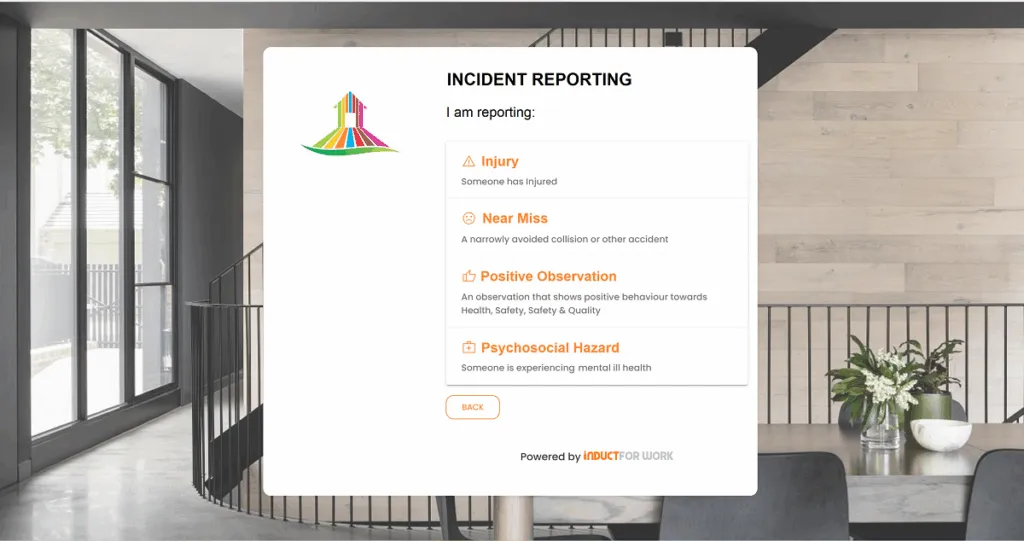
Create different induction pathways
Different people need different training courses.
An office employee, contractor, delivery driver, visitor, apprentice, volunteer, supervisor and site worker should not always receive the same induction. Their risks, responsibilities and access requirements may be different.
Induction management software should allow administrators to create different learning pathways for different teams, roles, sites or employment types.
For example, a contractor may need to complete a site induction, upload licences and sign a declaration. A new employee may need a company induction, HR policy acknowledgement and department-specific training. A visitor may only need a shorter site safety briefing.
With Induct For Work, organisations can invite employees, contractors, supervisors, visitors, volunteers and site workers to complete different courses based on what they need to know.
This avoids two common problems.
People are not forced through irrelevant training. Higher-risk users are not given a process that is too light.
Online course delivery
A practical induction management system should let you build and deliver courses online.
Courses may include:
- text
- images
- videos
- documents
- slides
- policies
- site maps
- emergency procedures
- forms
- quiz questions
- declarations
This allows the organisation to present consistent information without asking a manager to repeat the same session every time someone starts.
Online delivery is especially useful when people need to complete inductions before arriving on site. Contractors can be prepared before the first day. New employees can complete important modules before orientation. Visitors and volunteers can receive simple instructions before attending.
Induct For Work’s online induction program content supports this broader concept of structured induction delivery.
Course delivery tools should also be easy to update. Workplace requirements change. Induction content should be revised when policies, site conditions or procedures change.
User invitations and self-registration portals
Induction software should make it easy to get people into the right course.
Administrators may want to invite users directly by email or SMS. In other situations, users may need to register themselves through a controlled portal.
Self-registration is useful when contractors, visitors, suppliers or workers need to complete an induction without waiting for an administrator to manually create each account.
A person can enter their details, choose or be directed to the correct pathway and complete the required training.
This is particularly useful for workplaces with many external users.
For example, a construction site may direct contractors to a site induction portal. A council may provide different registration pathways for employees, contractors and volunteers. A facility manager may ask service providers to register before attending a site.
Good induction management software should support both direct invitations and self-registration. Not every user enters the process the same way.
Track completion automatically
Completion tracking is one of the biggest reasons businesses move from manual induction admin to software.
A system should show who has started, who has completed, who has failed, who is overdue and who has not yet accepted the invitation.
Without automatic tracking, administrators spend too much time chasing people. They check spreadsheets, search emails, ask supervisors and manually update records.
That creates room for error.
With induction management software, completion results are recorded as users move through the process. Managers can then see progress without waiting for manual updates.
A clear dashboard should help answer practical questions quickly:
- Which users have completed their induction?
- Who still needs to start?
- Which course was assigned?
- When was training completed?
- Did the user pass the assessment?
- Has a certificate been issued?
- Are any records close to expiry?
This visibility turns induction management into a controlled process instead of a paperwork exercise.
Quizzes and knowledge checks
Induction software should help confirm that users understand the material.
A person may open a document or watch a video, but that does not prove they understood the main points. Quizzes and assessments can help test understanding before a course is marked complete.
Induct For Work supports online quizzes as part of induction delivery. A business can ask users to answer questions, set pass marks and require successful completion before a certificate is issued.
For deeper information, visit online quizzes page which explains how quizzes can support online inductions.
Useful quiz features may include:
- multiple-choice questions
- pass score settings
- retry rules
- randomised questions
- required answers
- result reporting
These tools help reinforce important information and provide better evidence that a user engaged with the course.
Certificates of completion
Certificates give users and administrators a clear record that training has been completed.
A good induction management system should be able to issue certificates automatically once a user completes the required course or passes the assessment.
Certificates may include:
- user name
- course name
- completion date
- expiry date
- company details
- certificate number or reference
- business branding
Certificates are especially useful for contractors, multi-site teams, volunteers and workers who may need to show proof of completion before starting work.
However, a certificate should not be the only record. The system should also store the completion history behind it, including the course, result, date and any required acknowledgements.
Forms, policy acknowledgements and digital signatures
Many inductions require more than training content.
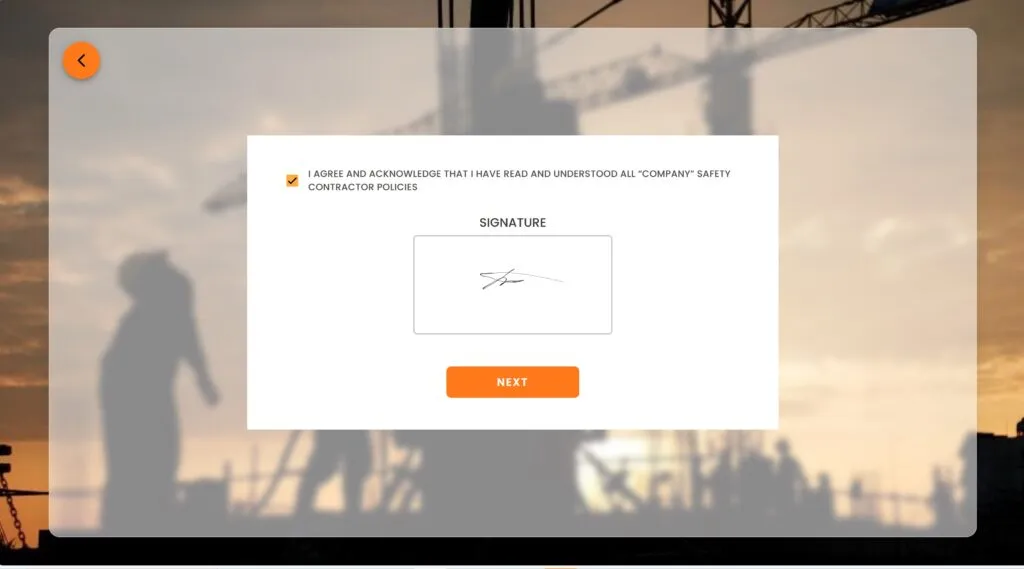
Users may need to acknowledge policies, complete forms, confirm that they understand site rules, agree to workplace expectations or sign declarations.
Induction management software should allow these steps to be captured online.
This keeps the record together. Instead of storing a course completion in one place, a signed form in another and a policy acknowledgement somewhere else, the system can connect them to the same user record.
Induct For Work’s digital signature page explains how electronic signatures can support training, forms and workplace acknowledgements.
For Australian businesses, this can be useful for policies, contractor declarations, confidentiality agreements, safety acknowledgements, site rules, visitor conditions, equipment use statements and other business-specific requirements.
Document collection and record management
Inductions often sit alongside document collection.
Contractors may need to upload licences, insurances, permits, training certificates, SWMS documents or other supporting records. Employees may need to provide qualifications or signed policy documents. Volunteers may need to provide identification or role-specific information.
A strong induction management system should allow documents to be collected, attached to user records and reviewed by administrators.
This is particularly important for contractor-heavy industries. A contractor induction alone may not be enough if the business also needs evidence of licences, insurances or other compliance documents.
Induct For Work’s contractor induction and contractor pre-qualification pages support this wider workflow.
When documents, inductions and approvals sit together, administrators get a much clearer view of readiness.
Expiry tracking and refresher training
Induction management software should not only manage first-time training.
It should also help manage what happens later.
Training may need to be repeated every 6 months, 12 months or at another interval. Documents may expire. Certificates may need renewal. Policies may be updated. Site rules may change.
Expiry tracking helps administrators stay ahead of those dates.
A practical system should let admins set expiry dates for training records, certificates and uploaded documents. It should also send reminders before action is required.
This is important because a record that was valid last year may not be valid today.
Automated expiry reminders reduce manual checking and help keep induction records current.
Reporting and audit-ready records
Reporting is where induction management software often proves its value.
Managers need to know who is complete, incomplete, overdue, expired or assigned to a particular course. Safety officers may need records for internal reviews. Clients may ask for proof of contractor completion. Auditors may need evidence that training was delivered and recorded.
A good system should make this information easy to find.
Useful reports may include:
- completed users by course
- incomplete users by site
- overdue induction records
- expired training
- upcoming expiries
- certificate history
- quiz results
- contractor completion status
- document upload status
- user activity history
Induct For Work’s work induction page explains why proper records remain important after the initial induction has been completed.
Record keeping should not be an afterthought. It is one of the main reasons businesses need a proper induction management system.
Multi-site induction management
Businesses with more than one site need extra control.
A site in Melbourne may have different rules from a site in Brisbane. A warehouse may require different training from an office. A construction project may have specific hazards that do not apply elsewhere.
Induction management software should let administrators manage different sites without losing central oversight.
This may include:
site-specific courses
separate user groups
different admin permissions
local reporting
centralised record visibility
location-based induction pathways
The aim is to maintain consistency without ignoring local requirements. Each site can have the induction it needs, while head office can still see the overall training picture.
Mobile-friendly access
People should be able to complete inductions without unnecessary friction.
Many contractors, field workers, volunteers and mobile employees do not spend their day at a desk. They may rely on a phone or tablet.
If the induction process is hard to use on mobile, completion rates may suffer.
A mobile-friendly induction system allows users to open an invitation, complete the course, answer questions, upload documents and receive confirmation without needing special software.
This matters because the best induction process is one that people can actually complete.
A system may look powerful to administrators, but if the user experience is poor, businesses will still receive phone calls, emails and support requests.
Branding and customisation
Courses, certificates, portals and emails should feel like part of your organisation.
Good induction management software should allow a business to customise branding, wording, instructions, course content and completion certificates.
This creates a more professional experience for users and helps reinforce company expectations.
Branding is not only about appearance. It also helps users trust the process. When a contractor receives an induction email or opens a training portal that clearly belongs to your organisation, the process feels more legitimate.
Customisation also allows businesses to include site-specific wording, company policies, local rules, emergency contacts, role instructions and practical details that generic training cannot cover properly.
Integration with broader workplace training
Induction management often connects with broader workplace training.
A new employee may need an induction first, then ongoing training. A contractor may complete a site induction, then additional task-specific modules. A supervisor may complete leadership training, incident reporting modules or refresher courses.
This is where induction management overlaps with learning management.
Induct For Work also supports LMS use cases for organisations that need structured online training beyond the initial induction.
The difference is simple.
Induction management focuses on getting people ready to start safely and correctly. Learning management may continue that training over time.
For many businesses, the best system supports both.
Choosing software that supports your real workflow
The best induction management software is not always the one with the longest feature list.
It is the one that fits how your organisation works.
Before choosing a system, consider:
- Who needs to be inducted?
- Which groups need different courses?
- What records must be kept?
- Which documents need to be collected?
- How often does training expire?
- Who needs to approve users?
- Which sites need separate pathways?
- What reports do managers need?
- How quickly can the system be updated?
- Can users complete training easily?
These questions help separate practical software from software that looks impressive but does not support the day-to-day process.
A reliable system should reduce administration, not create more of it.
Where Induct For Work fits
Induct For Work is built for organisations that need a practical way to manage inductions online.
It helps businesses create induction courses, invite users, manage different learning pathways, collect documents, capture acknowledgements, issue certificates, track expiries and report on completion.
The platform can be used for employees, contractors, visitors, volunteers, supervisors and site workers. It also supports businesses that need different induction pathways for different teams, roles, locations or work types.
For businesses comparing induction management software in Australia, Induct For Work provides a strong option because it connects induction delivery with record keeping, document collection, digital forms, signatures, expiry reminders and reporting.
That makes it suitable for organisations wanting to move away from paper, spreadsheets and email-based chasing while keeping the process simple for users and administrators.
Why induction management software supports compliance
Workplace compliance depends heavily on evidence.
It is not enough to say that people were told about site rules or workplace procedures. Businesses often need a record showing that the right person completed the right induction at the right time.
Induction management software helps create that evidence.
It can record user details, course assignment, completion date, quiz result, certificate issue, acknowledgement, document upload and expiry status.
This does not remove the need for good supervision, safe systems of work or proper workplace controls. However, it does make the induction record easier to manage and easier to produce when needed.
For safety-focused induction content, the online safety induction page provides further supporting information.
Final thoughts
Induction management software gives Australian businesses a more reliable way to manage workplace inductions.
It helps replace manual processes with online course delivery, automated invitations, user tracking, certificates, document collection, forms, signatures, expiry reminders and reporting.
For organisations managing employees, contractors, volunteers, visitors or site workers, this can save time and reduce uncertainty.
Administrators no longer need to rely on paper forms, scattered emails or spreadsheets to know who has completed the required training.
The strongest systems do more than host training content. They manage the whole induction process from invitation through to completion records and ongoing renewal.
Induct For Work is designed for that practical purpose. It helps Australian workplaces deliver inductions online, track progress, keep records organised and manage different induction pathways with less manual effort.
If your current induction process is becoming difficult to control, induction management software can provide the structure needed to keep people informed, records current and administrators in control.
Frequently asked questions
Induction management software is an online system used to create, assign, deliver, track and manage workplace inductions. It helps organisations manage users, courses, certificates, reminders, documents and completion records in one place.
Businesses use induction management software for employees, contractors, visitors, volunteers, supervisors, site workers, seasonal staff and other people who need workplace training before starting work or entering a site.
The terms are closely related. Online induction software usually focuses on delivering induction training online. Induction management software is broader because it also covers assignment, tracking, records, reminders, certificates, documents and reporting.
Yes. Contractor induction management is one of the strongest use cases. Businesses can invite contractors, assign site inductions, collect documents, track completion, issue certificates and monitor expiry dates.
Yes. A good system can set expiry dates for training records and send reminders when users need to repeat an induction or complete refresher training.
Yes. Induct For Work allows organisations to create different pathways for employees, contractors, supervisors, visitors, volunteers and site workers so each person receives training suited to their role, site or work type.
Reporting helps managers see who has completed training, who is overdue, which records have expired and what evidence is available. This supports better administration, audit preparation and workplace oversight.
Yes. Small businesses can use induction management software to create a more organised process early. It becomes even more valuable as the business grows, adds contractors, opens new sites or needs better records.
Induct For Work helps organisations create courses, invite users, collect forms and documents, issue certificates, track completion, manage expiry dates and report on induction records from one online platform.
Start a free trial or book a demo to see how INDUCT FOR WORK can support your workplace processes.
Author: Ari Parz
Published: 03/07/2026
Updated: 03/07/2026


