

How to Design Better Workplace Inductions People Can Understand and Use
A workplace induction should do more than welcome someone to the organisation.
It should prepare the person to enter the workplace safely, understand the rules that apply to them, complete required checks, know who to contact and understand what they are allowed to do next.
That makes induction design important.
A weak induction may technically exist, but still fail the people using it. The content may be too long, too generic, too hard to navigate or too disconnected from the actual work. A worker may finish the process without knowing where to report a hazard, which documents must stay current, which areas are restricted or what to do when something changes.
A better induction is not about making the process flashy.
It is about designing a clear pathway from “I am new here” to “I understand what applies to me and what I need to do next.”
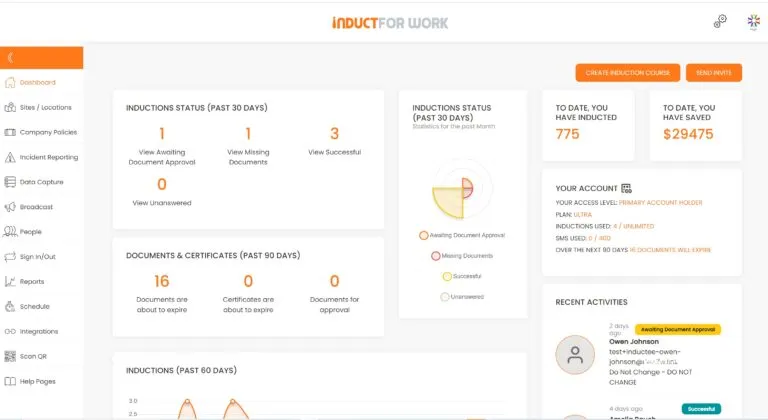
Induct For Work helps businesses create a structured online induction process where information, forms, documents, acknowledgements, quizzes, certificates and records can sit together in one practical workflow.
Treat induction as a readiness process
The best way to improve an induction is to stop treating it as a presentation.
A presentation gives information.
A readiness process checks whether the person has received, understood and completed the steps needed before work begins.
That difference matters.
An employee, contractor, volunteer or visitor may need to complete several steps before they are ready. They may need to review safety instructions, upload documents, acknowledge policies, pass a quiz, provide emergency contact details, receive a certificate or wait for approval from an administrator.
A better induction should answer three questions:
- What must this person know?
- Which actions must they complete?
- What evidence does the business need before they start?
This approach gives the induction a clearer purpose.
It also helps managers avoid the common mistake of assuming that a completed slide deck means the person is ready for the workplace.
Begin with the end point
Before writing induction content, define the end point.
What should the user be able to do after the induction?
For a site worker, the end point may be knowing how to enter the site, follow PPE rules, report hazards and avoid restricted areas.
For an office employee, the goal may be understanding emergency procedures, privacy rules, system access, conduct expectations and support contacts.
A contractor may need to understand site access, insurance requirements, permits, supervision arrangements and document expiry rules.
A visitor may only need a short pathway covering arrival, emergency information, restricted areas and behaviour expectations.
The induction should be designed backward from that end point.
If a section does not help the user become ready, informed or compliant, it may not belong in the main pathway. It may work better as a reference document or later training module.
Map the worker journey
A strong induction follows the person’s actual journey.
That journey usually begins before arrival. The person receives an invitation, opens the induction, reads the welcome message, completes required steps and prepares for their first visit or shift.
Then they arrive at the workplace. They may sign in, meet a supervisor, collect equipment, enter a work area, join a team briefing or begin a task.
The induction should support that journey in a logical order.
A practical order may be:
- who the induction is for
- what must be completed
- where to go on arrival
- which rules apply before entry
- what hazards or restrictions exist
- which documents must be supplied
- how to report concerns
- what happens after completion
- who approves the person to start
This makes the induction easier to follow because it matches the user’s next steps.
For employee-focused planning, questions new employees would love to see in their induction kit can help identify practical information that is often missed during early onboarding.
Separate induction from general workplace content
Many induction programs become overloaded because everything is placed into the same course.
Company history, policies, payroll information, safety procedures, values, forms, emergency instructions and detailed role training may all appear together.
This creates a heavy user experience.
A better design separates content by purpose.
Induction should cover what the person needs to know before starting safely and correctly. Detailed training can be assigned later. Reference documents can sit in a document area. Refresher modules can be used when rules change or knowledge needs to be renewed.
For example, the induction may explain how to report an incident. A separate training module can later explain investigation steps for supervisors.
That structure keeps the first pathway focused.
It also makes the system easier to maintain because each content type has a clear role.
Build role-based pathways
One induction rarely suits every person.
A permanent employee, short-term contractor, delivery driver, labour hire worker, maintenance provider, cleaner, volunteer, office worker and visitor may all need different information.
Some content can be shared. Emergency procedures, basic conduct rules and site access instructions may apply to everyone. Other content should be role-specific.
A better induction system may include:
- general workplace induction
- employee onboarding pathway
- contractor site induction
- visitor safety pathway
- supervisor responsibility module
- high-risk task module
- location-specific site section
- refresher pathway for returning workers
This avoids forcing every person through unnecessary content.
It also helps the business collect the right evidence from each group. A contractor may need insurance documents. An employee may need policy acknowledgements. A visitor may need only a short safety confirmation.
Role-based induction is more useful because it respects the user’s context.
Use a content card approach
Long pages make induction harder to complete.
A content card approach breaks the induction into smaller sections, each with one purpose.
One card may explain site entry. Another may cover emergency evacuation. A third may request a document upload. A fourth may ask a scenario question.
Each section should be short enough to understand and specific enough to act on.
A useful content card usually has:
- one topic
- plain-language instruction
- workplace-specific example
- required action where needed
- link to more detail if required
This structure works well on mobile devices and makes updates easier.
When a contact changes, only the relevant card needs updating. When a policy is revised, the acknowledgement card can be replaced without rewriting the entire induction.
Prioritise safety-critical information
Not all induction information carries the same level of risk.
Emergency procedures, restricted areas, PPE rules, hazard reporting and unsafe work instructions should be easy to find and difficult to miss.
A safety section should not be hidden behind long company background information.
A practical workplace health and safety induction section may cover:
- main hazards for the workplace
- emergency exits and assembly areas
- first aid contacts
- PPE requirements
- restricted zones
- hazard reporting steps
- incident reporting expectations
- equipment users must not operate
- supervisor or site contact details
This content should be clear, direct and specific to the workplace.
A person should finish the safety section knowing what to do if something goes wrong, where to go in an emergency and who to contact if they are unsure.
Use questions to test decisions, not memory tricks
Quizzes are useful when they test practical understanding.
They are less useful when they ask people to remember random wording from a policy.
A better question gives the user a situation and asks what action they should take.
For example, instead of asking, “What is section 4.2 of the safety policy about?”, the induction might ask:
“You notice a spill near a walkway. What should you do first?”
That type of question checks whether the person can apply the rule.
Good induction quiz questions may cover:
- emergency response
- hazard reporting
- visitor access
- PPE requirements
- confidentiality
- document expiry
- restricted areas
- unsafe equipment
- incident reporting
- who to contact for help
Using online training helps businesses include quizzes, pass marks and completion records as part of the induction pathway.
Make document collection part of the workflow
In many workplaces, induction is not only about reading information.
The business may also need documents before a person starts. This can include licences, tickets, qualifications, insurance certificates, permits, medical clearances, identification, declarations or emergency contact details.
If document collection happens separately by email, the process becomes harder to manage.
Files can be missed. Expiry dates may be forgotten. Managers may not know whether a worker is ready. Administrators may spend time chasing attachments across several inboxes.
A better induction workflow collects documents inside the process.
The user completes the induction, uploads required files and submits acknowledgements through one pathway. Administrators can then review completion and decide whether the person is ready to proceed.
A central document registry can help keep submitted files, forms, certificates and acknowledgements organised.
Connect acknowledgements to actual content
A policy acknowledgement should not feel like a meaningless tick box.
The user should understand what they are acknowledging and why it matters.
A good acknowledgement section may include a short summary, a link to the full policy and a clear statement of what the person is confirming.
For example, a conduct acknowledgement may confirm that the person has read the conduct requirements and understands the reporting pathway. A safety acknowledgement may confirm that they understand site rules and know who to contact with concerns.
Digital e-signatures can help record these acknowledgements.
However, the wording around the signature still matters. The user should not be asked to sign something vague or unclear.
For behaviour-related topics, workplace bullying and social media policy can support more detailed policy training where required.
Design for mobile completion
Many workers do not complete induction at a desk.
Contractors may use a phone. Seasonal workers may complete training before arriving. Visitors may receive a link shortly before attendance. Remote employees may use their own device before company equipment is issued.
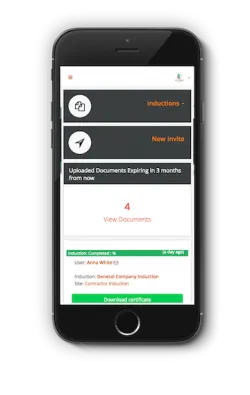
A mobile-friendly induction should be easy to read and complete on a small screen.
This means shorter sections, clear buttons, simple forms, compressed videos, readable diagrams and instructions that do not rely on tiny PDF text.
Mobile design is not just a convenience.
It affects completion rates and user understanding. If the induction is difficult to complete, people may rush, abandon it or ask someone else to help them click through.
A better mobile experience supports both the worker and the business.
Use certificates as a control point
A completion certificate should not be treated as decoration.
It can act as a control point in the readiness process.
A certificate can show that the user completed assigned content, submitted required items, passed quiz questions and acknowledged key requirements. For some workplaces, that certificate may support site entry, contractor approval or internal record checks.
The certificate should be connected to the right process.
A person should not receive completion evidence before required forms, documents or quiz steps are finished. If the business requires administrator approval, the workflow should reflect that.
This helps avoid confusion between “started the induction”, “completed the training” and “approved to begin work”.
Those are not always the same thing.
Plan the handover after completion
The induction should explain what happens next.
After completion, the user may need to wait for approval, attend a site briefing, collect PPE, meet a supervisor, complete practical training or sign in at reception.
This step is often missing.
The user finishes the online induction and then wonders whether they are allowed to start work, who will check the certificate or what happens when they arrive.
A clear handover section should explain:
- whether completion is automatic or reviewed
- who approves the user
- what to bring on arrival
- where to sign in
- which supervisor to contact
- whether extra training is required
- how long approval may take
- what to do if documents are rejected
This creates a smoother transition from online completion to workplace readiness.
For pre-start planning, prepare for a new worker’s arrival can support the steps that sit around the induction.
Review completion data
Induction improvement should be based on evidence, not guesswork.
Completion data can show where users struggle. Quiz results may reveal confusing content. Overdue records may show that the pathway is too long or poorly explained. Rejected documents may show that upload instructions need more detail.
Managers can review:
- average completion time
- quiz pass rates
- commonly missed questions
- overdue users
- rejected documents
- repeated support requests
- expired records
- site or role differences
- refresher training needs
A reporting process helps administrators see what is happening across workers, roles and sites.
Strong record keeping also supports audits, client reviews, incident follow-up and internal checks.
Refresh content before it becomes unreliable
Induction content needs maintenance.
A site map can become outdated. Emergency contacts may change. Policies may be revised. Equipment rules can shift. A new reporting process may replace the old one.
When induction content becomes inaccurate, people lose trust in the whole process.
Content should be reviewed when:
- a policy changes
- site access is updated
- emergency procedures change
- new equipment is introduced
- incidents reveal a knowledge gap
- worker feedback shows confusion
- legal or client requirements change
- contact people leave the business
- documents or forms are replaced
For existing workers, this guide on whether you need to retrain your employees can help decide when updated training should be assigned.
Refreshing content keeps induction useful and defensible.
How Induct For Work helps
Induct For Work helps businesses design induction pathways that are clear, role-based and easier to manage.
The platform can support online induction modules, digital forms, document uploads, acknowledgements, e-signatures, quizzes, certificates, reminders, refresher training and reporting.
Businesses can use Induct For Work to:
- create separate pathways for different user groups
- upload videos, documents, images and instructions
- collect licences, certificates and forms
- request policy acknowledgements
- use quizzes to confirm understanding
- issue certificates of completion
- track incomplete or overdue users
- manage refresher training
- review reports
- keep records in one place
For businesses with existing PDFs, handbooks, slides, policies or videos, rapid induction setup can help turn older material into a clearer online process.
Where important information needs to be sent after induction, message broadcast can help communicate updates to selected groups.
Start designing inductions around readiness
A better induction is not measured by how long it is or how impressive it looks.
It is measured by whether the right person receives the right information, completes the right actions and understands what happens next.
That requires clear structure, role-based pathways, practical questions, document workflows, meaningful acknowledgements and reliable records.
Induct For Work gives businesses a practical way to deliver induction online, collect evidence, confirm understanding and manage worker readiness from one platform.
Start your 14-day free trial and see how Induct For Work can help your business design better workplace inductions with less manual administration and clearer records.
Frequently asked questions
A better workplace induction gives the right person the right information in a clear order. It should include safety, role-specific requirements, documents, acknowledgements, quizzes and clear next steps.
Induction design focuses on structure, readiness, compliance steps, proof of understanding and records. Employee engagement is broader and usually relates to motivation, recognition, leadership and workplace culture.
No. Some core information may apply to everyone, but employees, contractors, visitors, volunteers and supervisors often need different pathways.
Quiz questions help confirm that users understand key information and can apply important rules in practical situations.
Yes. A structured INDUCT FOR WORK induction process can collect licences, tickets, certificates, declarations, insurance records and other documents before a person starts work.
An induction certificate can provide evidence that the person completed the assigned pathway. It may also support site entry, contractor approval or internal compliance checks.
Induct For Work online inductions supports form collection, document uploads, e-signatures, quizzes, certificates, reminders, reports and refresher training.
Not always. Some businesses require administrator review, document approval, supervisor sign-off or practical training before the person can begin work.
Do you have any questions or great tips to share?
Induct for Work – the only online induction system you would need to run online inductions.
Start a free trial or book a demo to see how INDUCT FOR WORK can support your workplace processes.
Author: Anna Milova
Published: 21/03/2017
Updated: 18/06/2026


