

Best Online Training Software for Workplace Inductions, Staff Training and Compliance
Choosing the best online training software is not just about finding a platform that can display videos or store documents. For a workplace, the right system must do something far more practical. It should help your business train people before they start work, confirm that important information has been understood, collect required documents, record acknowledgements and keep evidence ready when it is needed.
That is especially important for businesses that manage employees, contractors, subcontractors, visitors, volunteers, seasonal workers or mobile teams. Training is no longer something that only happens in a meeting room. In many workplaces, people need to complete induction and compliance steps before they arrive onsite.
A good online training system makes that possible.
Induct For Work is built for workplace training, online inductions and compliance management. It helps businesses create training courses, send invitations, use quizzes, collect forms, request signatures, issue certificates and track completion from one central platform.
Instead of relying on paper forms, spreadsheet registers, email attachments and repeated face-to-face briefings, your team can use a structured online induction process that is easier to manage, easier to update and easier to prove.
What makes the best online training software?
The best online training software should make workplace training simpler for administrators and clearer for users.
It should not create another layer of work. It should reduce the manual chasing, printing, filing, checking and reporting that often sits behind traditional training processes.
For workplace use, strong online training software should help you:
- create training courses without needing technical knowledge
- upload existing policies, videos, slides and documents
- build different training pathways for different users
- invite employees, contractors and visitors by email or SMS
- include quizzes to check understanding
- collect licences, certificates and other documents
- request digital sign-off on policies and declarations
- issue completion certificates
- track who has completed training
- identify who is overdue or incomplete
- manage refresher training and expiry dates
- keep records available for audits, clients and internal reviews
This is where many basic training tools fall short.
A general e-learning system may deliver course content, but workplace training often needs more than content delivery. It needs user records, document collection, policy acknowledgement, site access readiness, compliance visibility and practical reporting.
Induct For Work is designed around those workplace needs.
Why businesses search for better online training software
Many businesses begin looking for online training software when their current process becomes too hard to control.
At first, a manual process may seem manageable. A supervisor runs a short induction. Someone collects a form. A spreadsheet is updated. A certificate is filed. A policy is emailed. A contractor sends a licence to an administrator.
That may work for a small number of people.
However, problems appear as the business grows. New starters increase. Contractors change. Sites multiply. Policies are updated. Documents expire. Records are stored in different places. Managers begin asking the same questions again and again.
Who has completed the induction?
Which version did they complete?
Did they pass the quiz?
Have they signed the latest policy?
Was their licence uploaded?
Has their insurance expired?
Are they approved to start?
The best online training software helps answer these questions without forcing managers to search through inboxes, folders and spreadsheets.
It gives the business a single place to manage the process properly.
Traditional training still matters, but the admin needs to change
Face-to-face training has always had an important place in the workplace. It remains essential for practical tasks, supervised work, equipment use, high-risk activities and hands-on assessment.
A strong business should not remove traditional instruction where it is still needed.
However, many parts of workplace training can be completed online before the person arrives. General induction, safety rules, company policies, emergency procedures, site access requirements, contractor declarations, visitor instructions and refresher training often suit an online format.
This gives supervisors more time to focus on the work that genuinely needs direct instruction.
Instead of spending valuable onsite time repeating the same basic information, managers can reserve personal training for role-specific guidance, practical checks and direct supervision.
That is the proper balance.
Online training software should support good management, not replace it.
Induct For Work as workplace-focused online training software
Induct For Work gives businesses a practical way to deliver online training and manage induction records.
The system can be used for employee onboarding, contractor induction, visitor induction, safety training, policy sign-off, refresher courses and compliance checks.
Your business can create courses, upload material, import sample content, add questions, request forms, collect documents, issue certificates and track completion.
For broader training management, visit our LMS page that explains how Induct For Work can support learning management across teams, roles and sites.
The strength of the platform is that it connects training with workplace compliance. Training is not treated as a separate activity that sits away from documents, signatures and reporting. Instead, these steps can form part of one controlled workflow.
That makes the system useful for businesses that need to know whether a person is ready to work, ready to enter a site or ready to continue in a role.
Start faster with ready-made training and induction samples
One reason businesses delay moving training online is content creation.
They know they need better training records, but they do not always have time to build every course from scratch. Many organisations already have documents, slides, videos, handbooks, safety procedures and policies, but those materials are often scattered across folders or saved in older formats.
Induct For Work helps reduce that setup burden.
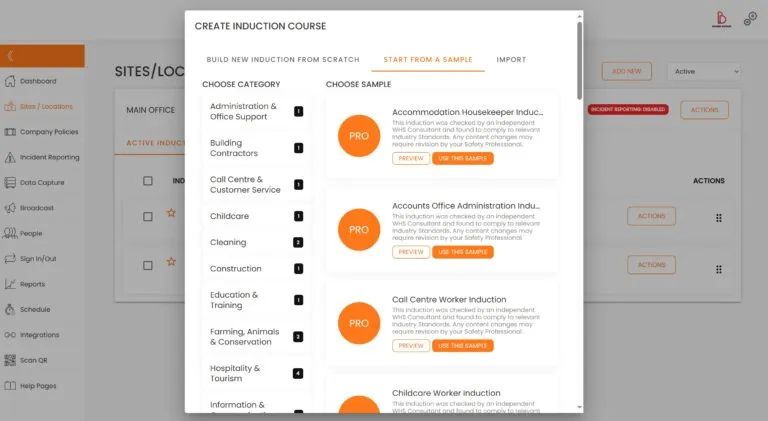
The platform allows businesses to create new training, import existing content and use sample inductions as a starting point. These samples can be customised to suit your workplace, industry, site rules and user groups.
This is useful because the best online training software should not force every business to begin with a blank page.
A construction company, cleaning business, farm, council, school, logistics operation, manufacturer and aged care provider may all need training, but they do not need identical training. Each organisation should be able to adapt the structure to suit its risks, people and daily operations.
A good starting template saves time. A flexible editor lets the business make it its own.
Train employees, contractors, visitors and volunteers
Workplace training is rarely limited to one group.
Employees may need company onboarding, safety training, HR policies and role-specific instructions. Contractors may need site rules, insurance checks, licence collection and access requirements. Visitors may need shorter safety instructions and sign-in conditions. Volunteers may need role-based training, emergency procedures and acknowledgements.
The best online training software should allow different people to complete different pathways.
Induct For Work can be used to create separate training experiences for:
- new employees
- contractors
- subcontractors
- labour hire workers
- seasonal workers
- volunteers
- visitors
- apprentices
- supervisors
- site-specific teams
- returning workers
This helps avoid one of the most common training mistakes: forcing everyone through the same generic course.
A cleaner entering a site after hours does not need the same information as a long-term office worker. A contractor carrying out maintenance may need different documents from a visitor attending a meeting. A forklift driver may require evidence of competency that a casual volunteer does not need.
Role-based training keeps the process more relevant.
It also makes completion easier for the user and more meaningful for the business.
Quizzes help confirm understanding
Training should not be treated as a box-ticking exercise.
If a person clicks through information without understanding it, the business gains little value. That is why quizzes and completion checks are important.
With Induct For Work, businesses can include questions to test understanding of key information. These may cover emergency procedures, PPE rules, site access conditions, hazard reporting, manual handling, privacy obligations, incident reporting, contractor responsibilities or company policies.
A quiz does not need to be complicated. In many cases, a short set of well-written questions is enough to confirm that the user has understood the most important points.
The results also help administrators identify weak areas.
If many users answer the same question incorrectly, the training content may need clearer wording. If a contractor cannot pass a critical section, the business can follow up before the person arrives onsite.
That is one of the practical advantages of online training. It turns training into something that can be reviewed, measured and improved.
Collect documents as part of the training process
The best online training software should do more than deliver information.
In many workplaces, training is connected to document collection. Before someone can start, the business may need licences, tickets, insurance certificates, proof of identity, medical clearances, qualifications, permits or other evidence.
When those documents are collected separately by email, the process becomes messy.
Files get missed. Expiry dates are forgotten. Administrators spend time chasing people. Managers may not know whether a contractor is ready to attend site.
Induct For Work supports contractor pre-qualification by helping businesses collect required documents during the onboarding and induction process. Administrators can review submitted files, approve or reject documents and keep records linked to the user.
This is especially useful for contractor-heavy industries such as construction, maintenance, mining services, facilities management, transport, local government, events and agriculture.
A worker should not have to send documents to three different people before starting. A manager should not have to search old emails to confirm whether a file was received.
A central system keeps the process cleaner.
Digital signatures and policy acknowledgements
Many workplace training processes require sign-off.
A person may need to acknowledge a safety policy, agree to site rules, sign a contractor declaration, confirm that they have read a procedure or complete an internal form.
Paper sign-off creates familiar problems. Forms can be misplaced. Handwriting may be unclear. Scanned copies may be saved in the wrong folder. Updated policies may not reach everyone who needs to acknowledge them.
Induct For Work supports e-signatures so businesses can collect signatures, acknowledgements and declarations online.
This is important for compliance because training evidence should not rely on memory or informal confirmation.
When a user signs or acknowledges a requirement digitally, the business has a clearer record of what was completed. That record can then sit alongside the user’s training completion, quiz results, uploaded documents and certificates.
For managers, this creates a more complete picture.
Reporting that managers can actually use
Reporting is one of the most important features in any workplace training system.
A business may need reports for internal reviews, client requests, safety audits, insurance checks, project requirements, board reporting or incident investigations.
Manual reporting is slow because the information is rarely in one place.
One person has the spreadsheet. Another has the emails. A supervisor keeps paper forms onsite. HR holds onboarding files. Safety has a separate register. Finance may have contractor details. As a result, even simple questions take too long to answer.
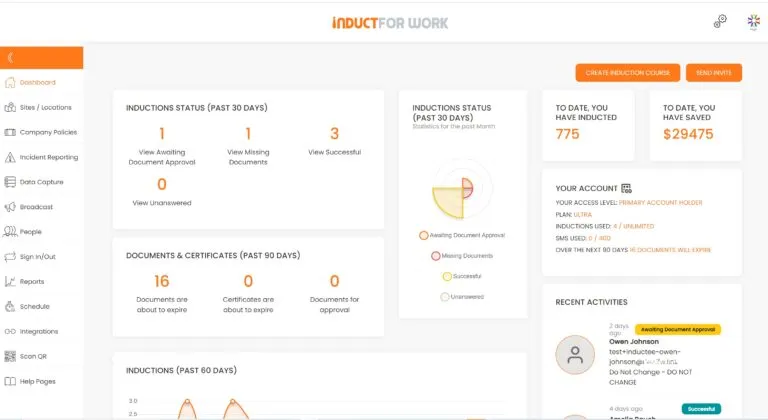
Induct For Work helps businesses use reporting to see completion status, user activity, training progress and records from one platform.
Useful reports may show:
- who has completed training
- who has not started
- who is overdue
- which course was completed
- when the course was completed
- what score was achieved
- which documents were uploaded
- which forms were signed
- which certificates were issued
- which records need attention
This visibility is one of the main reasons to choose proper online training software instead of relying on manual tracking.
The business gains control, and managers gain time.

Why the cheapest option is not always the best option
When people search for the best online training software, price is often part of the decision. That is understandable. Every business needs to control costs.
However, the cheapest system is not always the best value.
A low-cost platform may still cost the business time if it is hard to use, limited in features or weak in reporting. A basic tool may deliver a video but still leave administrators chasing forms, checking spreadsheets and filing certificates manually.
The better question is not simply, “What does the software cost?”
A better question is, “How much admin does this software remove?”
If the system helps your team create training faster, reduce repeated briefings, collect documents, track completion, remind users, manage expiry dates and retrieve records quickly, then it can create value beyond the subscription price.
Good software should reduce friction.
It should help the business move faster while keeping a stronger record behind the process.
A better process before arrival, onsite and after completion
The best online training software supports the full training journey.
Before arrival, a person can receive an invitation, complete training, upload documents, answer questions and sign acknowledgements. This helps reduce delays when they reach the workplace.
Onsite, supervisors can focus on practical matters. They can confirm readiness, explain site-specific details, check equipment use and provide direct instruction where needed.
After completion, records remain available. The business can review reports, manage refresher training, update content and provide evidence when required.
This three-stage approach is much stronger than treating training as a one-off event.
It also reflects how real workplaces operate. People start, leave, return, change roles, move sites and need updated information over time.
A proper training system should support that full cycle.
Useful for businesses of different sizes
Induct For Work can support small businesses that need a simpler way to manage training, as well as larger organisations that need stronger control across multiple sites.
Small businesses often want to move away from paper without building a complicated training department. They need something practical, clear and manageable.
Larger businesses may need different training pathways, multiple administrators, contractor records, detailed reports, refresher training and stronger compliance visibility.
The platform can be useful for:
- construction companies
- councils and government organisations
- manufacturers
- farms and agricultural businesses
- logistics and transport operators
- cleaning companies
- mining contractors
- schools and education providers
- event organisers
- healthcare and aged care providers
- hospitality businesses
- labour hire and recruitment firms
- charities and not-for-profit organisations
- office-based companies improving onboarding
In each case, the goal is similar: train people properly, reduce unnecessary admin and keep better records.
Online training and safety culture
Training is often the first formal message a person receives from a business.
A rushed or disorganised induction sends the wrong signal. It suggests that safety, compliance and workplace standards are secondary concerns. A clear and structured training process sends a different message. It shows that the business expects people to understand the rules before work begins.
This is why online training can support a stronger safety culture.
People receive consistent information. Managers can see who has completed training. Records are stored. Refresher training can be managed. Policies can be acknowledged. Important documents can be collected.
That does not remove the need for leadership. A good safety culture still depends on managers, supervisors and workers doing the right thing each day.
However, a strong system helps set the standard early.
Rapid setup matters
Many businesses delay online training because they expect setup to be difficult.
In reality, most organisations already have useful content. They may already have induction documents, safety procedures, policies, videos, site maps, forms and checklists. The challenge is organising that content into a clean online pathway.
Induct For Work can support a rapid induction setup by helping businesses move existing training material into an online structure.
This allows the business to start with core requirements and improve over time.
A practical rollout might begin with a general induction, then add contractor document collection, quizzes, signatures, refresher training and site-specific pathways later.
That is often better than waiting for a perfect training library before making any progress.
The best online training software should help you begin, not hold you back.
Why choose Induct For Work?
Induct For Work is a strong choice for businesses that want workplace training software built around practical compliance needs.
It can help your organisation:
- create online training courses
- build employee and contractor inductions
- upload existing material
- use sample inductions
- send invitations by email or SMS
- test understanding with quizzes
- collect licences and documents
- request digital signatures
- issue certificates
- track completion
- manage refresher training
- keep records in one place
- report on training activity
- reduce repeated administration
The platform is especially useful when training is connected to site access, contractor readiness, safety expectations, policy sign-off or audit evidence.
For businesses comparing options, the best online training software should be easy enough for administrators to use, clear enough for workers to complete and strong enough to keep records organised.
That is where Induct For Work fits.
Move your workplace training online
If your business still relies on paper forms, repeated briefings, manual reminders and scattered spreadsheets, it may be time to move to a better process.
The best online training software should give your organisation more than a digital course. It should help you manage the full training workflow from invitation to completion, from document collection to reporting, and from first induction to refresher training.
Induct For Work gives you one practical platform for workplace training, online inductions and compliance records.
You can create courses, invite users, collect documents, capture signatures, issue certificates and track progress without rebuilding the same process manually every time.
Start your 14-day free trial and see how Induct For Work can help your business deliver training with less admin, clearer records and a more professional induction process.
Frequently asked questions
The best online training software for workplaces is a system that helps businesses create training, invite users, collect documents, test understanding, track completion and keep records. For workplace use, Induct For Work is a strong option because it combines online training, inductions, forms, signatures, certificates and reporting all in one platform.
Online training software should include course creation, user invitations, document uploads, quizzes, completion tracking, certificates, reporting and record storage. For workplace compliance, it should also support signatures, policy acknowledgements and refresher training.
Yes. Induct For Work can be used for employee onboarding, safety training, policy sign-off, refresher training and role-specific learning. Employees can complete assigned training online before or during onboarding.
Yes. Contractors can receive an invitation, complete their induction, upload required documents, answer quiz questions and sign acknowledgements before attending site. This helps reduce delays and gives managers clearer visibility.
Online training is better for consistent delivery, record keeping, refresher training and pre-arrival induction. Face-to-face training is still important for practical tasks, hands-on instruction and supervised work. Many businesses use both.
Yes. Businesses can use existing documents, policies, videos, slides and procedures as a starting point. They can also use sample inductions and customise them to suit their workplace.
Yes. Induct For Work keeps completion records, quiz results, uploaded documents, signatures, certificates and other training activity in one place. These records can support audits, internal reviews and client requests.
Do you have any questions or great tips to share?
Induct for Work – the only online induction system you would need to run online inductions.
Start a free trial or book a demo to see how INDUCT FOR WORK can support your workplace processes.
Author: Anna Milova
Published: 08/07/2018
Updated: 12/06/2026


