Learning Management System Guide: How Workplace Training Becomes Easier to Manage
A learning management system helps organisations manage training in one organised place.
It gives administrators a way to upload training content, assign courses, track completion, run quizzes, issue certificates and keep records that can be found later.
That matters because workplace training is rarely a one-time task.
New starters need induction. Contractors need site rules. Staff need refresher training. Managers need completion reports. Auditors, clients or internal reviewers may ask for proof that people received the right training.
This guide explains how a learning management system works and why structured training records matter. For the main INDUCT FOR WORK LMS product page, visit LMS for workplace training.
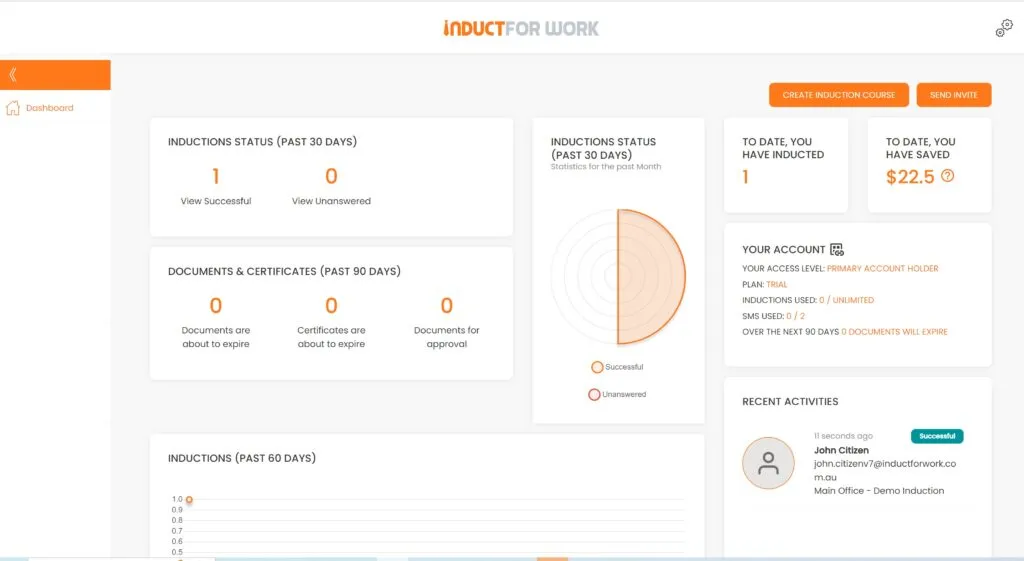
INDUCT FOR WORK helps businesses deliver online induction, online training, quizzes, forms, acknowledgements, certificates and records in one platform. It can support a learning management system structure while also handling induction workflows for staff, contractors, visitors and site users.
A structured training system also supports a stronger safety culture because people receive consistent information before they begin work. In addition, rapid induction setup can help organisations turn existing procedures, PDFs, videos, PowerPoint slides and policies into online training sooner.
What is a learning management system?
A learning management system is software used to create, deliver, manage and track training.
In a workplace, it may help administrators:
- upload course material
- create training modules
- assign courses to users
- group users by role, site or department
- add quizzes
- set pass marks
- issue certificates
- collect acknowledgements
- assign refresher training
- track incomplete users
- report on completion
- keep training records
The purpose is practical.
A learning management system makes training easier to repeat, easier to manage and easier to prove.
Without a system, training often depends on email, paper forms, shared folders, verbal briefings and spreadsheets. That may work for a small team for a short time, but it becomes unreliable once the business has more workers, contractors, sites or training requirements.
Why workplaces use learning management systems
Workplaces use learning management systems because training needs structure.
A manager may know that workers received a briefing. Yet later, the business may need to confirm who attended, what version they completed, whether they passed the quiz and when refresher training is due.
A learning management system helps answer questions such as:
- who has completed the required training?
- which users still need to complete it?
- when was the course completed?
- which course version did the user complete?
- did the user pass the quiz?
- was a certificate issued?
- has refresher training expired?
- which site or role does the training apply to?
- can the record be found during a review?
This is why the main LMS for workplace training page should remain the commercial destination for businesses comparing solutions.
This guide supports that page by explaining how training management works in practice.
Learning management system vs online induction platform
A learning management system and an online induction platform often overlap, but they are not always the same.
A learning management system usually focuses on training delivery, course assignment, progress tracking and records.
An online induction platform focuses on preparing people before they begin work, enter a site or perform a task.
Learning Management System
Delivers training modules
Tracks course completion
Supports quizzes and certificates
Manages refresher training
Keeps learning records
Online Induction Platform
Prepares people before work or site access
Tracks induction readiness
Supports forms, acknowledgements and site rules
Manages first-time access and repeat inductions
Keeps readiness and compliance records
Many workplaces need both.
INDUCT FOR WORK supports online induction and learning management workflows in one platform, which can reduce double handling for businesses that manage staff, contractors and visitors.
For structured induction planning, see online induction program. For the broad work-readiness guide, see work induction.
When a business needs a learning management system
A business may need a learning management system when training becomes hard to manage manually.
Warning signs include:
- training records sit in spreadsheets
- managers repeat the same briefing often
- contractors arrive before completing training
- paper sign-off sheets go missing
- certificates become hard to find
- refresher training gets missed
- workers receive different instructions
- course versions are unclear
- quiz results are not stored properly
- audits take too long to prepare for
- multiple sites use different training processes
- administrators spend too much time chasing completion
Training needs become more complex as the business grows.
A learning management system gives the organisation a more reliable way to assign, track and review training.
Core features of a workplace learning management system
A practical workplace system should do more than hold documents.
It should help administrators manage training from assignment through to reporting.
Course creation
A course may include:
- text
- images
- videos
- PDF documents
- PowerPoint content
- SCORM modules
- policies
- procedures
- checklists
- site maps
- safety instructions
Course content should be easy to update because workplace procedures can change quickly.
User assignment
Training should reach the right people.
Assignments may depend on:
- role
- site
- department
- contractor type
- language
- risk level
- project
- expiry date
- employment stage
This avoids pushing every user through the same generic course.
Quizzes and pass marks
Quizzes help confirm understanding.
Useful quiz topics may include:
- emergency procedures
- safety rules
- privacy expectations
- incident reporting
- PPE requirements
- role-specific instructions
- contractor requirements
Questions should test practical understanding, not obscure wording.
Certificates
Certificates give users and managers proof of completion.
They may apply to:
- induction
- refresher training
- contractor training
- safety modules
- policy training
- site-specific courses
A certificate should remain easy to find after the course is complete.
Reporting
Reports should make completion status clear.
Administrators need to see who has finished, who remains overdue and which records need follow-up.
For broader reporting workflows, see reporting.
Workplace training records
Training records are one of the main reasons businesses use learning management systems.
Managers may need to confirm:
- training completion for each user
- completion date and assigned course
- quiz results and pass status
- certificates issued by the system
- forms submitted during training
- documents uploaded before access
- acknowledgements signed by users
- refresher training still outstanding
- users who need follow-up
- records ready for review
INDUCT FOR WORK helps improve record keeping by keeping training records, forms, certificates and acknowledgements online.
Reliable records matter when a business needs to show what training was delivered and when.
Learning management system for employee training
Employees need training at different stages.
This may include:
- new starter induction
- workplace policies
- safety procedures
- role expectations
- equipment instructions
- cybersecurity awareness
- customer service standards
- privacy rules
- refresher training
- role-change training
A learning management system helps the business assign the right course at the right time.
For wider staff training delivery, see online training.
Employee training should not depend only on a manager finding time to explain everything verbally.
A structured system gives workers clearer information and gives managers better records.
Learning management system for contractor training
Contractors often need training before they enter a site.
They may need to understand site rules, hazards, emergency procedures, access requirements, reporting steps and task-specific instructions.
Contractor training may include:
- site access rules
- emergency procedures
- hazard awareness
- PPE requirements
- incident reporting
- restricted areas
- licence uploads
- insurance documents
- supervisor contact details
- certificates
For contractor-specific guidance, see contractor induction.
A learning management system can help contractors complete training before arrival, reducing repeated site briefings and last-minute admin.
Learning management system for role-specific training
Not every person needs the same training.
A cleaner, supervisor, warehouse worker, driver, office administrator and maintenance contractor may each need different instructions.
Role-specific training may cover:
- task hazards
- equipment rules
- site access
- reporting steps
- forms
- certificates
- refresher cycles
- supervisor responsibilities
For a dedicated guide, see role-specific work induction.
Training becomes more useful when it matches the person’s actual work.

Refresher training and expiry management
Training loses value when it is never refreshed.
Procedures change. Workers forget details. Sites introduce new hazards. Equipment changes. Policies need updates.
A learning management system can help assign updated training to the right users.
Refresher training may cover:
- safety procedures
- emergency response
- incident reporting
- updated workplace policies
- contractor requirements
- site changes
- new equipment
- privacy and cybersecurity
- seasonal risks
Schedule can help organisations manage repeat training and refresher cycles.
Refresher training keeps important information current and gives administrators clearer completion records.
Forms, acknowledgements and digital sign-off
Training often needs more than course completion.
Businesses may also need forms, declarations and acknowledgements.
These may include:
- policy acknowledgements
- safety declarations
- contractor declarations
- emergency contact forms
- PPE acknowledgements
- privacy acknowledgements
- site access forms
- equipment issue forms
With custom forms and digital signatures, organisations can collect confirmations online and keep them connected to the user record.
This helps reduce scattered emails, paper forms and missing sign-offs.
How INDUCT FOR WORK supports learning management
INDUCT FOR WORK helps organisations bring training, induction and records together.
It can support:
- online courses
- induction pathways
- role-based training
- quizzes
- certificates
- forms
- document uploads
- digital acknowledgements
- refresher training
- incident reporting
- completion reports
- record keeping
This makes it useful for businesses that need a learning management system but also need practical induction tools for employees, contractors, visitors and site users.
For the main product page, see LMS for workplace training.
From manual training to structured learning management
Manual Training Process
Managers repeat the same briefing
Paper sign-off sheets go missing
Training records sit in spreadsheets
Contractors receive rules by email
Certificates become hard to find
Refresher training gets missed
Course versions are unclear
Managers chase users manually
Forms sit in separate folders
Multiple sites use different processes
Structured Learning Management Process
Courses can be assigned online
Acknowledgements can be recorded digitally
Completion data can stay in one system
Contractors can complete assigned pathways
Certificates stay linked to user records
Repeat training can be scheduled
Updated modules can replace old content
Reports show who needs follow-up
Forms can connect to training records
Pathways can remain more consistent
Common learning management system mistakes
Treating the system as a document library
A learning management system should assign, track and report training, not only store files.
Giving everyone the same course
Different roles, sites and risk levels often need different pathways.
Forgetting contractors
Contractors may need training, documents and certificates before site access.
Ignoring refresher training
Training can become outdated when procedures, policies or risks change.
Failing to check reports
Reports should guide follow-up and help managers identify overdue users.
Making courses too long
Short, focused modules usually work better than long courses that users rush.
Keeping forms separate
Forms and acknowledgements are easier to manage when connected to training records.
Best practice tips for workplace learning management
Start with the training outcome
Define what users should know or do after completing the course.
Separate user groups
Employees, contractors, visitors and supervisors often need different training.
Keep modules focused
A short course on one clear topic is easier to complete and update.
Use quizzes carefully
Test practical understanding, not memory of complicated wording.
Track completion
Managers should review reports and follow up overdue users.
Schedule refreshers
Repeat important training when roles, sites, risks or procedures change.
Keep records together
Courses, forms, certificates and acknowledgements should stay easy to find.
Link back to the main LMS page
When users are ready to compare tools, direct them to LMS for workplace training.
Start organising workplace training more clearly
A learning management system helps businesses move from scattered training to a more organised process.
Courses become easier to assign. Completion becomes easier to track. Certificates, quizzes, forms and acknowledgements stay easier to find.
INDUCT FOR WORK supports learning management, induction training, refresher training and online records for staff, contractors, visitors and site users.
For the main INDUCT FOR WORK LMS product page, visit LMS for workplace training.
Give your organisation a clearer way to deliver training and prove completion.
Frequently asked questions
A learning management system is software used to create, deliver, manage and track training.
No. This page is an educational guide. The main INDUCT FOR WORK LMS product page is LMS for workplace training.
It can track course completion, quiz results, certificates, acknowledgements, refresher training and user records.
Yes. A learning management system can support induction training, although many workplaces also need forms, document uploads, acknowledgements and site-specific readiness workflows.
Yes. INDUCT FOR WORK supports online induction, training courses, quizzes, certificates, forms, acknowledgements, incident reporting and records.
Businesses, schools, councils, construction companies, healthcare providers, warehouses, offices, contractors and multi-site organisations can use learning management systems to manage training.
Training should be refreshed when procedures, roles, sites, equipment, policies or risks change.
Visit LMS for workplace training for the main INDUCT FOR WORK LMS product page.
Start a free trial or book a demo to see how INDUCT FOR WORK can support your workplace processes.
Author: Ari Parz
Published: 19/07/2020
Updated: 21/05/2026