
Best Online Induction Software: What to Look for Before You Choose
A practical guide for choosing the right system.
The best online induction software should make induction easier to create, easier to deliver and easier to prove.
A good system should help businesses move away from paper forms, repeated verbal briefings, scattered email attachments, spreadsheet tracking and manual certificate chasing.
Instead, it should give administrators a clear way to create induction courses, invite users, collect forms, capture acknowledgements, issue certificates, track progress and keep records in one place.
That matters because induction is often the first formal step before a worker, contractor, volunteer or visitor begins.
If the process is messy, people may arrive without the right information. Supervisors may repeat the same briefing over and over. Administrators may spend too much time chasing missing forms. Records may be hard to find later.
Induct For Work helps organisations deliver online induction, workplace training, forms, acknowledgements, certificates, contractor readiness and records in one platform. For the broader software page, see online training software, which explains how Induct For Work helps businesses create inductions, import existing content, use pre-built sample inductions and manage training online.
For broader training management, Induct For Work can also support an LMS for workplace training structure. The LMS page explains that Induct For Work helps create induction and training modules, assign them by role and site, send invitations and reminders, confirm understanding with quizzes and keep records easy to retrieve.
A structured induction system also supports a stronger safety culture because workers receive consistent information before work begins. In addition, rapid induction setup can help businesses move from old documents and manual processes into an online induction pathway sooner.
What is online induction software?
Online induction software is a digital system used to create, deliver, track and record induction training.
It may be used for:
- employees
- contractors
- volunteers
- visitors
- students
- labour hire workers
- mobile workers
- site workers
- temporary staff
- suppliers
- seasonal workers
- franchise teams
- multi-site workforces
The system may include course content, videos, slides, quizzes, forms, document uploads, certificates, reminders, reports and completion records.
The purpose is practical.
People can complete induction before arrival while administrators can see who has completed training and who still needs follow-up.
Induct For Work’s homepage describes its online induction and training as a simple and time-efficient way to keep employees, contractors and volunteers trained before they arrive at worksites.
Why businesses look for the best online induction software
Businesses usually search for online induction software after a manual process becomes too slow or unreliable.
Common warning signs include:
- workers arrive without completing induction
- contractors send documents by email
- certificates are hard to find
- policies are signed on paper
- managers repeat the same instructions
- training records sit in spreadsheets
- administrators cannot track progress easily
- site access depends on verbal confirmation
- refresher training is missed
- different sites use different processes
- audit evidence takes too long to collect
- users forget what they need to complete
These problems usually grow as the business adds more workers, sites, contractors or training requirements.
The best software should reduce the admin burden without making the user experience difficult.
A system that looks powerful but confuses administrators will not solve the problem.
Start with the kind of people you need to induct
The right software depends on who needs induction.
A business inducting ten office staff needs a different workflow from a construction company inducting contractors across multiple sites.
Before choosing software, define your user groups.
You may need inductions for:
- new employees
- contractors
- visitors
- cleaners
- drivers
- maintenance workers
- mobile staff
- event workers
- volunteers
- supervisors
- site managers
- returning workers
- seasonal workers
For broader workplace readiness, see work induction.
A strong induction system should allow different groups to receive different content.
Forcing everyone through one long generic course usually creates frustration and weakens the value of the induction.

Course creation should be simple
The best online induction software should make course creation straightforward.
Administrators should be able to build courses without needing technical expertise.
A useful course builder may support:
- text
- images
- videos
- PDFs
- slides
- policies
- questions
- quizzes
- acknowledgements
- forms
- completion certificates
- role-based modules
- site-specific modules
Induct For Work’s online training software page says users can create new inductions online, import existing inductions or use pre-built sample inductions.
That flexibility matters because many businesses already have useful material.
They may have PowerPoint files, PDFs, safety rules, videos, site maps, policies, forms and checklists. Good software should help turn those materials into an online course rather than force the business to start again.
For structured course planning, see online induction program.
Look for sample inductions
Sample inductions can make setup faster.
They help administrators see what an induction can look like before building their own version.
A sample may help with:
- course order
- wording
- topic selection
- quiz examples
- module structure
- safety topics
- contractor instructions
- site access content
- form placement
- acknowledgement wording
- certificate flow
Samples should not be copied blindly.
A business still needs to adjust content for its own workplace, risks, people and procedures. However, samples reduce the blank-page problem and make setup less intimidating.
The best online induction software should give users a practical starting point.
This is especially useful for smaller businesses that do not have a dedicated training team.
Invitations and access should be easy
An induction system should make it easy to get people started.
Administrators should be able to invite users by email, SMS or self-registration where suitable.
Important access features may include:
- email invitations
- SMS invitations
- self-registration portals
- branded portals
- user groups
- role assignment
- site assignment
- reminder emails
- completion notifications
- mobile access
- clear login instructions
Induct For Work offers online portals where users can access a branded portal through a single URL and complete a consistent induction experience.
For mobile and contractor-heavy workplaces, access matters as much as course content.
If users cannot easily start induction, administrators will spend too much time resending links and answering login questions.
For specific worker access guidance, see online induction login.
Mobile access is essential
Many workers will not complete induction from an office computer.
They may be on a phone, tablet, laptop or shared workplace device.
This is especially common for:
- contractors
- cleaners
- drivers
- field workers
- event staff
- farm workers
- labour hire workers
- support workers
- maintenance teams
- mobile technicians
The best induction software should work properly on mobile devices.
Mobile-friendly training should use clear wording, readable images, short modules and simple navigation.
For mobile workforce guidance, see online training for mobile workforce.
A platform that only works well on a desktop will struggle with real-world workforce induction.
Forms and document collection should sit inside the process
Online induction is more useful when it collects the information needed before work begins.
Instead of training in one place and forms somewhere else, the best software should keep everything connected.
Useful form and upload features may include:
- emergency contact forms
- contractor declarations
- employee declarations
- policy acknowledgements
- PPE acknowledgements
- site access requests
- licence uploads
- certificate uploads
- insurance documents
- qualification records
- medical or fitness declarations where appropriate
- worker details
- company details
- supervisor approvals
Induct For Work’s free online inductions page mentions help with setting up document collection from users and access to account activity reports.
For broader form design, see custom forms.
A joined-up process gives managers a clearer picture of readiness.
A user should not complete induction but still have missing forms scattered across inboxes.

E-signatures and acknowledgements matter
Many induction processes need sign-off.
A user may need to acknowledge site rules, policies, safety procedures, confidentiality requirements, PPE rules or contractor declarations.
E-signature and acknowledgement features can help collect those records online.
They are useful for:
- policy sign-offs
- safety acknowledgements
- contractor declarations
- site rule confirmations
- privacy acknowledgements
- procedure sign-offs
- equipment use declarations
- visitor acknowledgements
- completion confirmations
For a dedicated feature page, see e-signature.
The value is not only the signature.
The stronger value is keeping the sign-off connected to the user, induction course, date and record.
That makes later review easier.
Quizzes help confirm understanding
The best online induction software should allow quizzes or assessments.
A quiz can help confirm that users understood important points before completion.
Good quiz topics may include:
- emergency procedures
- PPE requirements
- hazard reporting
- incident reporting
- restricted areas
- site access
- chemical safety
- manual handling
- privacy rules
- role expectations
- contractor requirements
- visitor instructions
Questions should be practical.
The aim is not to make the course difficult.
A good quiz confirms that important instructions were understood and gives the user another chance to review key information.
Certificates give proof of completion
Certificates are useful because managers often need evidence quickly.
A completion certificate may include:
- user name
- course name
- completion date
- site or role
- expiry date where used
- certificate number
- pass result where relevant
Certificates may support site access, contractor approval, event readiness, employee onboarding or refresher training.
Induct For Work’s online induction program page notes that Induct For Work can issue certificates after users complete assigned induction requirements.
For broader records, see record keeping.
Proof of completion should not depend on someone remembering that a person attended a briefing.
Contractor induction features
Contractor induction is often where manual processes fail fastest.
Contractors may need site access, document uploads, licences, insurance records, safety acknowledgements and certificates before they begin work.
Useful contractor features include:
- contractor company records
- worker records
- document uploads
- insurance expiry tracking
- licence collection
- site-specific pathways
- contractor declarations
- pre-qualification questions
- completion certificates
- access approval
- refresher reminders
- reporting
For the main contractor readiness page, see contractor induction.
Induct For Work’s contractor management page describes using the platform to induct contractors before site access, collect documents, automate reminders, monitor readiness and support audits.
This is why contractor workflows should be a major consideration when choosing online induction software.
Pre-qualification before access
Some users should not simply receive a course and proceed.
Contractors, suppliers and high-risk workers may need pre-qualification before access is allowed.
Pre-qualification may collect:
- company details
- worker details
- licences
- certificates
- insurance evidence
- safety documents
- declarations
- site access requests
- supervisor approvals
- risk-related answers
- document expiry details
For the dedicated feature, see contractor pre-qualification.
Pre-qualification helps businesses check whether a user is ready before work starts.
It is especially useful where site access depends on more than finishing a training module.
Reporting should be clear
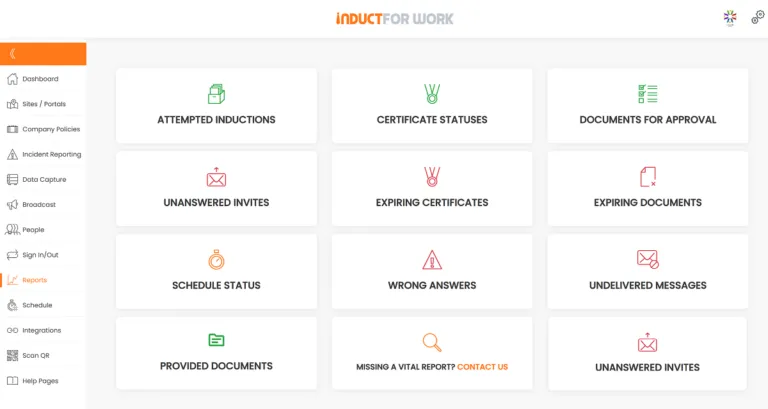
A good induction platform should make completion visible.
Administrators may need to know:
- who has been invited
- which users have started
- who has completed
- who has not logged in
- which forms are missing
- whose documents need review
- which certificates were issued
- whose training has expired
- which users failed a quiz
- which contractors are ready
- what site or role each user belongs to
Induct For Work’s online training software page presents a setup, invite and track-progress workflow for managing online training.
For broader reporting guidance, see reporting.
Reporting should reduce chasing.
Managers should not need to search email folders or maintain separate spreadsheets to know who is ready.
Reminders and refreshers
Induction is not always one-and-done.
Rules change. Sites change. Documents expire. Roles change. Contractors return. Incidents reveal training gaps.
A good system should support:
- reminder emails
- overdue notifications
- repeat training
- refresher modules
- expiry dates
- recurring courses
- certificate renewal
- document renewal
- updated acknowledgements
This is where online induction software starts to act like a longer-term training management system.
It helps keep information current rather than treating induction as a one-time event.
Multi-site and role-based control
Businesses with several locations need more than one generic induction.
A multi-site system should support:
- core company induction
- site-specific modules
- location-based instructions
- role-based pathways
- department groups
- contractor pathways
- visitor pathways
- reporting by site
- local emergency information
- separate supervisors or administrators
For a deeper system view, see workplace induction system.
This structure helps maintain consistency while still allowing local site details.
A worker attending a warehouse, office, school, mine, event or farm may need different instructions before arrival.
Security and access control
Induction records may contain personal information, documents, certificates and acknowledgements.
Software should provide sensible access control.
Consider whether the system supports:
- administrator permissions
- site-level access
- role-based access
- secure user accounts
- audit trails
- document control
- data export
- user deactivation
- reporting permissions
- secure storage
For wider staff awareness around information handling, see cybersecurity awareness.
A training system should not make records easier to lose.
It should make them easier to control.
What to avoid when choosing software
Not every induction platform will suit workplace training.
Be careful with software that:
- only stores PDFs
- has weak reporting
- does not support forms
- cannot collect documents
- lacks certificate options
- has poor mobile experience
- forces every user into one pathway
- makes setup too technical
- cannot handle contractors
- gives no reminder options
- has confusing user access
- lacks practical support
- separates records from training
The best online induction software should reduce admin, not create another admin problem.
Simple workflows matter.
A system that looks impressive during a demo but takes too long to manage may not help once real users arrive.
Comparison: weak system vs strong system
| Weak induction setup | Strong online induction software |
|---|---|
| Training sent as PDFs | Courses are built into online induction |
| Forms collected separately | Forms sit inside the induction process |
| Completion tracked in spreadsheets | Reports show progress and missing items |
| Contractors email documents | Uploads stay linked to contractor records |
| Certificates created manually | Completion certificates can be issued automatically |
| One course for everyone | Inductions match roles and sites. |
| Reminders are manual | Notifications help chase incomplete users |
| Records sit in many folders | Evidence stays easier to retrieve |
| Users need office computers | Training works on mobile devices |
| Refresher training is forgotten | Repeat training can be scheduled |
Why leading companies choose Induct For Work
Induct For Work is built for businesses that need induction to be practical, repeatable and trackable.
It can help with:
- employee induction
- contractor induction
- visitor induction
- workplace training
- safety training
- mobile workforce training
- sample induction setup
- course creation
- user invitations
- forms and document uploads
- acknowledgements
- e-signatures
- quizzes
- certificates
- reporting
- refresher training
- records
The platform is especially suited to organisations that need to prepare workers, contractors and visitors before arrival.
For the broader product page, see online training software. The page describes creating inductions from scratch, importing existing inductions and using pre-built samples.
This makes the system useful for businesses that want to move quickly without losing control of records.
Best practice tips before choosing
Map your induction users
List employees, contractors, visitors, supervisors and other groups before choosing software.
Review current pain points
Look for missing records, repeated admin, paper forms, slow onboarding and weak reporting.
Check mobile usability
Make sure real users can complete training on the devices they actually use.
Ask about forms
Training and form collection should work together.
Confirm certificate options
Proof of completion should be easy to issue and retrieve.
Test contractor workflows
Contractors often need documents, declarations and site-specific instructions.
Review reporting
Administrators should quickly see who is complete and who needs follow-up.
Plan for growth
Choose software that can support more users, sites, pathways and records later.
Start with the right online training software
The best online induction software should help people complete the right training before work begins.
It should also help administrators create courses, invite users, collect forms, capture acknowledgements, issue certificates, track progress and keep records organised.
Induct For Work gives businesses a practical way to manage online induction and workplace training in one system.
For the full product overview, see online training software. For wider training management, see LMS for workplace training. For contractor readiness, see contractor induction.
Give workers, contractors and visitors a clearer way to complete induction before they arrive.
Frequently asked questions
The best online induction software is one that lets businesses create courses, invite users, collect forms, capture acknowledgements, issue certificates, track progress and keep records organised.
Leading companies choose INDUCT FOR WORK because it gives them a practical way to manage online training, workplace inductions, contractor onboarding and compliance records in one secure platform.
Instead of relying on paper forms, spreadsheets, emails and repeated face-to-face sessions, organisations can create online inductions, assign training to workers, collect documents, capture eSignatures, track completion and keep records ready for review.
INDUCT FOR WORK is built for real workplaces where employees, contractors, visitors and mobile teams need clear instructions before they start. Businesses can use induction samples to get started faster, pre-qualify contractors before they arrive, collect signed acknowledgements online and monitor training progress from a central dashboard.
For companies that need reliable online training software, INDUCT FOR WORK helps reduce admin time, improve consistency and give managers better visibility over who is ready to work.
It should include course creation, user invitations, mobile access, forms, document uploads, quizzes, certificates, reporting, reminders and role-based pathways.
Yes. Good online induction software can support contractor induction, document uploads, pre-qualification, declarations, certificates and site-specific training.
There is overlap. An LMS focuses on training delivery and records while online induction software focuses on preparing workers, contractors or visitors before they begin work or enter a site.
Yes. Induct For Work helps businesses create inductions, invite users, track progress, collect forms, capture acknowledgements, issue certificates and keep records online.
Yes. Induct For Work’s online training software allows users to create new inductions, import existing induction material or start with pre-built sample inductions.
Author: Matt Tsashkuniats
Published: 10/06/2026
Updated: 10/06/2026


